
What's Fresh?
News
2 June 2026
Bulk actions are now available in Social Inbox
Select multiple tickets at once and apply any of the following in a single move:
- Delete – remove multiple tickets without opening each one
- Flag – mark tickets that need attention or follow-up
- Tag – apply labels across a batch of conversations at once
- Mark sentiment – assign positive, neutral, or negative sentiment to multiple tickets simultaneously
- Hide – remove selected tickets from view without deleting them
- Mark as done – close out resolved conversations in bulk
- Assign moderator – route multiple tickets to the right team member at once
Useful when clearing a backlog, triaging high-volume periods, or handing off a set of conversations between shifts.
Availability Bulk actions are now live for all Social Inbox 2.2 users.
News
2 June 2026
New: AI Reply Suggestions in Social Inbox
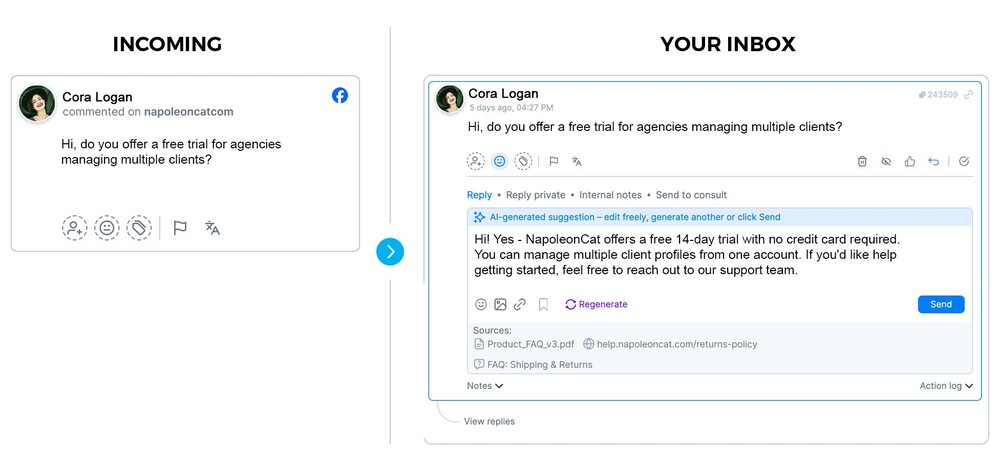
You can now create AI Agents that suggest replies for incoming comments — based on your brand’s tone of voice, FAQs, and any other knowledge sources you configure.
When a comment comes in on an assigned profile, you can ask for a draft reply and then review, edit , or discard. Nothing is sent without your approval.
How does it work?
Trained on your brand
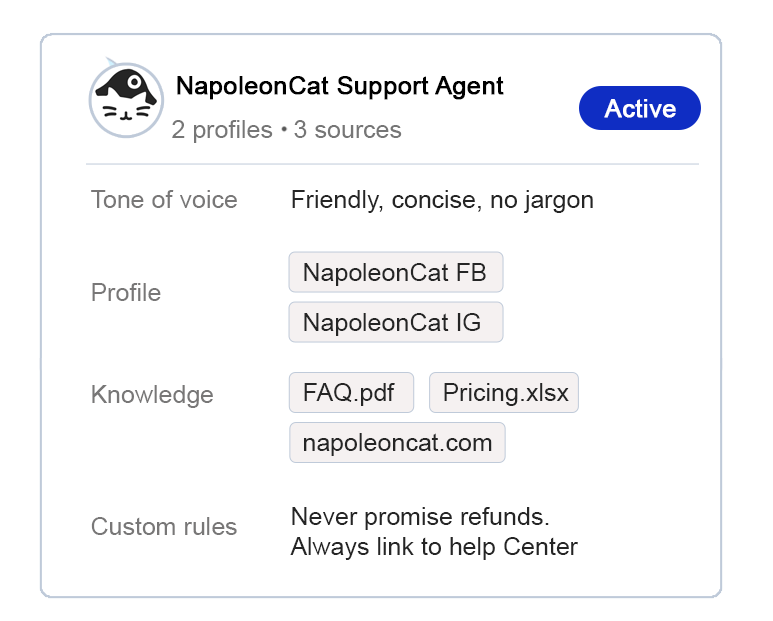
You set up an AI Agent with your brand’s tone of voice, knowledge sources (FAQs, product docs, policies), and custom rules. The AI Agent stays within what you’ve provided — no generic responses, no hallucinated answers.
Human in the loop, always
When a comment comes in on an assigned profile, the moderator can ask the Agent to suggest a reply. Your moderator sees the draft in the composer — they can send it, edit it, regenerate it, or discard it. Nothing goes out without a human reviewing it first.
Works across your channels
Get suggested comments for Facebook, Instagram, TikTok, and more — all in one inbox. Set up separate AI Agents per brand or client, each with its own tone and knowledge sources.
What can you configure?
- Tone of voice (free text description or generated from past interactions)
- Knowledge sources: uploaded documents, FAQ spreadsheets, URLs
- Custom rules: per-line instructions the Agent must follow
- Saved replies: include your existing reply templates as a knowledge source
Availability
AI Reply Suggestion is launching in Beta – available to all Social Inbox 2.1 users with the AI Assistant add-on, across all plans and active trials.
After the Beta phase, AI Reply Suggestion will be available only on the Expert plan.
If you’re on a lower plan, now is the time to explore it — free, at full functionality.
Set up your first Agent in NapoleonCat.