What's Fresh?
News
2 June 2026
Bulk actions are now available in Social Inbox
Select multiple tickets at once and apply any of the following in a single move:
- Delete – remove multiple tickets without opening each one
- Flag – mark tickets that need attention or follow-up
- Tag – apply labels across a batch of conversations at once
- Mark sentiment – assign positive, neutral, or negative sentiment to multiple tickets simultaneously
- Hide – remove selected tickets from view without deleting them
- Mark as done – close out resolved conversations in bulk
- Assign moderator – route multiple tickets to the right team member at once
Useful when clearing a backlog, triaging high-volume periods, or handing off a set of conversations between shifts.
Availability Bulk actions are now live for all Social Inbox 2.2 users.
News
2 June 2026
New: AI Reply Suggestions in Social Inbox
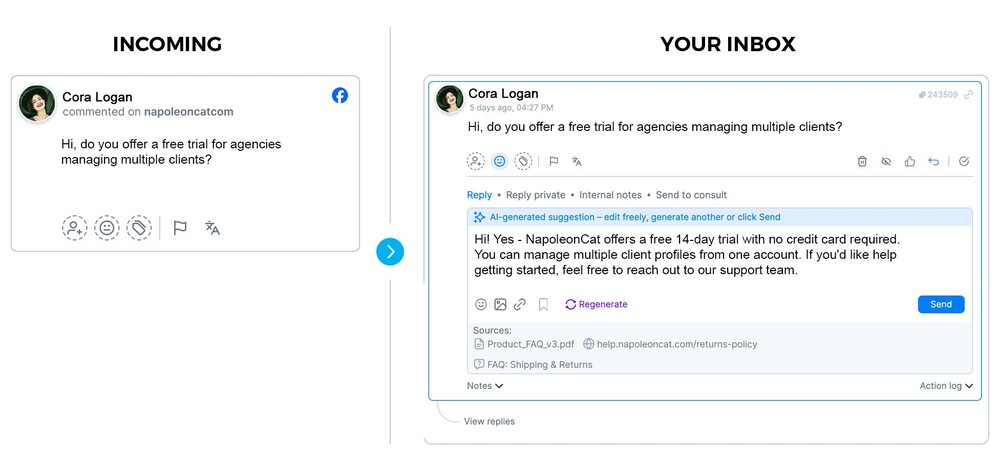
You can now create AI Agents that suggest replies for incoming comments — based on your brand’s tone of voice, FAQs, and any other knowledge sources you configure.
When a comment comes in on an assigned profile, you can ask for a draft reply and then review, edit , or discard. Nothing is sent without your approval.
How does it work?
Trained on your brand
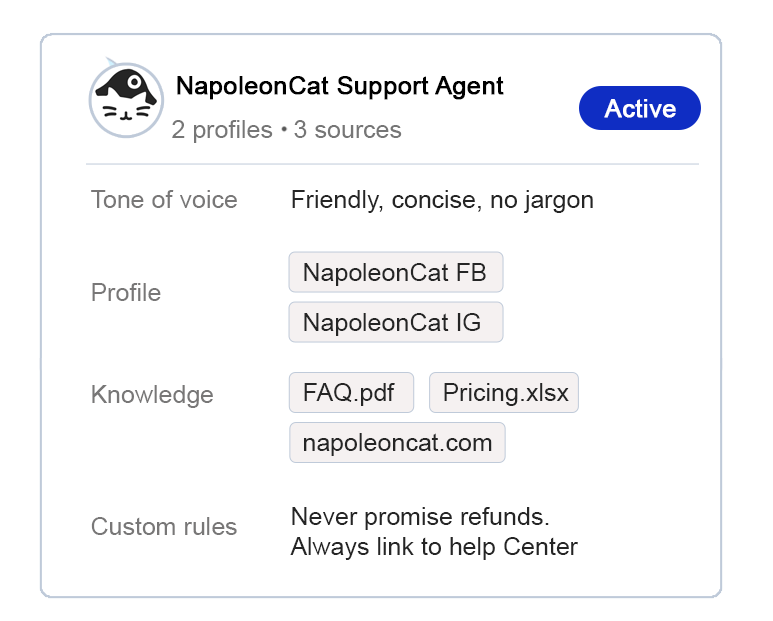
You set up an AI Agent with your brand’s tone of voice, knowledge sources (FAQs, product docs, policies), and custom rules. The AI Agent stays within what you’ve provided — no generic responses, no hallucinated answers.
Human in the loop, always
When a comment comes in on an assigned profile, the moderator can ask the Agent to suggest a reply. Your moderator sees the draft in the composer — they can send it, edit it, regenerate it, or discard it. Nothing goes out without a human reviewing it first.
Works across your channels
Get suggested comments for Facebook, Instagram, TikTok, and more — all in one inbox. Set up separate AI Agents per brand or client, each with its own tone and knowledge sources.
What can you configure?
- Tone of voice (free text description or generated from past interactions)
- Knowledge sources: uploaded documents, FAQ spreadsheets, URLs
- Custom rules: per-line instructions the Agent must follow
- Saved replies: include your existing reply templates as a knowledge source
Availability
AI Reply Suggestion is launching in Beta – available to all Social Inbox 2.1 users with the AI Assistant add-on, across all plans and active trials.
After the Beta phase, AI Reply Suggestion will be available only on the Expert plan.
If you’re on a lower plan, now is the time to explore it — free, at full functionality.
Set up your first Agent in NapoleonCat.
News
2 April 2026
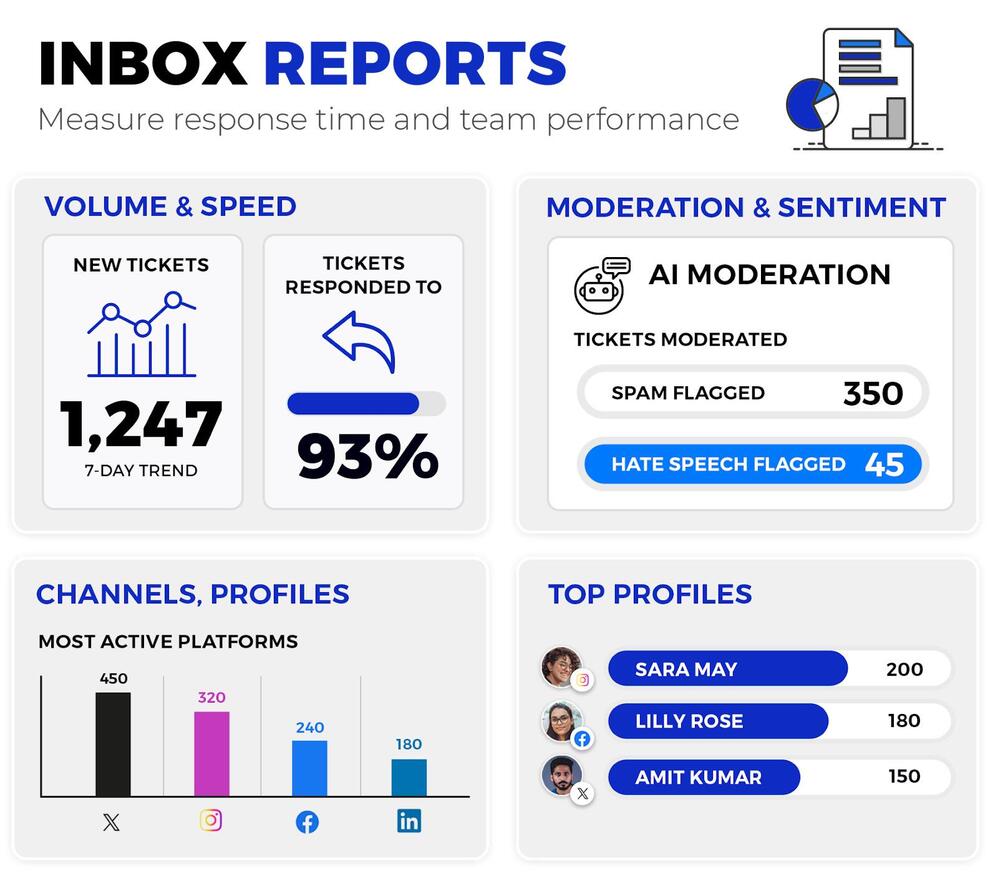
Inbox Activity Reports are now available for Social Inbox 2.1 users
Inbox Activity Reports are now available for Social Inbox 2.1 users. Use them to track team performance and moderation efficiency across your social channels.
📊 Profile-level breakdown: See total ticket volume by type — comments, DMs, ad comments, visitor posts — alongside response rates, reaction time data, and a full breakdown of moderator actions per profile. Also includes separate columns for AI and Auto-moderation actions, so you can see how much of the workload is handled automatically.
👤 Per-moderator stats Track each moderator’s average and median reaction time, total tickets handled, replies by type, and full action history. Clear data for performance reviews and workload management.
🏷️ Tag and sentiment overview: See how many messages were tagged with each Inbox tag, with sentiment breakdown for both manual and AI-assigned tags. Useful for spotting recurring topics and trends over time.
📁 Raw message export: A full message-level log with content, type, author, date, sentiment, tags, and moderator reply data. Useful for auditing specific interactions or exporting data for compliance purposes.
To generate a report, simply click on the “Create report” icon in the Social Inbox
News
18 March 2026
Social Inbox 2.1: What’s New
Social Inbox – your unified inbox for all social media messages, comments, and reviews – is now available in version 2.1 and rolling out to new users.
This update has one focus: help you moderate faster, with full context and fewer clicks.
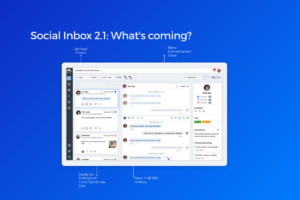
🆕 Full conversation context in one view
The new Conversation View combines the full message thread with Social CRM data into a single place. No more switching between sections to understand a contact’s history — it’s all in one place.
🆕 Full DM History
Direct Message threads now show the complete conversation history. You always know what was agreed before, which cuts response time and reduces the risk of mistakes.
🆕 Move a public conversation to private with one click.
Makes it easier to handle more complex cases and build relationships directly in messages.
Faster performance at high volume
Tickets load faster, even with large numbers of comments and messages. Work stays smooth without slowdowns, regardless of scale.
Simplified, unified filtering
All filters -including status – are now in one place. Easier to manage multiple brands, campaigns, or clients without the chaos.
Availability
Version 2.1 is currently rolling out to new users. Bulk actions and rollout to existing users are coming soon.
Questions? Contact our support team.
News
19 December 2025
Introducing the Social AI Reply Feature (Beta)
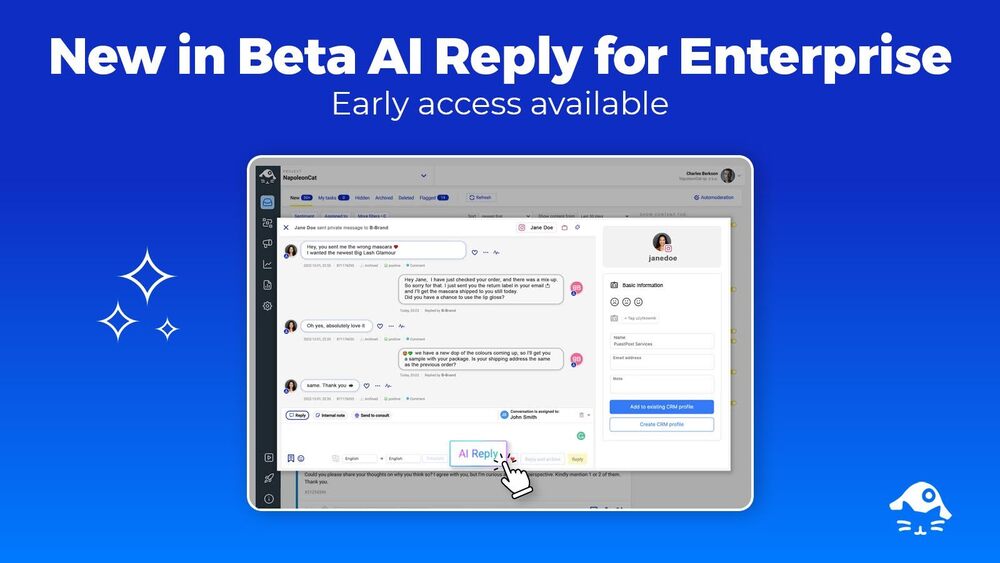
We are excited to announce the release of a new AI-powered reply feature within the Social Inbox. This Beta version is currently available on demand for our Enterprise customers.
How It Works
This new capability is designed to help moderation teams respond to comments more quickly while ensuring brand consistency. The feature generates suggested responses by analyzing:
- The brand’s existing moderation history.
- Additional knowledge sources, such as help centers or FAQs.
By utilizing these inputs, the AI proposes context-aware replies that sound human and on-brand, avoiding generic responses.
Current Beta Scope
During this Beta phase, the AI Reply feature:
- Supports comment replies exclusively.
- Requires individual activation per page by the NapoleonCat team.
Once activated, moderators will see a new “AI reply” button in the reply form within the Social Inbox. This allows them to generate, edit, and publish a suggested response with a single click.
Future Development
This rollout is a key part of our strategic roadmap to enhance AI-powered customer service. Future iterations are planned to expand coverage to private messages and include more advanced workflows tailored for high-volume moderation teams.
News
26 August 2025
New: Export Your Social CRM Profiles
We have launched the export feature in Social CRM.
You can now export your Social CRM data into XLS format, allowing you to take your insights further.
Go to Social CRM
Here are some ideas on how to use this feature:
You can analyze customer profiles to identify trends, preferences, and common issues, which can help refine customer care strategies and marketing campaigns.
Sharing profile data with other teams, such as sales or product development, can help create targeted outreach or pinpoint opportunities for new features based on real customer needs.
News
19 August 2025
Social CRM Gets a Dedicated Profile Management View
We’re excited to share a significant improvement to our Social CRM. This update results from listening closely to your feedback and understanding how you work with customer data every day.
What’s New
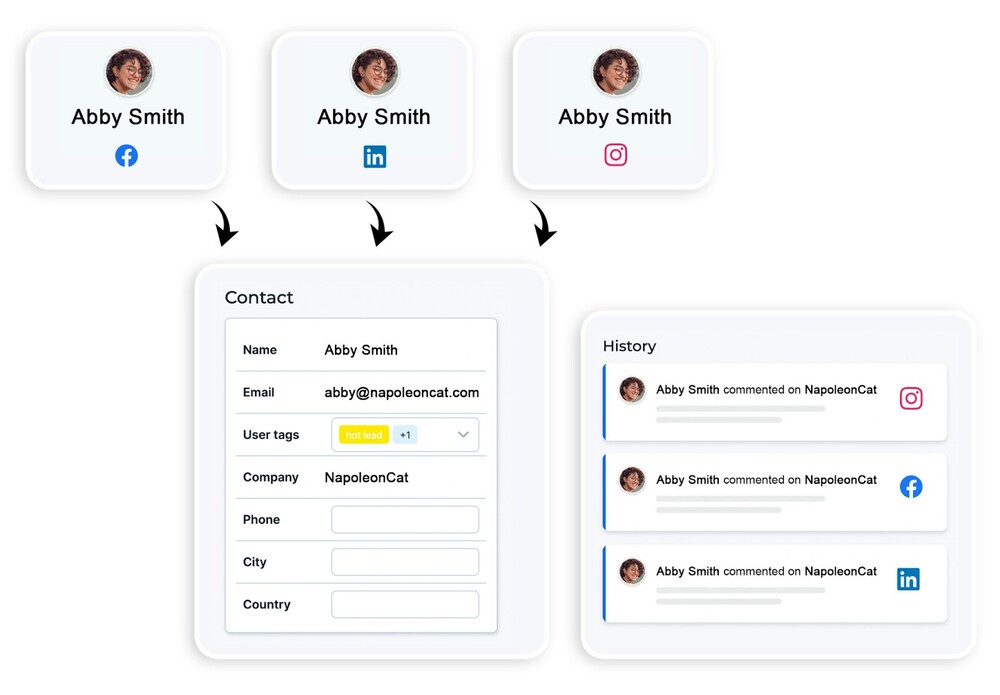
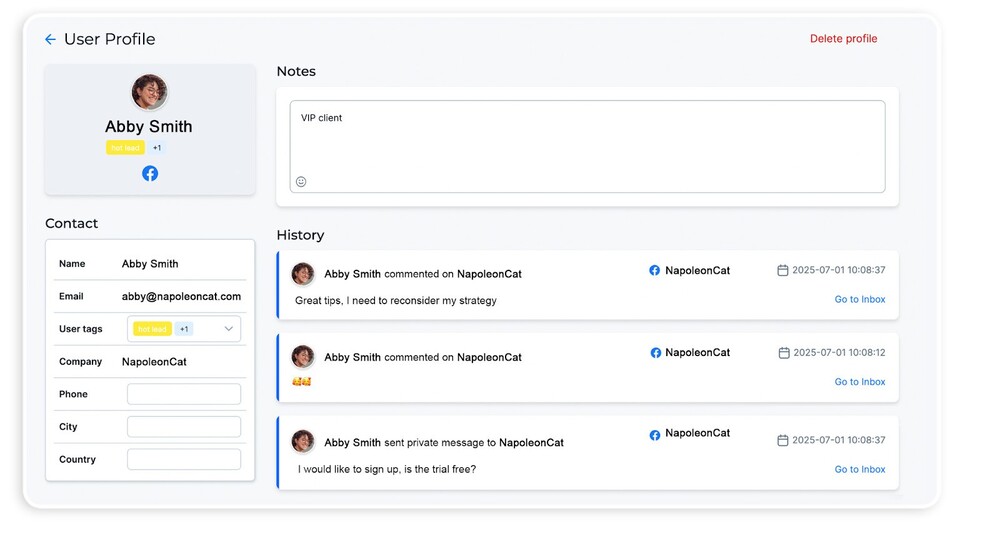
You can now view, manage, merge two profiles together, and soon export your customer profiles from one dedicated place. Instead of trying to figure out whether you have even spoken to the client before or searching through scattered records, everything you need is right in front of you. This update is for you if you’ve ever dealt with clients writing to you from multiple social media profiles or struggled to keep your customer info tidy.
Why We Made This Change
Customer care teams told us they needed a clearer, simpler way to organize and use profile data. Responding to people on social media isn’t just about speed—it’s about knowing who you’re talking to, understanding their history with your brand, and making every conversation count. We wanted to help you do that, without the clutter or confusion from messy data.
How It Helps Your Team
- Stay Organized: All your customer profiles are now easy to find, update, and keep accurate. No more guessing if you’re talking to the same person twice.
- Work Together: When everyone on your team sees the same, up-to-date information, it’s easier to pick up conversations, avoid double work, and support each other.
- Respond with Confidence: With a complete view of each customer’s history, you can answer questions faster and make your replies more personal, even when handling a busy inbox.
- Export When You Need: Exporting profiles is now straightforward, whether you want to analyze your customer base, share data with other teams, or just keep a backup.
Try It Out
The new Social CRM profile management view is live. Take a look, see how it fits into your workflow, and let us know what you think. Your feedback is what drives us to keep improving.
News
12 June 2025
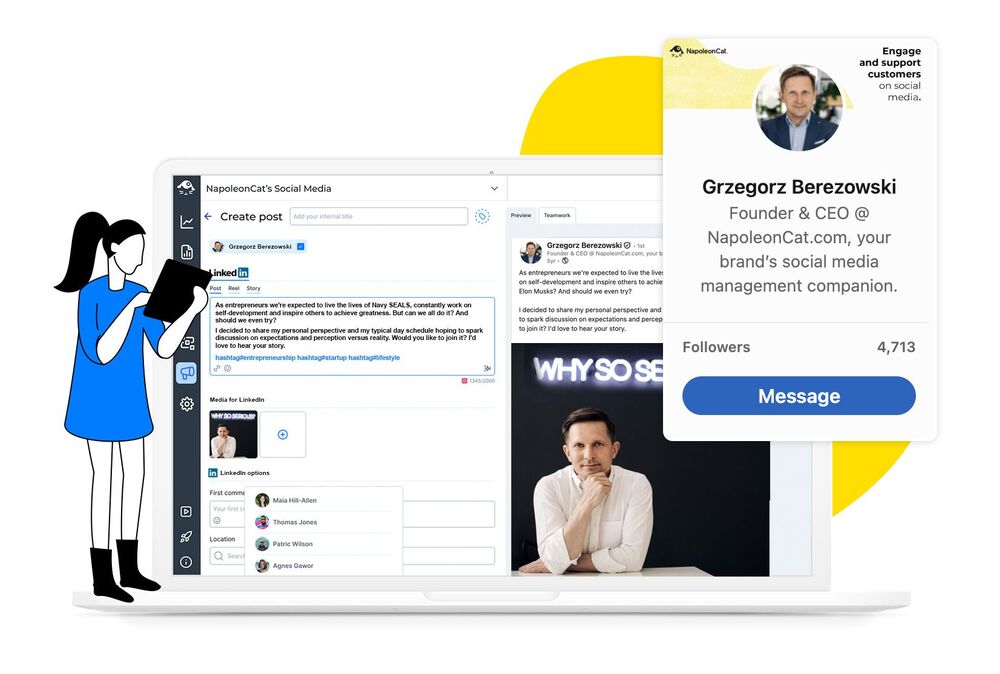
Scheduling and Publishing Posts from Private LinkedIn Profiles
We’ve just introduced the ability to schedule and publish posts directly from private LinkedIn profiles using our Publisher. This enhancement is a game-changer not only for social media managers, executive assistants, and anyone responsible for supporting company leaders, but also for CEOs and board members themselves who actively build their personal brand and use LinkedIn for sales or expert activities.
By enabling direct scheduling and publishing from private profiles, the entire process—from content preparation, through scheduling, to publication- can happen in one place, streamlining the sharing of executive updates, thought leadership content, and CEO communications while eliminating the need to switch accounts or coordinate manual posting. This is particularly important when we want to maintain communication consistency and systematic actions across leaders’ personal channels.
A key use case is board communication and personal branding activities. Previously, managing leaders’ private profiles involved additional steps and organizational challenges. With this update, after connecting profiles to NapoleonCat, you can plan, create, and publish content in advance, scheduling and drafting content on behalf of executives directly from NapoleonCat’s unified dashboard. This not only saves valuable time but also ensures that messaging remains consistent and timely across all channels, maintaining full control over communication quality and timeliness.
Ultimately, this feature empowers organizations to elevate their executive communications and personal branding efforts. By connecting private LinkedIn profiles to NapoleonCat, users can centralize all social media activities, automate routine tasks, and focus on creating impactful content that drives engagement and builds leadership credibility.
Whether you’re supporting a CEO’s profile, multiple board members, or conducting LinkedIn activities yourself, this update makes it easier than ever to maintain a strong, authentic presence on LinkedIn and helps achieve communication and business goals.
News
16 May 2025
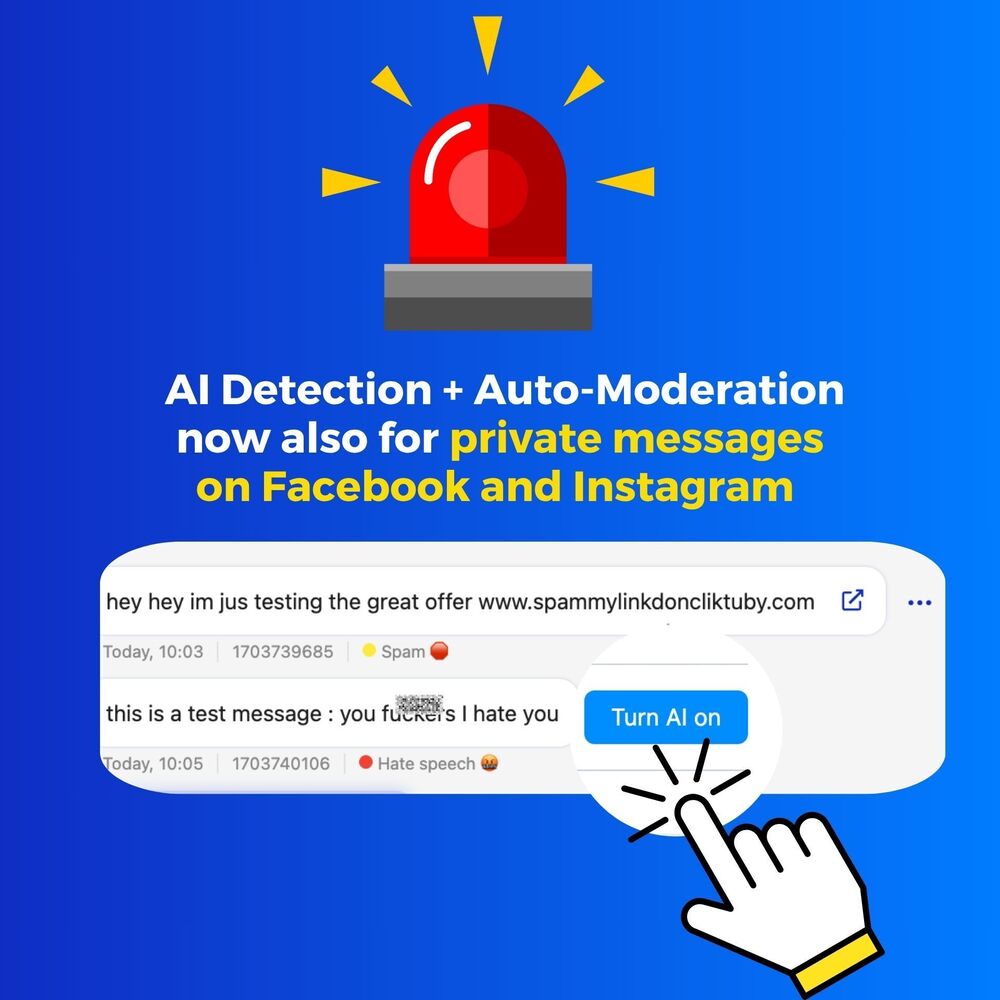
AI spam & hate speech detection for your Facebook and Instagram DMs.
Our AI Assistant just leveled up again: it now detects spam & hate speech in your Facebook and Instagram DMs, too!
Combine it with Auto-moderation for cleaner, safer conversations, everywhere you connect.
If you already use the AI Assistant, check your DMs… our AI is already on the case!
If you want to try it sign up for a free trial.