
Table of Contents
- LinkedIn auto commenter: What it is and why it matters
- Common challenges of managing LinkedIn comments manually
- Key benefits of using a smart LinkedIn auto commenter
- NapoleonCat Auto-moderation: An all-in-one tool for LinkedIn comments
- How NapoleonCat automates LinkedIn comment management
- How to set up NapoleonCat’s LinkedIn auto commenter step by step
- Best practices for getting the most out of a LinkedIn auto commenter
- NapoleonCat vs other LinkedIn auto comment tools
- Build relationships and grow your LinkedIn community with smart automation
- LinkedIn Auto-Commenter - FAQs
LinkedIn has quietly become one of the busiest social platforms for brands. It’s no longer just a place to update your CV or announce a new job. It’s where companies launch products, run paid campaigns, build thought leadership, and actively generate leads.
And where there’s activity, there are comments. Lots of them. Let’s talk about how to keep up using a LinkedIn auto commenter – for both personal accounts and company pages.
- LinkedIn auto commenter: What it is and why it matters
- Common challenges of managing LinkedIn comments manually
- Key benefits of using a smart LinkedIn auto commenter
- NapoleonCat Auto-moderation: An all-in-one tool for LinkedIn comments
- How NapoleonCat automates LinkedIn comment management
- How to set up NapoleonCat’s LinkedIn auto commenter step by step
- Best practices for getting the most out of a LinkedIn auto commenter
- NapoleonCat vs other LinkedIn auto comment tools
- Build relationships and grow your LinkedIn community with smart automation
- LinkedIn Auto-Commenter – FAQs
Best LinkedIn auto commenter for personal & company accounts
Use NapoleonCat to automate all your organic and ad comments – for LinkedIn, Facebook, Instagram, TikTok, and YouTube. Automate repetitive comments and automatically delete spam.
LinkedIn auto commenter: What it is and why it matters
LinkedIn auto commenter is a tool that helps automate comment replies on LinkedIn in cases when you actually can automate them – for example, with frequently asked questions. You can also use it to automatically moderate spam or offensive comments.
I’m not talking about using a bot to respond to any and all LinkedIn engagement – but rather, a way to support your moderation team in scenarios where automation is easy and really helpful. And I’ll talk about those in a minute.
By the very nature of social media, LinkedIn comments can quickly pile up if you already have that engagement on your company page or personal profile. From genuine questions and warm leads to spam, irrelevant promotions, and the occasional not-so-friendly opinion. All of it.
Keeping up with them manually might work when your page is small. But once your content starts getting traction, manual comment moderation simply becomes unsustainable. And that’s what LinkedIn auto commenter tools help with:
- Save time replying when it can be automated – and removing spam and offensive comments (yes, hate is also a thing on LinkedIn, even though it wouldn’t seem like people can hate and troll under their professional titles. Apparently, they can.)
- Protect your brand (or personal brand) reputation by helping you eliminate inappropriate content.
- Save your moderation team’s morale (or yours) – as they can focus on building meaningful relationships, which, for most, is still the primary goal when it comes to building a LinkedIn presence.
Common challenges of managing LinkedIn comments manually
If you’ve ever tried to manage LinkedIn comments “the old way,” you already know the pain points. They’re also pretty clear from the previous section of this article.
First, volume scales faster than people expect. One successful post or ad can generate dozens or hundreds of comments in hours. By the time you respond, the conversation may already be over.
Second, timing matters more than ever. People expect fast responses, even on LinkedIn. A prospect asking a question doesn’t want to wait until Monday morning for a reply.
Third, manual moderation is inconsistent. Different team members respond in different tones, forget to answer similar questions, or miss comments entirely, especially when managing multiple LinkedIn pages or campaigns.
And finally, there’s spam and inappropriate content. LinkedIn may be more professional than other platforms, but spam bots, self-promo comments, and off-topic replies still happen, and leaving them visible hurts your brand credibility.

Automatically Block Spam with AI Precision
Automatically hide or delete spam and hate comments on your posts and ads across all your social media profiles, powered by advanced AI.
Key benefits of using a smart LinkedIn auto commenter
A smart LinkedIn auto commenter is a time-saver – but it’s also much more than that. Because it helps you create a better experience for your audience while keeping your brand presence professional and responsive.
Save time and never miss a comment or message
Even when your team is busy, offline, or managing multiple platforms at once – that’s exactly what automation is for.
Instead of constantly refreshing LinkedIn notifications, you get a structured system that captures all interactions in one place and handles repetitive replies automatically.
Respond to prospects and followers instantly
Even after business hours. Automated replies can acknowledge comments immediately, answer common questions, or guide prospects to the next step, without waiting for a human to jump in.
And that means better engagement, higher chances of conversion, and fewer lost opportunities just because someone commented outside of office hours.
Keep a professional, consistent brand voice across comments
When you automate responses using predefined rules and templates, your brand voice stays consistent, no matter who’s “on duty” that day.
This is especially important for larger teams, global brands, or agencies managing multiple clients and LinkedIn pages.
NapoleonCat Auto-moderation: An all-in-one tool for LinkedIn comments
You didn’t think this was about just any LinkedIn auto commenter tool, did you? 🙂
Let’s talk about NapoleonCat’s Auto-moderation. This is a complete comment management system designed for growing brands and teams.
Instead of juggling native LinkedIn tools, spreadsheets, and inboxes, NapoleonCat brings everything together in one dashboard, so you can automate what makes sense and keep control over what doesn’t. (And trust me, some things on LinkedIn just don’t.)
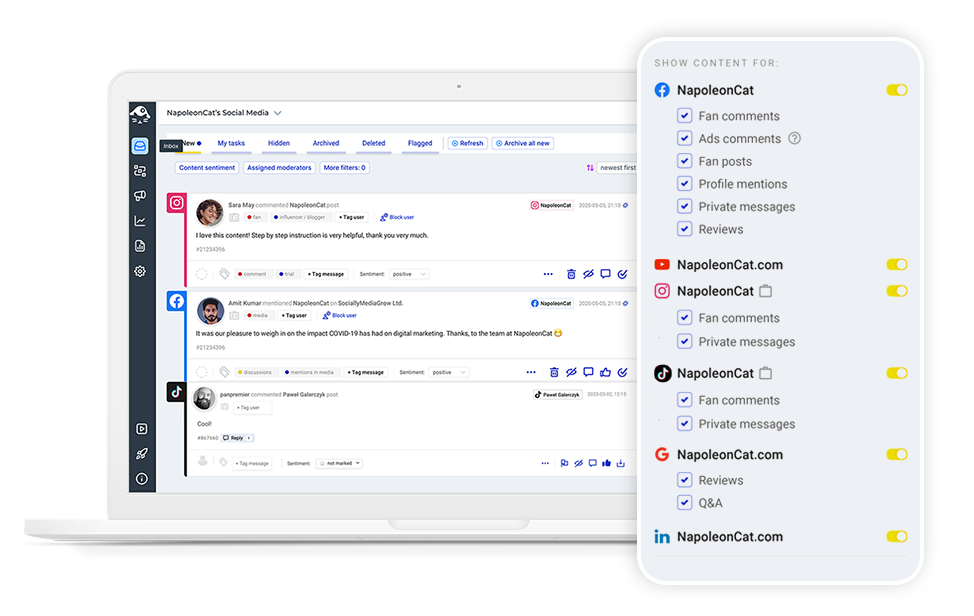
On top of that, NapoleonCat offers an entire suite of LinkedIn management tools for business, so it’s even less juggling of tools and platforms. Let me show you how it works.
How NapoleonCat automates LinkedIn comment management
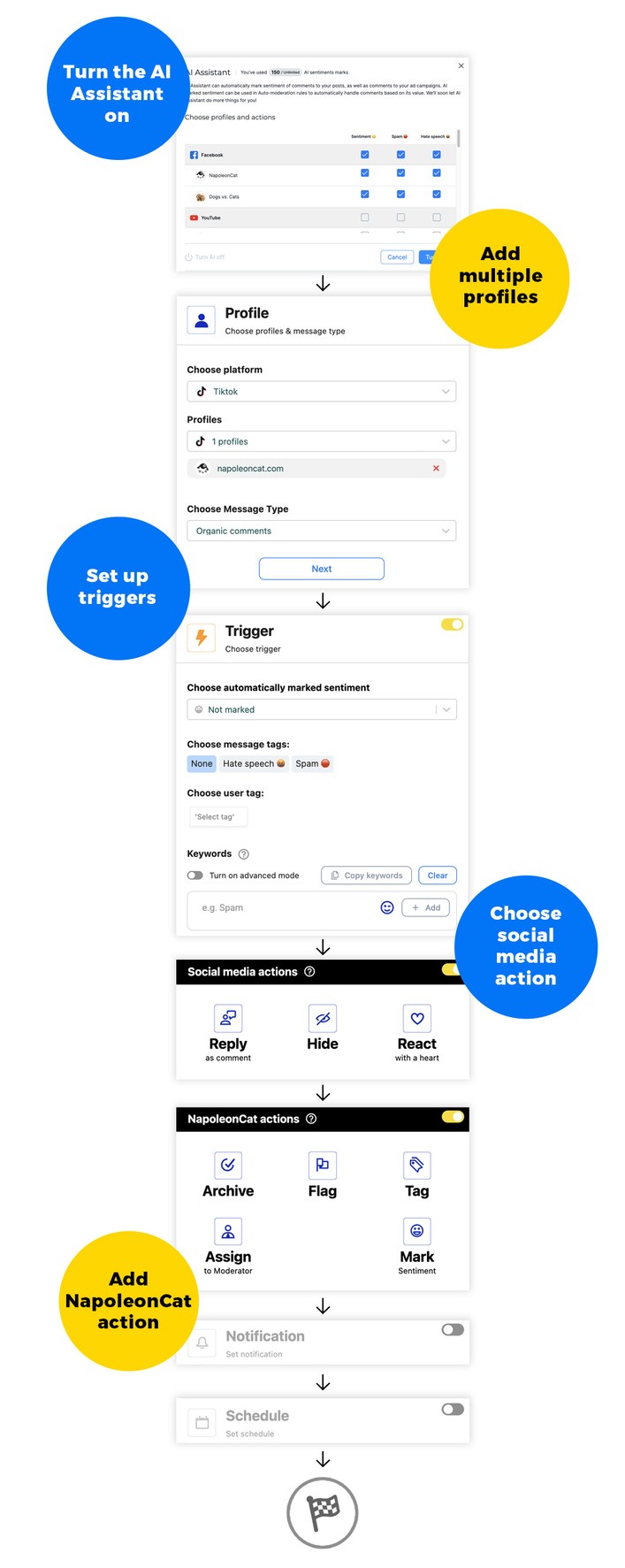
NapoleonCat’s LinkedIn auto-moderation is built around flexible rules that adapt to how people actually comment – this is definitely not a rigid, one-size-fits-all kind of thing.
Smart triggers – automatically reply based on keywords, sentiment, or defined conditions
You can set up automation rules triggered by:
- specific keywords or phrases
- sentiment (positive, negative, neutral)
- automatically detected spam and hate speech contents
- promotional links or images
- user tags in Social CRM profiles
- and a combination of triggers for a very specific automation scenario
This way, you can respond differently to a lead inquiry, a complaint, or a spam comment (or just remove the latter; you probably have no business responding to it, anyway).
Send fast, personalized replies that still feel human
Automation doesn’t have to sound robotic. (This has to be one of the sentences I’ve repeated the most in my professional career.)
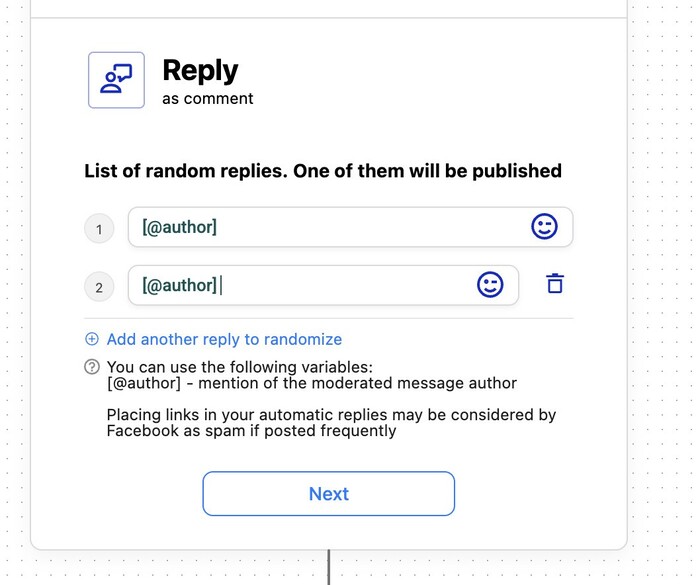
NapoleonCat lets you create personalized replies with multiple (actually unlimited) response versions, so people don’t just see you commenting the same thing to everyone. It’s easy, then, to send helpful and friendly responses while still leaving room for a team member to jump in later, in person, if needed.
Automatically remove spam and inappropriate comments
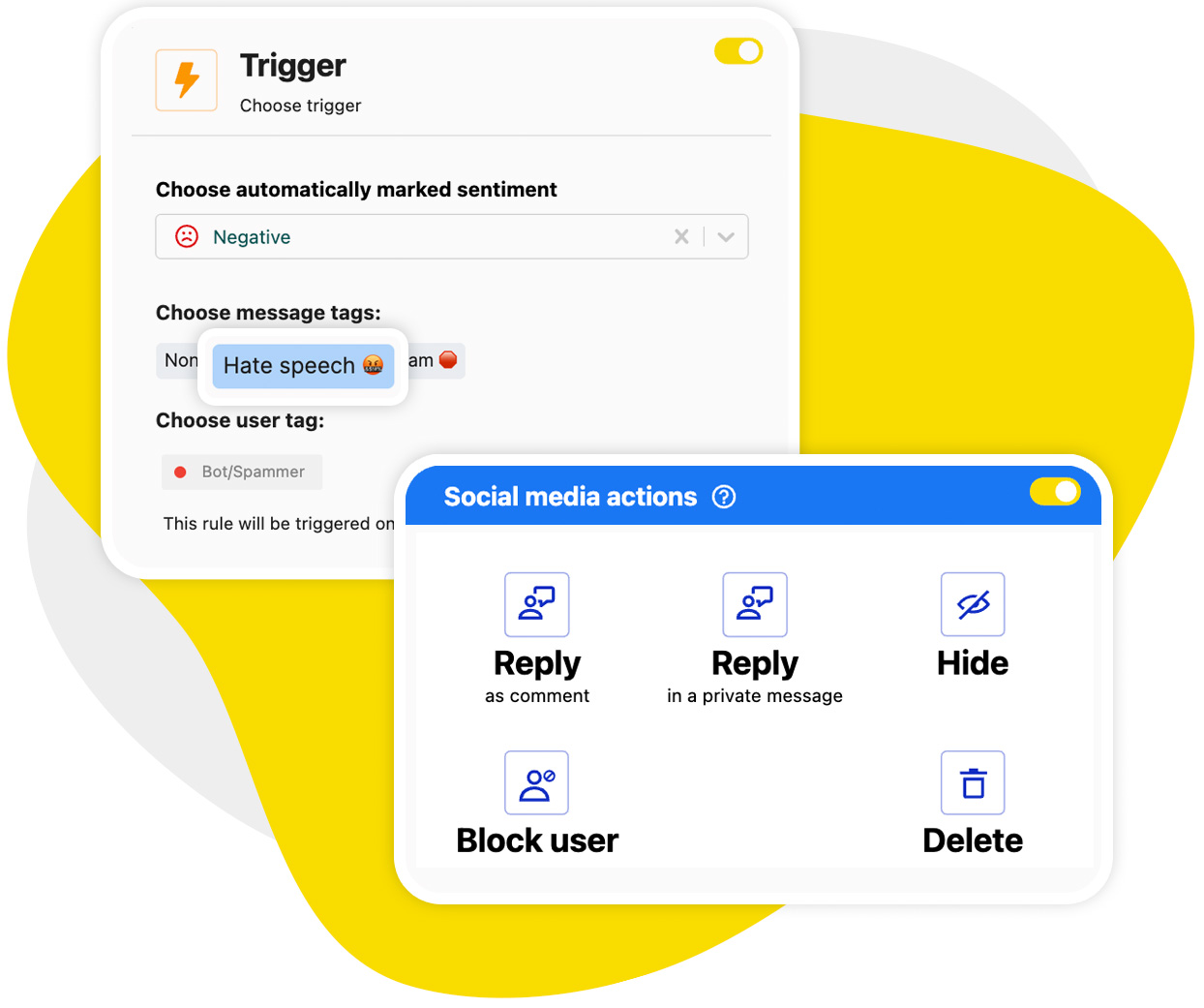
Spam comments can derail conversations and damage trust. But with NapoleonCat, you can automatically hide or delete them, including:
- promotional spam
- suspicious links
- offensive or inappropriate language
This keeps your LinkedIn presence clean and professional without constant manual monitoring.
What’s more, NapoleonCat’s AI Assistant (which you’ll find in the Social Inbox, all within the same platform, mind you) can automatically detect spam and hate (and do it really well). You can then use the AI tags to automatically trigger spam removal.
Pause or adjust automation rules during campaigns or announcements
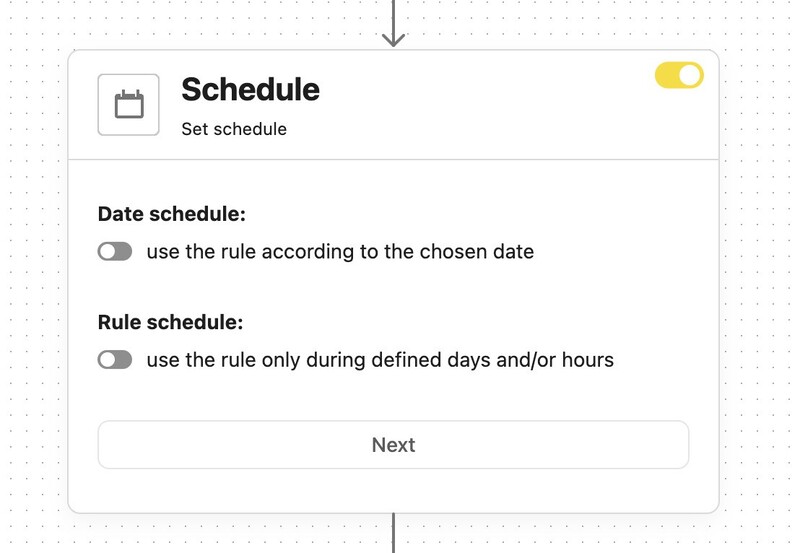
Another flexibility you get with Auto-moderation is the timing of your LinkedIn auto comment. You can set a time frame for the duration of a campaign or set a rule to run only on the weekends or after 5 pm.
You can easily pause, edit, or adjust rules during product launches, announcements, or sensitive campaigns. Your team stays fully in control all the time, using the LinkedIn auto commenter as needed.
Assign, tag, or flag comments for your team to handle
Not every comment should be automated. And what’s really cool about NapoleonCat’s Auto-moderation is that it also lets you:
- assign comments to specific team members
- tag conversations for follow-up
- flag high-priority leads or issues
That way, automation handles the basics, and humans focus on high-value interactions.
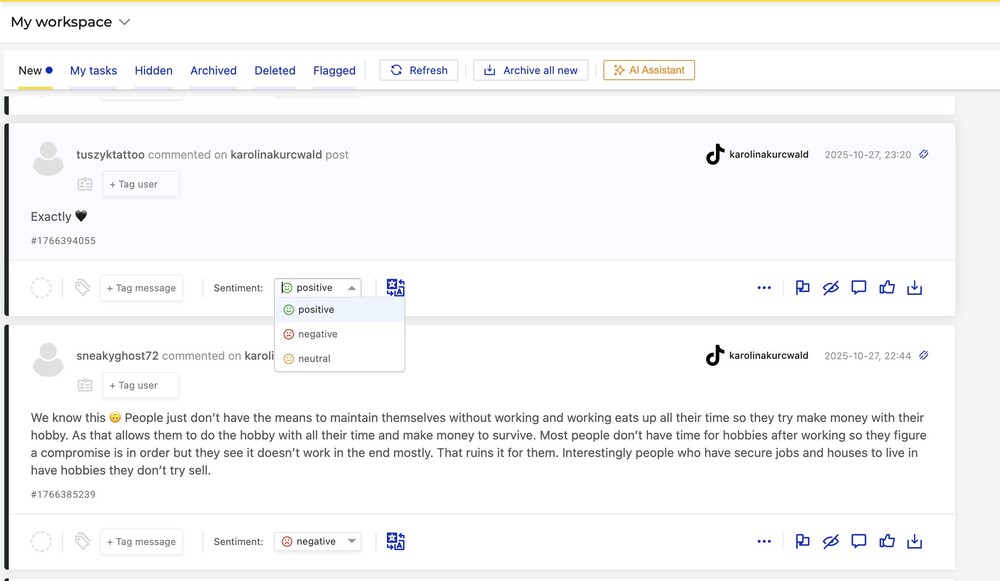
Track sentiment to understand how people respond to your brand
You can track sentiment in NapoleonCat in a few ways:
- Manually assign it to comments in the Social Inbox
- Let the AI Assistant assign it automatically
- Or use an Auto-moderation rule to assign it based on the contents of the comment
And of course, you can use the sentiment to trigger an Auto-moderation rule.
The built-in sentiment tracking is especially useful for spotting trends, measuring campaign impact, and identifying potential issues early, before they escalate.
How to set up NapoleonCat’s LinkedIn auto commenter step by step
Getting started doesn’t require technical skills or hours of setup – it’s a pretty straightforward, step-by-step process.
- Connect your LinkedIn Page or personal profile to NapoleonCat.
- Open the Auto-moderation section, create a new rule, and choose LinkedIn as your platform.
- Define your triggers and conditions based on keywords, sentiment, or content type.
- Create response templates that match your brand voice.
- Choose actions (e.g., reply, hide, assign, tag).
- Activate your rule, then monitor performance.
You can always tweak rules as your strategy evolves – automation is meant to adapt, not lock you in for good.
Best LinkedIn auto commenter for personal & company accounts
Use NapoleonCat to automate all your organic and ad comments – for LinkedIn, Facebook, Instagram, TikTok, and YouTube. Automate repetitive comments and automatically delete spam.
Best practices for getting the most out of a LinkedIn auto commenter
Automation works best when it supports human interaction instead of replacing it altogether. Here are a few things to keep in mind:
Combine automation with manual, high-value replies
Use automation for:
- FAQs
- acknowledgments
- spam removal
But keep meaningful conversations human, especially sales discussions, partnership inquiries, or sensitive topics. You can still use automation to assign comments to individual moderators.
Regularly review and optimize your automation rules
Comment behavior changes over time – and so do social media algorithms and policies.
Review your rules regularly to:
- add new keywords
- adjust reply tone
- remove outdated responses
- keep up with new spam patterns
This will keep automation relevant and effective.
Measure engagement and improve performance with insights
NapoleonCat’s analytics help you track things like:
- response times
- sentiment trends
- engagement levels
And you can use these insights to improve both your automation and overall LinkedIn strategy to reach your goals.
NapoleonCat vs other LinkedIn auto comment tools
Instead of just focusing on posting automated comments, NapoleonCat’s LinkedIn auto commenter includes auto-moderation, team collaboration, sentiment analysis, and inbox management, making it a much more comprehensive tool.
Below is a quick comparison with other similar tools:
| Feature | NapoleonCat Auto-moderation (for LinkedIn) | Typical LinkedIn Auto Comment / Moderation Tool |
|---|---|---|
| Platforms Supported | Works natively on LinkedIn plus Facebook, Instagram, TikTok, YouTube, and more—so teams manage multi-platform conversations from one dashboard. | Usually built only for LinkedIn, with no cross-platform moderation or inbox. |
| Auto-reply & Auto-moderation | Can automatically reply to LinkedIn comments and auto-delete spam, promotional, or inappropriate comments using advanced rules. | Many tools send basic auto-replies, but few reliably moderate or remove unwanted comments. |
| Personalization | Dynamic placeholders (e.g., commenter’s name or company), unlimited reply variants, and randomized templates to keep replies natural and non-repetitive. | Often limited to one static reply per trigger, with little or no personalization. |
| Advanced Triggers & Rules | Combine keywords, sentiment, post type, user tags, and timing. Rules can be prioritized to avoid conflicts. | Usually limited to simple keyword-based triggers with no sentiment or multi-condition logic. |
| Rule Scheduling | Automation can run only on selected dates, days, or hours (e.g., during campaigns, events, or launches), with easy pause and resume. | Typically runs 24/7 with minimal scheduling or campaign-level control. |
| Lead Nurturing & Escalation | Can flag, assign, or route comments to teammates, nurture leads (e.g., gated content, demos), or escalate high-intent inquiries automatically. | Lead handling is mostly manual and disconnected from comments. |
| Analytics & Reporting | Unified Social Inbox with detailed logs of triggered rules, sentiment trends, response times, and engagement performance. | Basic counts of comments and replies, with little insight into automation effectiveness. |
| Templates & Setup Ease | Guided rule builder, ready-made templates, and easy duplication of rules across posts or campaigns. | Setup often requires building every rule from scratch; harder to scale. |
Build relationships and grow your LinkedIn community with smart automation
While some might think LinkedIn automation is just looking for shortcuts, it really is a tool to help you show up consistently, respond on time, and create more space for real conversations.
With smart auto-moderation like the one in NapoleonCat, you can build trust, improve engagement, and give your team the breathing room to focus on what’s actually important. Used thoughtfully, a LinkedIn auto commenter becomes a relationship-building tool, and not just a time-saver.
And you can test the way it works in NapoleonCat when you sign up for the 14-day free trial – which I highly recommend.
Best LinkedIn auto commenter for personal & company accounts
Use NapoleonCat to automate all your organic and ad comments – for LinkedIn, Facebook, Instagram, TikTok, and YouTube. Automate repetitive comments and automatically delete spam.
LinkedIn Auto-Commenter – FAQs
Let’s answer some of the most common questions regarding auto-comments on LinkedIn.
Can you set up automated comments for LinkedIn?
Yes. With tools like NapoleonCat, you can automate LinkedIn comment replies based on keywords, sentiment, or specific conditions, while still keeping control over tone and actions.
How do I stop automatic bot comments on LinkedIn?
You can automatically hide or delete spam and bot comments using moderation rules that detect links, promotional language, or suspicious patterns.
Is automating LinkedIn comments safe and allowed?
When done responsibly, without spammy behavior or fake engagement, comment automation focused on moderation and replies is safe. Tools like NapoleonCat follow platform-friendly practices.
Can LinkedIn comment automation replace human interaction?
Technically, it could, but it definitely shouldn’t. Use it for repetitive tasks, while letting humans handle meaningful conversations.
What types of LinkedIn comments should be automated?
FAQs, acknowledgments, spam and hate removal, and basic routing are perfect for automation. Sales conversations and complex questions should probably stay human.
How do I know if LinkedIn comment automation is working?
Look at faster response times, improved sentiment, higher engagement, and fewer missed comments. NapoleonCat’s analytics make this really easy to track.
You may also like:
- Setting Up a LinkedIn Comments Auto Reply (For Company Pages and Personal Profiles)
- How to Automatically Delete Spam on LinkedIn
- Best Auto Commenter for Social Media: Full Guide
- Best Facebook Auto Commenter – a Guide
- Best TikTok Auto Commenter – Expert Guide
- Best Instagram Auto Commenter
- Best YouTube Auto Commenter – Expert Guide
- How to Use Automated Customer Service on Social Media
- How to Automate Social Media Replies (And When You Should)
- Instagram Auto-Comments: When and How Should You Use Them?
- How to Set Up a Smart Auto-Reply in Instagram Comments
- How to Set Up a Smart TikTok Comments Auto-Reply
- How to Set Up Auto-Reply in Facebook Comments
- How to Set Up Auto-Reply in YouTube Comments