
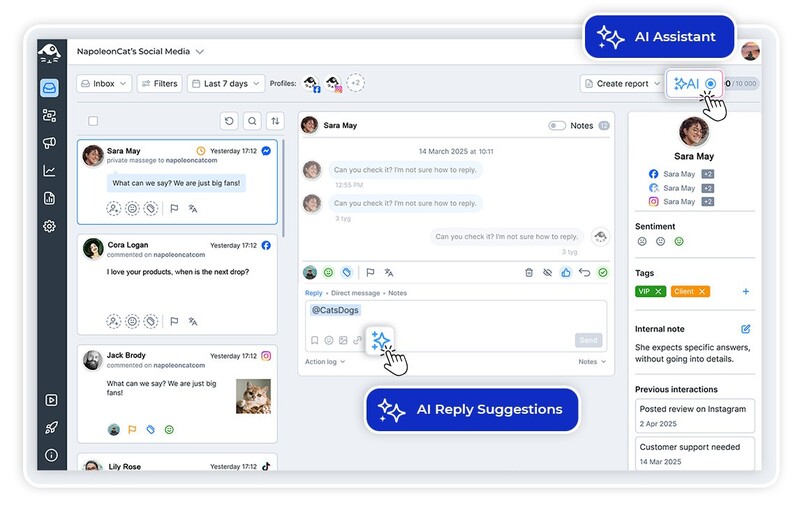
Comments are the heart of TikTok, but they move fast. Use auto commenting AI for TikTok to moderate and filter the noise, so you’re not glued to your notifications. Think of it as a smarter TikTok auto commenter that keeps things in check.
Auto-Commenting AI for TikTok – Manage Every Comment on Autopilot
Trusted by:




Supported platforms








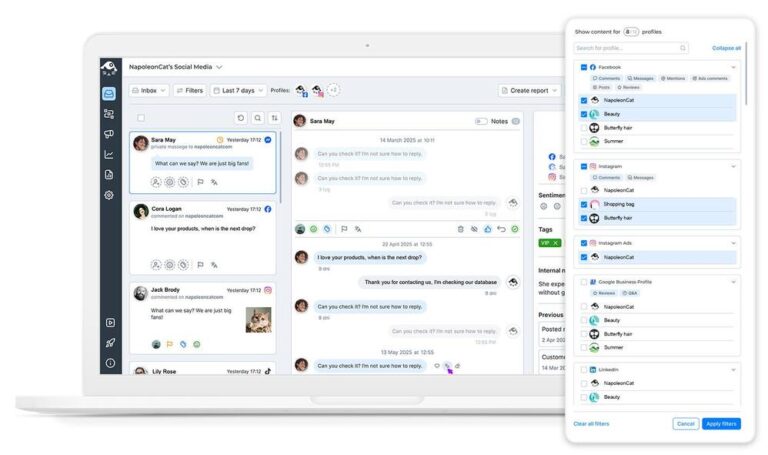
Manage all TikTok comments from one customizable view
Managing many TikTok accounts at once? Stop switching between accounts and devices, and start using one dashboard for all of them. The Social Inbox displays all your social media interactions chronologically in one place. And TikTok comment moderation suddenly becomes a breeze. (Even for TikTok ads!)
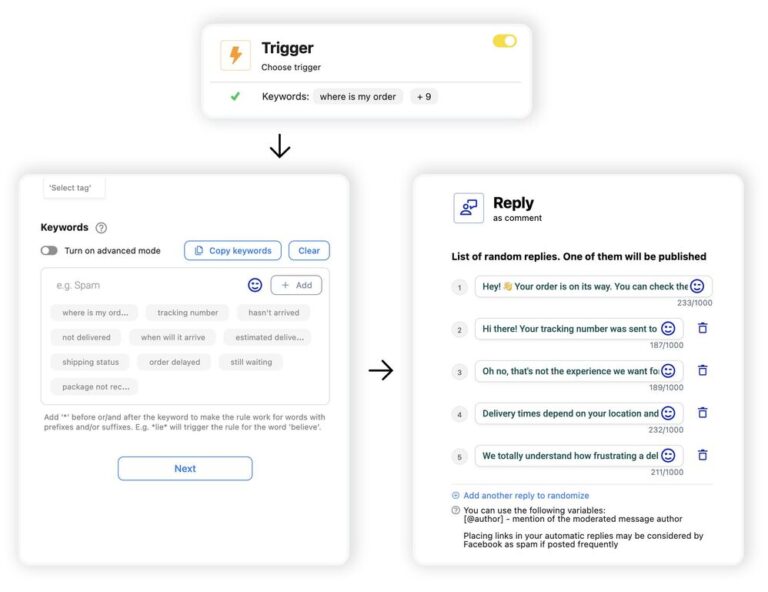
Auto-reply to TikTok comments on organic posts and ads
Automatically reply to TikTok comments using custom rules based on keywords, sentiment, user tags, and more. Add multiple reply variations to keep every response natural and avoid sounding repetitive.
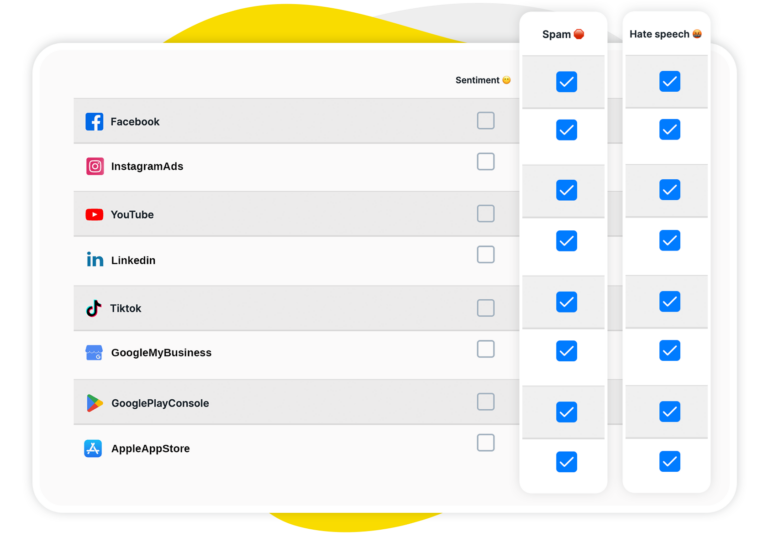
AI assistant: Auto-detect spam, hate speech, and sentiment on TikTok
Some things on social media are just time sucks, like manually tagging spam and then removing it. Instead, ask your AI Assistant to do it. It’ll tag sentiment, spam, and hateful content automatically, in bulk, in seconds. And you can then take over to decide what to do about it.
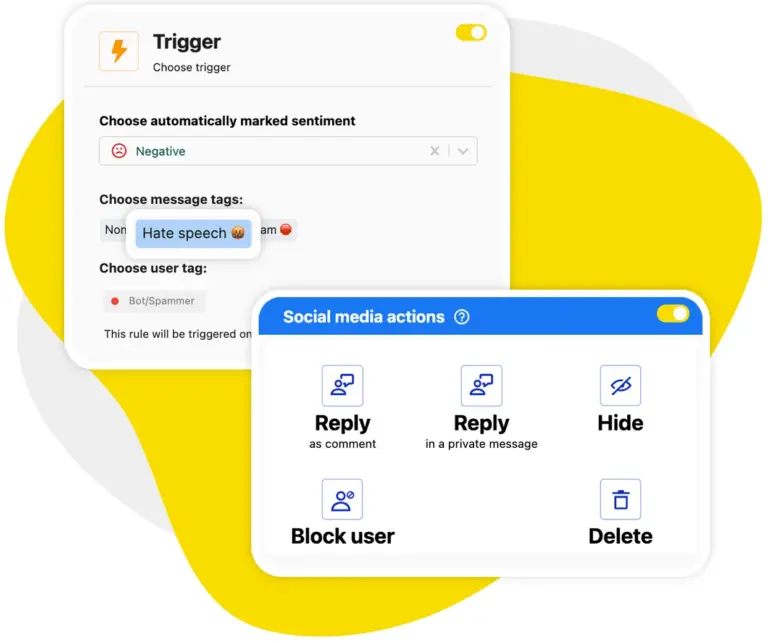
Auto-moderation: Automatically hide spam TikTok comments
You can also automate spam removal entirely, which we recommend if you don’t want to waste any more of your moderators’ time. Set up your Auto-moderation to automatically hide spam and TikTok comment-bot activity the second it’s posted, and never worry about it again.
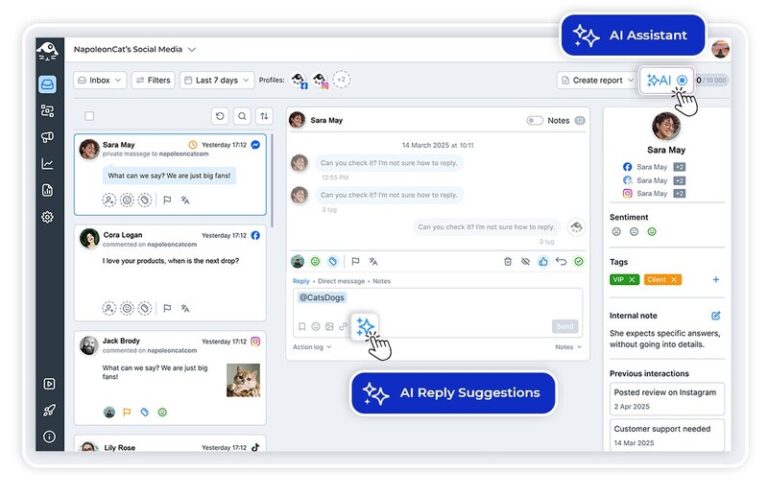
AI reply suggestions: Get smart response recommendations for every TikTok comment
Get AI to write TikTok comment replies for you. But not just any kind of replies. Thoughtful, helpful, and on-brand replies, because they’re based on your previous responses, your brand guidelines, and your product or service content that you provide.
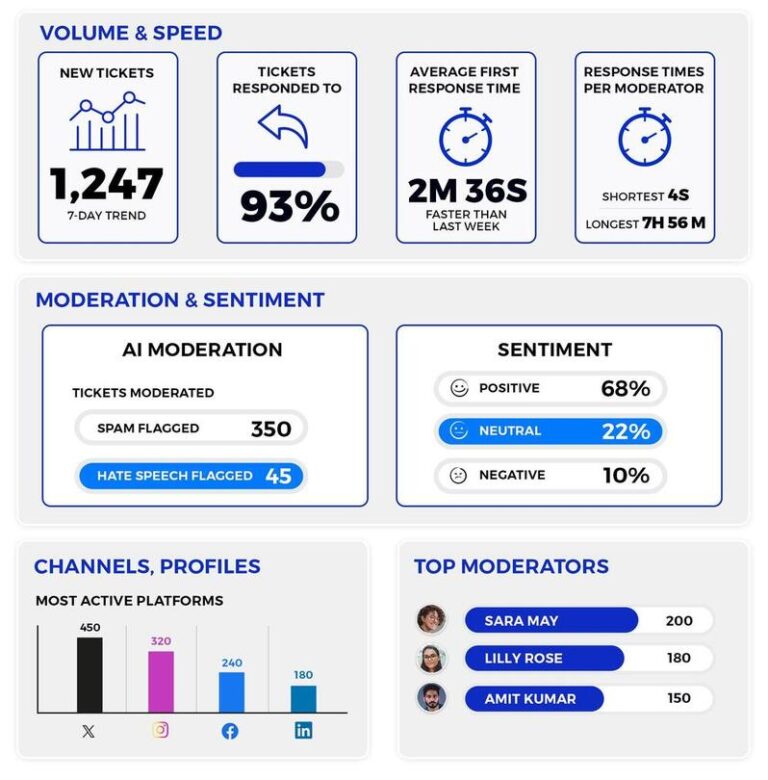
Track your team’s response performance on TikTok
You can’t improve what you can’t measure, and NapoleonCat will help you keep an eye on your moderation performance. So you know whenever interaction volumes are rising or response times are getting dangerously long, and can fix it in time.
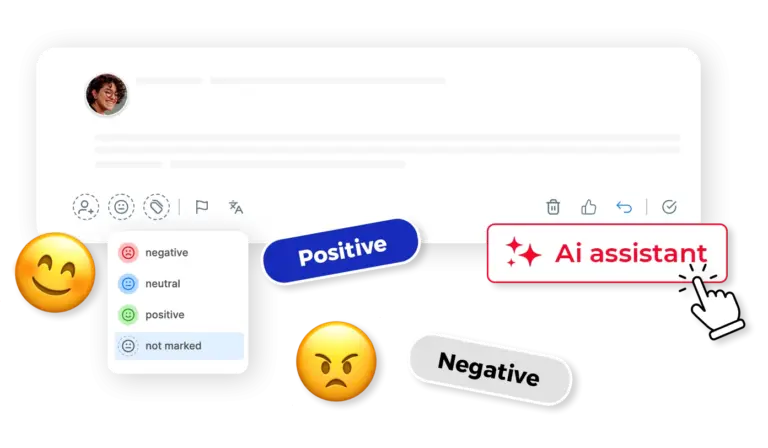
Let AI decide which TikTok comments need human attention
The benefit of AI for your team is that it excels at scale. So it can tag your comments in bulk, helping you organize them and filter them much faster. And that’s a good chunk of work already done, even before a moderator opens their laptop.
Automate TikTok comments with a little extra help from AI




Here’s why our clients love NapoleonCat
Join businesses that save hours every week with TikTok automation.

NapoleonCat saves up to one-third of a full-time position. That’s time we would otherwise spend manually moderating thousands of comments each month using the Meta Business Suite, profile by profile and comment by comment. Time we can now use for growth. NapoleonCat is the best tool of its kind on the market, and it’s still constantly evolving and improving by introducing new AI features.

It’s hard to imagine our work without a tool that includes so many valuable features. It won’t be an overstatement when I say that NapoleonCat saves us multiple full-time positions that would be dedicated to just moderating comments or manually generating reports.

NapoleonCat gives us the full picture of social media interactions. It’s easier to pick up urgent threads that need taking immediate action. And with conversation history, it’s much easier to continue the work of another team member while they’re out of office.

We work with multiple clients, and with NapoleonCat, we don’t waste time switching between multiple software tools. We can also deliver reliable data from a single source. We tested other social media moderation and analytics tools before, but none of them lived up to what NapoleonCat delivers. They’re the best, and I personally love using the tool. 🙂

NapoleonCat is now an indispensable tool that we use for moderation and analytical purposes, as well as content publishing. We’re curious to see new capabilities of the tool and test its new uses, for example, to moderate TikTok ad comments, as we predict this social media channel to become more and more important for our clients.

It’s the first social media engagement tool we have ever tried that is truly intuitive and that makes it easy for us to include the clients in the process. The service and support is great and personal. And the value for money is great!

We were looking for a tool that would allow us to consolidate and manage comments and private messages from Messenger in one place. Analytics and reports were also very important to us, as they would show us the level of our social media customer service. That’s why, in 2017, we decided to choose NapoleonCat.
NapoleonCat vs. other TikTok auto commenters
| Feature | NapoleonCat | Hootsuite | Sprout Social | Sendible |
|---|---|---|---|---|
| TikTok Comment Moderation | ✅ Advanced (keywords, sentiment, AI tags) | ⚠️ Limited rules | ⚠️ Limited filtering | ❌ No |
| AI Spam & Hate Detection | ✅ AI-based auto removal | ⚠️ Limited (rules / add-on) | ❌ No auto removal | ❌ No |
| AI-Generated Reply Suggestions | ✅ Yes | ✅ Yes | ✅ Yes | ❌ No |
| Automated Comment Hiding | ✅ Yes (AI-triggered) | ⚠️ Manual only | ⚠️ Limited | ❌ No |
| TikTok Ad Comment Management | ✅ Yes (TT ads) | ⚠️ Limited | ❌ No | ❌ No |
| Smart Comment Categorization | ✅ AI-supported tagging | ⚠️ Basic | ⚠️ Labels only | ❌ No |
| Cross-Platform Comment Inbox | ✅ Yes | ✅ Yes | ✅ Yes | ✅ Yes |
| GDPR Compliance | ✅ EU-based, GDPR-first | ⚠️ CA-based | ⚠️ US-based | ⚠️ UK-based |
FAQs
Can I auto-moderate TikTok comments with NapoleonCat?
Yes. NapoleonCat’s Auto-moderation lets you create rules that automatically hide spammy or hateful TikTok comments as soon as they appear. Rules can be triggered by keywords, AI-detected spam tags, or both.
Does NapoleonCat support TikTok ad comments?
Yes. Comments on your TikTok ads flow into the Social Inbox just like organic comments. You can moderate, reply to, and automate responses for ad comments the same way you handle any other TikTok interaction.
How does the AI Assistant help with TikTok comments?
The AI Assistant automatically analyzes every incoming TikTok comment, tagging it by sentiment (positive, negative, neutral) and flagging spam or hate speech. This lets your team prioritize meaningful conversations and automate the removal of unwanted content. It is the same engine behind AI comment moderation for brands, so one setup covers every channel you connect.
Can I manage multiple TikTok accounts in one place?
Absolutely. NapoleonCat’s Social Inbox gathers comments and DMs from all your connected TikTok accounts (and other social platforms) into a single chronological view. No more switching between profiles.
Will AI reply suggestions match my brand’s tone on TikTok?
Yes. AI reply suggestions are generated based on your previous responses, brand guidelines, and any product or service content you provide. The result is replies that feel natural and on-brand, not generic or robotic.
Is NapoleonCat a good fit for TikTok creators and agencies?
Definitely. Whether you’re a creator managing your own community or an agency handling multiple client accounts, NapoleonCat’s multi-account support, team collaboration features, and AI-powered moderation make TikTok comment management scalable and efficient.
Is NapoleonCat a TikTok auto commenter or comment bot?
No, NapoleonCat isn’t a spam comment bot that posts comments for you. It’s an AI-powered TikTok auto comment tool for managing the comments you already get: it auto-detects spam and hate speech, hides unwanted comments, and suggests on-brand replies, so you automate moderation without breaking TikTok’s rules or risking your account.
Is there a free TikTok auto comment tool?
You can try NapoleonCat’s TikTok auto comment and moderation features free for 14 days, with no credit card required. During the trial you can automate spam removal, set up moderation rules, and test AI reply suggestions across all your TikTok accounts before choosing a plan.
What can TikTok comment automation actually do for you?
Four jobs, and you can run them together or pick one. Auto-reply, so the question that comes up under every video gets answered without anyone typing it again. Auto-moderation, so spam and hate are hidden the moment they appear, on organic posts and on ads. Auto-tagging, so comments arrive sorted by sentiment and topic instead of as one long list. And automatic blocking for the accounts that keep coming back. Anything TikTok comment automation cannot decide on its own still reaches a person, which is rather the point: it clears the repetitive work so your team spends its time on the comments worth a real answer.
Can I auto comment on TikTok?
Yes. To automate TikTok comment replies, Auto-moderation posts replies to TikTok comments automatically based on your rules, triggered by keywords, user tags, or the sentiment and spam/hate tags the AI Assistant assigns to each comment. For the comments your team answers itself, AI Reply Suggestions help too: an AI Agent trained on your brand’s tone of voice and knowledge sources (FAQs, docs, saved replies) drafts a reply your moderator can review, edit, or send. Nothing goes out without a human approving it. Both work for organic TikTok posts and TikTok Ads.
How do I set up a TikTok comment auto reply?
Connect your TikTok or TikTok Ads profile to NapoleonCat, open Auto-moderation, and create a rule with a trigger and a “reply as comment” action. A trigger can be a keyword or phrase, a user tag, or a sentiment or spam tag the AI Assistant detects automatically. Add several reply variants so they rotate and never look robotic, then schedule the rule to run 24/7 or only during set hours. That is all it takes to set an auto reply on TikTok.
Can I run the same setup on my other social channels?
Yes, and most teams end up doing exactly that. The rules, the automated replies and the AI tagging you configure for TikTok behave the same way on Facebook, Instagram, LinkedIn, YouTube and Google Business Profile, out of the same inbox, so you are not rebuilding the logic per platform. That is what makes it an auto-commenting AI tool for the whole stack rather than a TikTok-only one.
Can I auto-reply to different TikTok comments in different ways?
Yes. The AI Assistant reads every TikTok comment and marks its sentiment, spam, and hate speech automatically, and Auto-moderation acts on those tags. So one TikTok comment automation setup can auto-reply to common questions, heart positive comments, and hide spam or hate, each handled differently. For replies that need a human touch, an AI Agent can suggest a draft in your brand’s tone that your moderator reviews and sends.
Does TikTok have a built-in comment auto reply?
TikTok’s native options are limited. Business accounts can set keyword auto-replies for direct messages, but there is no full comment auto reply built into the app. To auto-reply to TikTok comments at scale, across organic posts and ads, with rotating replies and AI-detected triggers, you need a tool like NapoleonCat.
Let AI keep up with your TikTok comments
Free 14-day trial: full access, zero commitment.
No credit card required