
Table of Contents
- What is a TikTok comment moderation tool?
- Why TikTok requires a different approach to comment management
- Challenges brands face when moderating TikTok comments
- How NapoleonCat transforms TikTok comment moderation
- Monitor and manage TikTok comments effortlessly with Social Inbox
- How Social CRM helps you track user history and build better relationships
- Leveraging the AI Assistant to detect spam, hate speech, and sentiment on TikTok
- How to set up TikTok comment moderation in NapoleonCat
- Best practices for staying on top of TikTok engagement
- Final thoughts
- TikTok Comment Moderation Tool - FAQs
With all the tech advancements these days, you really don’t have to stay glued to your phone screen to build a community on social media. You can also stay (relatively) sane managing TikTok comments. Want to know how? Let me show you just the TikTok comment moderation tool you need.
- What is a TikTok comment moderation tool?
- Why TikTok requires a different approach to comment management
- Challenges brands face when moderating TikTok comments
- How NapoleonCat transforms TikTok comment moderation
- Monitor and manage TikTok comments effortlessly with Social Inbox
- How Social CRM helps you track user history and build better relationships
- Leveraging the AI Assistant to detect spam, hate speech, and sentiment on TikTok
- How to set up TikTok comment moderation in NapoleonCat
- Best practices for staying on top of TikTok engagement
- Final thoughts
- TikTok Comment Moderation Tool – FAQs
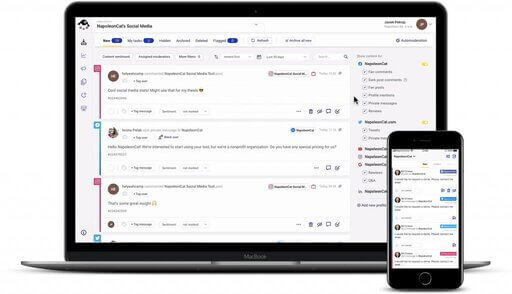
The best TikTok moderation tool
Use NapoleonCat to manage and automate all your comments, messages, and more – with an all-in-one social media tool that supports Facebook, Instagram, TikTok, LinkedIn, YouTube, Google My Business, and more.
What is a TikTok comment moderation tool?
A TikTok comment moderation tool is a piece of software – typically an inbox – that gathers all your comments from all TikTok accounts you manage in one place, letting you moderate them without having to open the app on your phone – or living on TikTok all day. (And usually, letting you moderate comments from other social networks like Instagram, Facebook, and more.)
Instead of manually scrolling through notifications, a TikTok comment moderation tool pulls all comments into one place, lets teams reply collaboratively, flags spam or abuse, and often automates repetitive actions (like hiding obvious spam).
Making all of the above much easier and less time-consuming, often acting like a customer service hub for your team. For brands using TikTok seriously, comment moderation tools quickly stop being a “nice to have” and become basic survival gear.
Why TikTok requires a different approach to comment management
TikTok is not just another social network with videos attached. If you’re a TikTok heavy user (like me), I know you know it.
The algorithm behaves differently, and so do the comments.
First, TikTok content can go viral days or weeks after posting. A video that felt quiet yesterday can suddenly attract thousands of comments overnight. (Yes, I also wish I knew how to do that. 🤷)
And second, the algorithm pushes content far beyond your follower base, which means:
- You’re exposed to a much wider (and less predictable) audience
- Comments come in large volumes and in short bursts
- Engagement is often emotional and unfiltered.
Add trends, duets, stitches, and meme culture into the mix, and you get comment sections that can turn chaotic very quickly. Yes, even on ads (they’re just TikToks, too.)
So, when you moderate TikTok comments, you need to be prepared to remove the bad stuff, but even more so, to keep conversations going, spot opportunities to engage, and respond fast enough to stay relevant.
All without burning out your team.
Challenges brands face when moderating TikTok comments
TikTok comment sections can be wild, and brands typically struggle with a few recurring problems.
- One viral video can generate more comments than a month’s worth of Instagram posts. Manual moderation is nearly impossible in this scenario – and you never know what will blow up.
- Spam and hate love TikTok – just as much as any other social media platform. And it’s not a good look for your brand to have comment sections full of unwanted or even offensive comments.
- If you post product videos, you’re bound to get repetitive questions – like those about shipping, price, or availability – over and over again. Sure, it’s basic custom service – but the scale can be huge.
- All of this obviously takes time for your team. With all that volume and urgency of social media, if you don’t have a shared workspace, replies get duplicated, missed, or delayed, and so on. You’ve probably been there.
Which is exactly why a TikTok comment moderation tool is your friend.
How NapoleonCat transforms TikTok comment moderation
NapoleonCat brings TikTok comments into the same ecosystem as the rest of your social channels, which already makes life easier. But it doesn’t stop at just the aggregation.
With NapoleonCat, you get:
- A unified Social Inbox for TikTok comments
- Team workflows for assigning, tagging, and resolving conversations
- Auto-moderation rules to handle spam and unwanted content (and the repetitive questions, too) automatically
- Social CRM context for every user interaction
- AI-powered support to automatically detect spam, hate speech, and sentiment
Instead of just reacting to chaos, you move into a proactive, structured way of handling TikTok engagement. And that’s without losing the platform’s fun, informal vibe that TikTok is known for.
Monitor and manage TikTok comments effortlessly with Social Inbox
The Social Inbox is the heart of TikTok comment moderation in NapoleonCat.
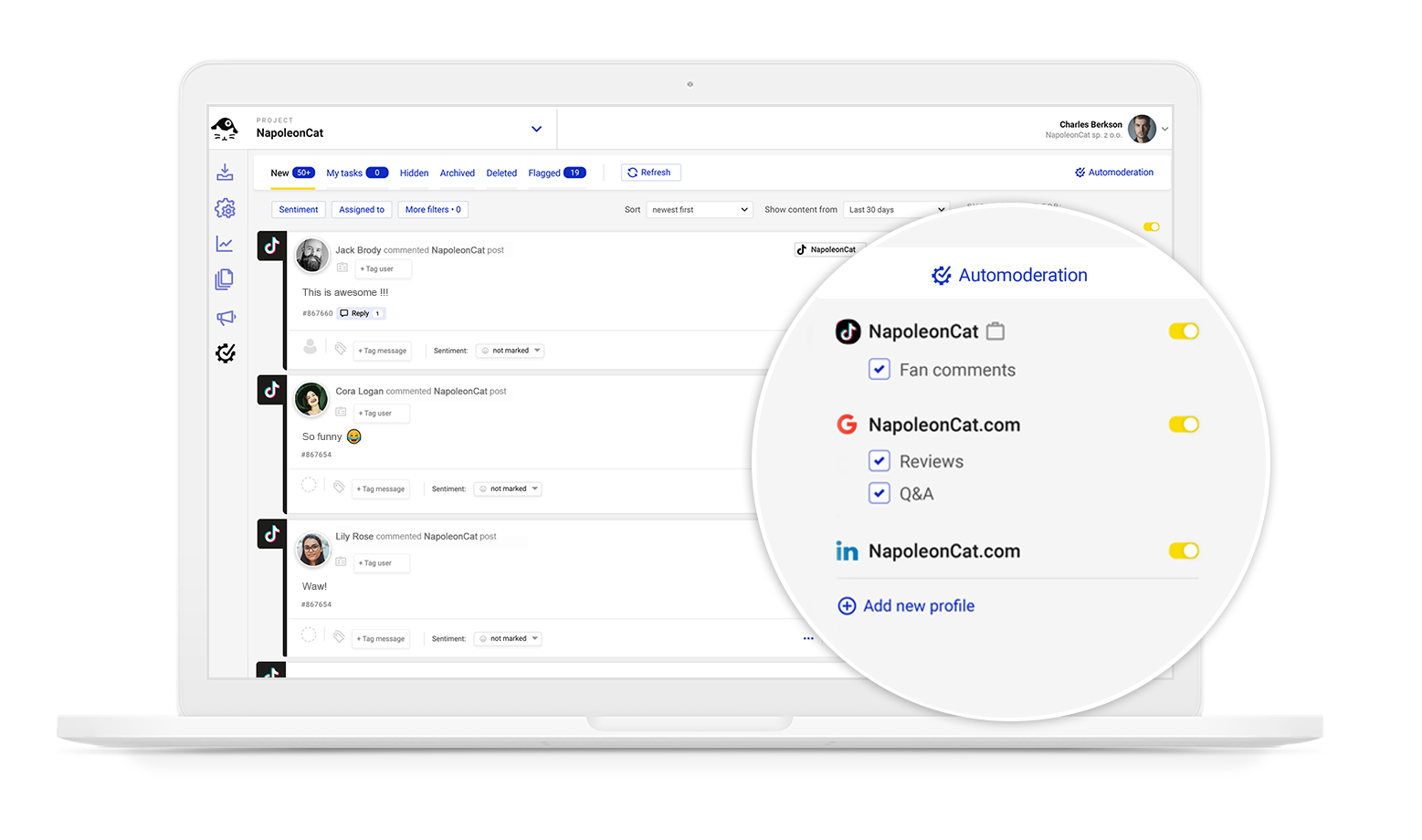
All TikTok comments land in one clean, organized dashboard, where you can:
- Reply to, hide, or like comments
- Assign comments to other team members
- Add internal notes or tags
- Filter by status, sentiment, and more
No more jumping between apps, no more missed comments buried under newer ones. It’s all there, clearly and chronologically laid out for you.
You see everything as it happens, your team knows who’s handling what, and nothing gets missed. And yes, you can manage TikTok comments alongside Instagram, Facebook, YouTube, and more. (Because constant context switching is really overrated.)
One inbox for all social media interactions
Manage all your comments, messages, and more – with an all-in-one social media tool that supports Facebook, Instagram, TikTok, LinkedIn, YouTube, Google My Business, and more.
How Social CRM helps you track user history and build better relationships
Even though your TikTok content reaches people outside of your following, not every TikTok commenter will be a stranger shouting into the void. You’ll see some loyal fans and repeat customers, too. And some… well, some will just really like asking the same question every week.
The Social CRM in NapoleonCat lets you see the full interaction history of a user:
- Previous comments
- Past replies from your team
- Notes or tags added internally
Which turns anonymous usernames into recognizable people.

This is more than just “handy” – I mean, responses feel more human when you remember who you’re talking to. You can acknowledge loyal followers, recognize returning customers, and avoid repeating the same explanations over and over.
You can even automate some actions based on user tags in your Social CRM. (I mean how cool is that?)
It’s subtle, but it’s one of those things that quietly upgrades your brand’s TikTok presence. Kind of a subtle game-changer, you know?
Leveraging the AI Assistant to detect spam, hate speech, and sentiment on TikTok
Speaking of game-changers. NapoleonCat’s AI Assistant is definitely one.
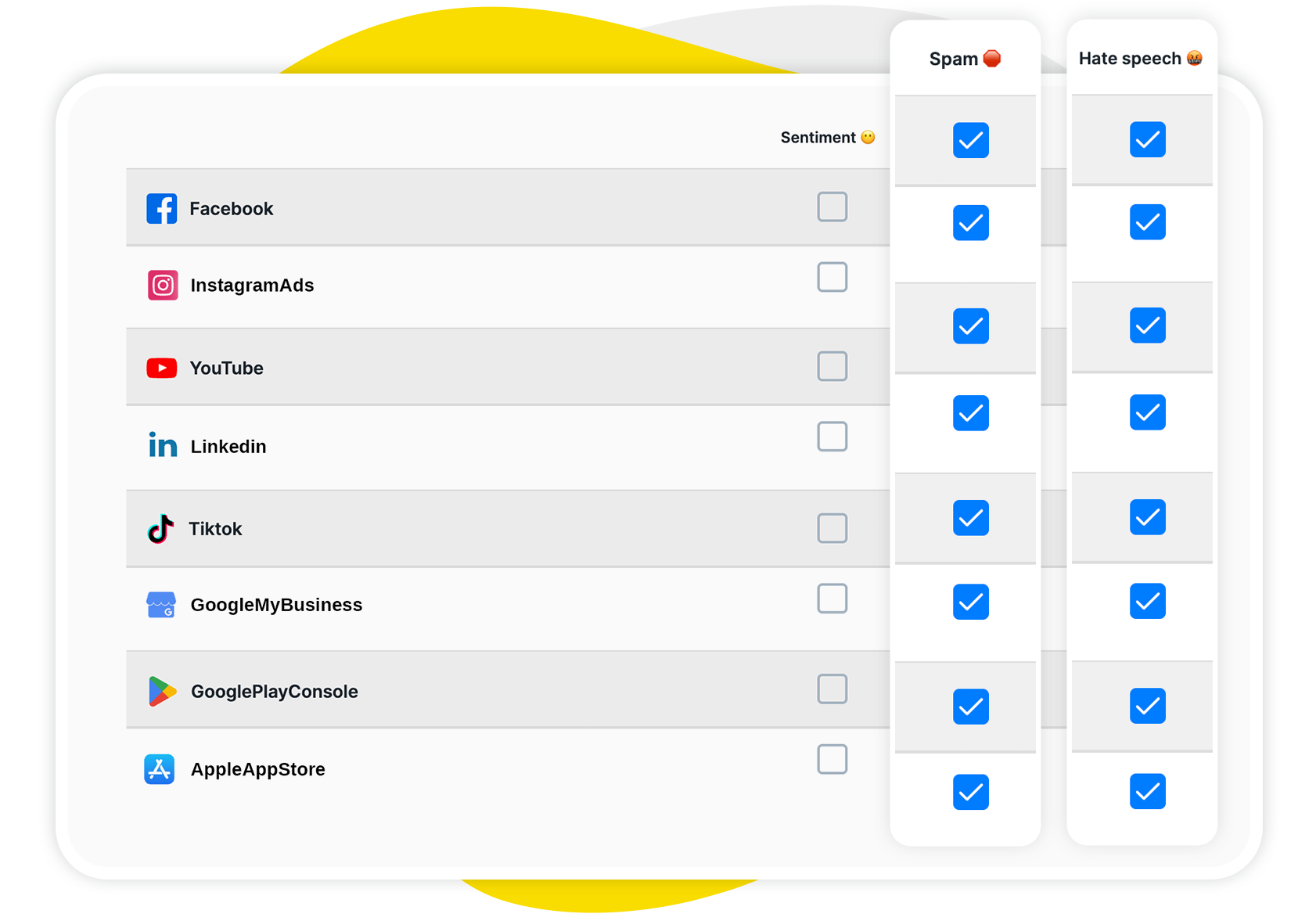
The AI Assistant analyzes incoming comments 24/7 to:
- Detect spam patterns
- Identify hate speech or offensive language
- Analyze sentiment (positive, neutral, negative)
Then it tags them in the Social Inbox, and your team gets an extra layer of intelligence on top of your moderation rules.
Instead of reacting after something problematic escalates, you get early signals. You can prioritize sensitive comments, respond faster to negativity, and keep the tone of your comment section aligned with your brand values.
And you can use the automated tag to – yes, also automatically – trigger Auto-moderation rules (it’s a lot of autos!) to instantly remove spam or hate, or route negative comments to individual moderators.
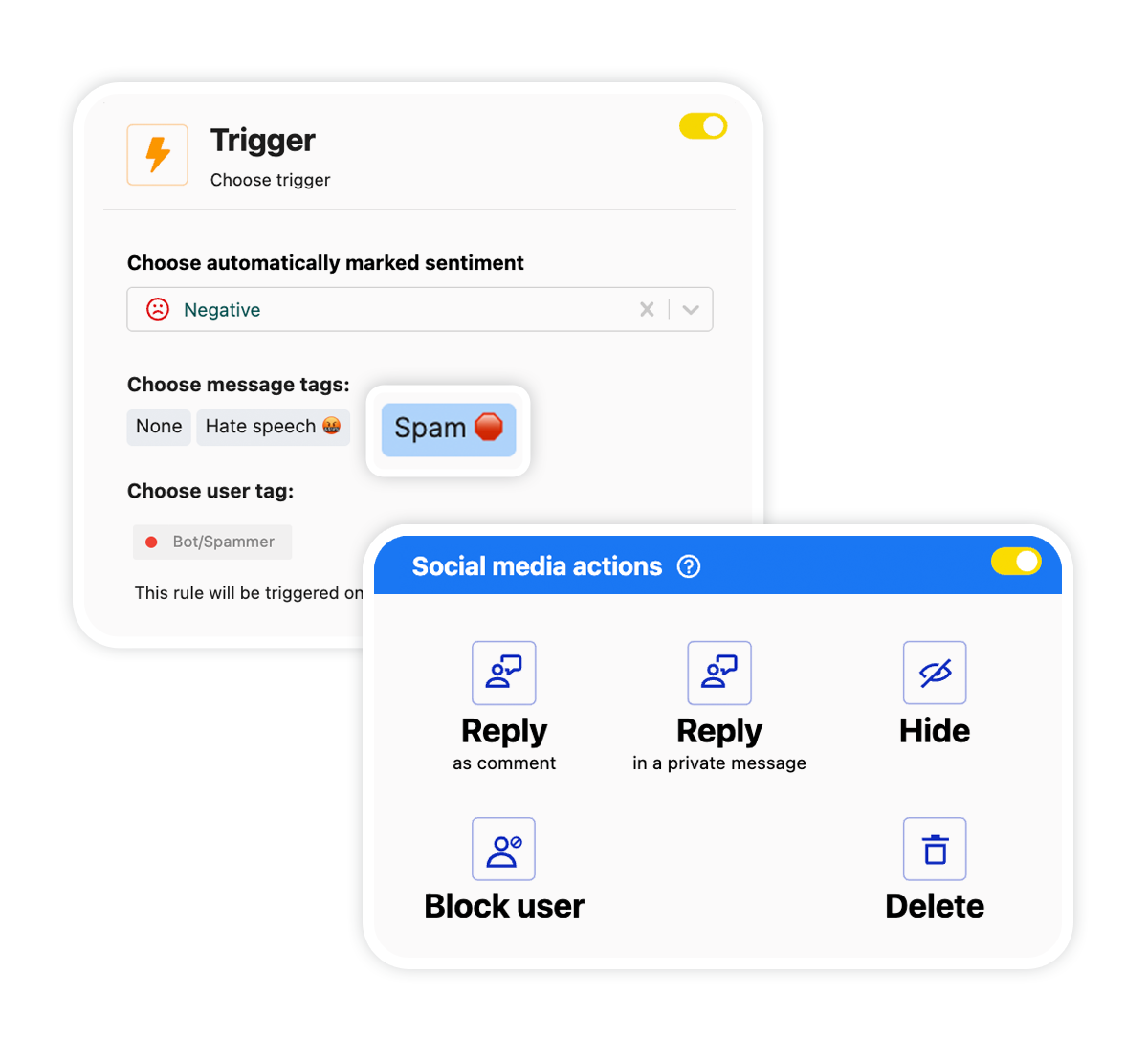

Automatically Block Spam with AI Precision
Automatically hide spam and hate comments on your posts and ads across all your TikTok profiles, powered by advanced AI.
How to set up TikTok comment moderation in NapoleonCat
Probably the best part about NapoleonCat’s TikTok comment moderation tool is that getting started doesn’t require a long onboarding saga.
A typical setup looks like this:
- Connect your TikTok account to NapoleonCat. If you have more than one account – for example, for multiple agency clients, you can create different workspaces with different teams assigned.
- Define moderation roles for your team in each workspace.
- If you want to use the AI Assistant, activate it in the Social Inbox.
- Set up Auto-moderation rules according to relevant scenarios (for example, automated spam removal).
From there, you can refine your workflows as you go. Start simple, then layer in more automation once you see where the real volume and pain points are.
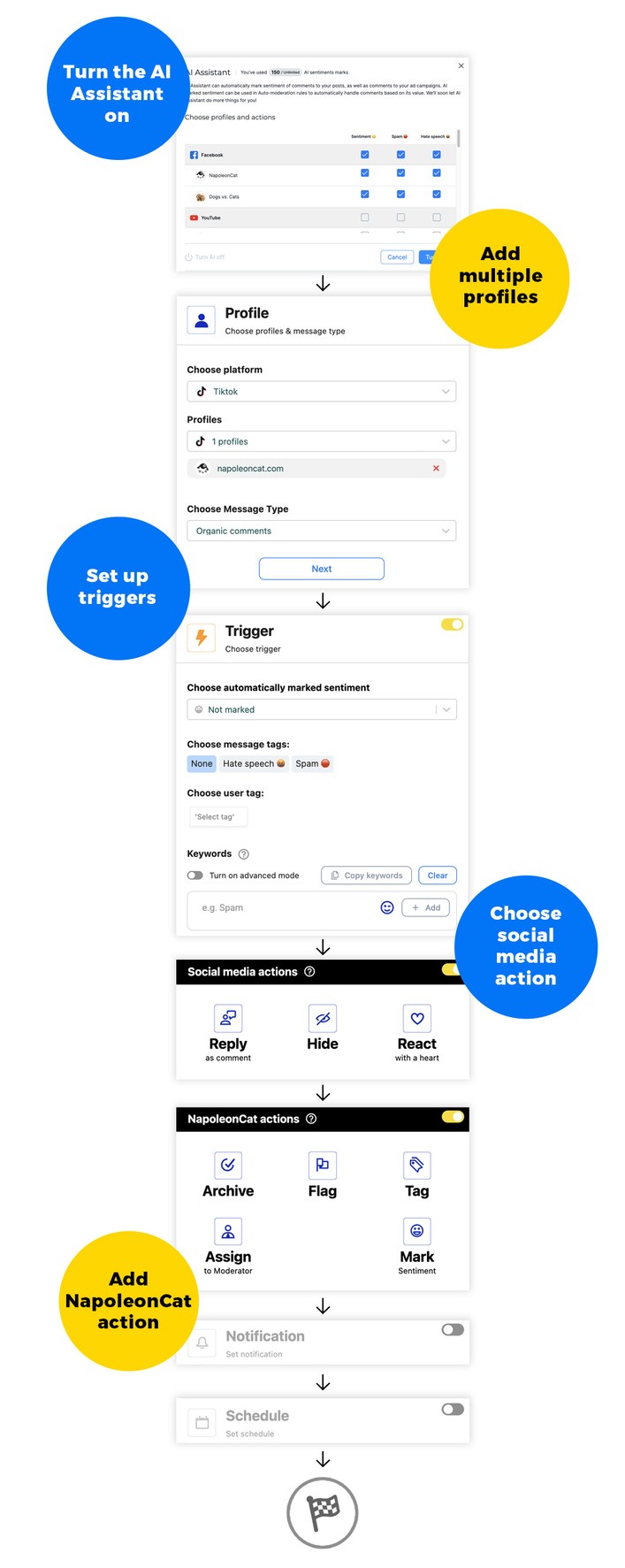
Setting up an Auto-moderation rule
To set up automated rules, go to the Auto-moderation tab and:
- Create a new rule, then select TikTok (or TikTok Ads, if you want to automatically moderate TikTok ad comments).
- Set up your triggers – AI tags, keywords, sentiment, or user tags (or a combination).
- Set up actions – on TikTok and in NapoleonCat, including:
- Replying to a comment (you can set up unlimited reply variants to sound more human)
- Hiding a comment
- Assigning a conversation to a moderator in NapoleonCat
- Tagging a comment or flagging it for review
- You can leave your rule running 24/7 or specify a schedule or timeframe to support your promotional campaigns or after-hours customer service.
And before you do all that, make sure you define relevant scenarios for your Auto-moderation rules to actually support your moderation team.
Best practices for staying on top of TikTok engagement
Having an efficient TikTok comment moderation tool is great – but you still need to have a strategy behind it. Here are a few best practices worth sticking to:
- Respond fast, especially on viral posts. The faster you react, the more engagement you can get. (And that’s where Auto-moderation can really shine.)
- Use pinned comments under your TikToks to answer FAQs proactively.
- Respond to comments with TikTok videos or add them to stories – it’s a great way to elevate conversations on TikTok and prolong the life of your videos.
- Let automation handle spam – that bit really doesn’t have to be done manually (you’ll have time for actual conversations.)
- Keep replies human, even when using automated templates. TikTok users can smell robotic behavior from a mile away, so keep that in mind.
- Review AI and Auto-moderation rules regularly to make necessary changes and tweaks.
Final thoughts
TikTok comments are not a nuisance (well, at least not all of them) – they’re an opportunity to build relationships with your audience. So grab it instead of ignoring it.
And to make comments less overwhelming (which I know they can be), use a TikTok comment moderation tool like NapoleonCat and all the features it has to offer.
You’ll be able to have healthier conversations, respond faster, and build a brand presence that actually feels present on TikTok.
Not sure if that’s gonna work? Try it completely for free for 14 days – you’ll see. 🙂
The best TikTok moderation tool
Use NapoleonCat to manage and automate all your comments, messages, and more – with an all-in-one social media tool that supports Facebook, Instagram, TikTok, LinkedIn, YouTube, Google My Business, and more.
TikTok Comment Moderation Tool – FAQs
Below are some extra answers to the most common questions regarding TikTok moderation.
How to moderate TikTok comments?
You can moderate TikTok comments manually using TikTok’s built-in tools directly in the app or use a dedicated moderation platform like NapoleonCat to manage comments at scale, automate spam handling, and collaborate with your team.
How much do TikTok moderators get paid?
TikTok moderator pay varies widely depending on location, experience, and whether moderation is done in-house or outsourced – so I can’t give you a number. Salaries will range from entry-level hourly rates to full-time social media roles.
Why is TikTok restricting my comments?
TikTok may restrict comments due to community guideline violations, spam-like behavior, or account safety settings. High volumes of reported comments can also trigger restrictions.
What’s the 3-second rule on TikTok?
The 3-second rule refers to the importance of capturing attention in the first few seconds of a TikTok video to prevent users from scrolling away. There’s a number of trending hooks creators tend to use – but really, it’s up to you to come up with something that will prevent people from scrolling on to the next video on their For You Page.
What can a TikTok comment moderation tool do?
It can gather all comments in one inbox and make it easier to moderate them, with team collaboration features, automated spam removal, conversation history tracking, sentiment analysis, and more. This will obviously depend on the actual TikTok comment moderation tool you use.
Does TikTok have built-in comment moderation features?
Yes, TikTok offers basic tools like keyword filters, comment blocking, and manual moderation, but they are limited for teams and high-volume accounts.
How does NapoleonCat improve TikTok comment management?
NapoleonCat brings TikTok comments into a shared Social Inbox, adds Auto-moderation, Social CRM, and AI-powered analysis on top. As a result, it cuts the time moderation takes teams, makes it more relevant, and leaves you more time for more strategic tasks, relationship-building, and problem-solving.
Can Auto-moderation hide unwanted TikTok comments automatically?
Yes. Auto-moderation rules can automatically hide or respond to comments on TikTok based on keywords, AI spam or hate speech tags, and other conditions.
What types of comments can the AI Assistant detect on TikTok?
The AI Assistant automatically detects spam and hate speech. It also analyzes comment sentiment to support moderation decisions.
Does Social CRM work with TikTok interactions?
Yes. Social CRM tracks TikTok user interactions, too, allowing teams to see comment history and add internal notes.
Can I manage multiple TikTok accounts in one place?
Yes. NapoleonCat’s TikTok management tools for business allow you to manage multiple TikTok accounts alongside other social media profiles from one dashboard.
How quickly does NapoleonCat process TikTok comments?
Comments appear in near real time in the Social Inbox, so you can respond to conversations on TikTok as they happen.
Will Auto-moderation affect my TikTok engagement or reach?
When used correctly (as in: not to spam TikTok users), Auto-moderation won’t hurt your TikTok performance.
You may also like:
- How to Set Up a Smart TikTok Comments Auto-Reply
- Best TikTok Auto Commenter – Expert Guide
- Best TikTok Ad Comments Automation Tool
- Best TikTok Automation Tools
- How to Automatically Block Spam Comments on TikTok Posts and Ads
- How to Stop Spam Comments on TikTok Ads – Expert Guide
- Support Your Team With a Social Media Moderation Tool They Deserve
- The Best AI Comment Moderation Tool
- The Best Facebook Comment Moderation Tool
- Best Content Moderation Tools to Protect Your Brand Online
- The Best Facebook Moderation Tool for eCommerce
- The Best YouTube Comment Moderation Tool
- The Best Instagram Comment Moderation Tool