

Table of Contents
- What are social media moderation reports?
- Why social media moderation reporting matters for brands
- Overview of NapoleonCat’s Inbox activity reports
- Social networks covered by moderation reports
- Profiles report: Measuring performance across individual accounts
- Moderators report: Tracking team efficiency and response quality
- Export Inbox posts: Analyzing conversations at scale
- Inbox tag statistics: Understanding themes and sentiment
- How to interpret key moderation metrics (and why they matter)
- How these reports improve your customer engagement strategy
- Using moderation reports to optimize team workflows
- Using moderation reports to detect issues early (spam, crises, trends)
- How AI Assistant enhances reporting data with sentiment & classification
- How to generate social media moderation reports in NapoleonCat
- Best practices for using moderation reports to drive performance
- Conclusion
- Social Media Moderation Reports - FAQs
You already know what I’m going to say: You can’t improve what you don’t measure. Thing is, it’s true – and also for social media moderation.
Let me show you some tools that can make it really effective and efficient, benefiting both your brand and your social media moderation team. Let’s talk about social media moderation performance reports, how they work, and what’s in it for you.
- What are social media moderation reports?
- Why social media moderation reporting matters for brands
- Overview of NapoleonCat’s Inbox activity reports
- Social networks covered by moderation reports
- Profiles report: Measuring performance across individual accounts
- Moderators report: Tracking team efficiency and response quality
- Export Inbox posts: Analyzing conversations at scale
- Inbox tag statistics: Understanding themes and sentiment
- How to interpret key moderation metrics (and why they matter)
- How these reports improve your customer engagement strategy
- Using moderation reports to optimize team workflows
- Using moderation reports to detect issues early (spam, crises, trends)
- How AI Assistant enhances reporting data with sentiment & classification
- How to generate social media moderation reports in NapoleonCat
- Best practices for using moderation reports to drive performance
- Conclusion
- Social Media Moderation Reports – FAQs
Automate social media moderation reports
See response times, workloads, sentiment, and conversation volume across all your social channels — without exporting data or building spreadsheets.
What are social media moderation reports?
Social media moderation reports are analytics reports focused specifically on how your brand handles incoming conversations on social media – comments, messages, reviews, and ad interactions.
Unlike standard social media performance analytics, which focus on reach, engagement, or follower growth, moderation reports zoom in on what happens after users speak up, and how your team’s handling it.
They answer questions like:
- How many comments and messages are we receiving? (And what kind?)
- How quickly do we respond?
- Who on the team is handling conversations?
- What types of issues show up most often?
- Are we keeping response quality consistent across platforms and profiles?
That kind of thing.
In NapoleonCat, moderation reports are built around Inbox activity. (They’re actually called Inbox Activity Reports – more on that in just a bit). They help brands understand not just volume, but efficiency, workload distribution, quality of responses, and emerging patterns in customer conversations.
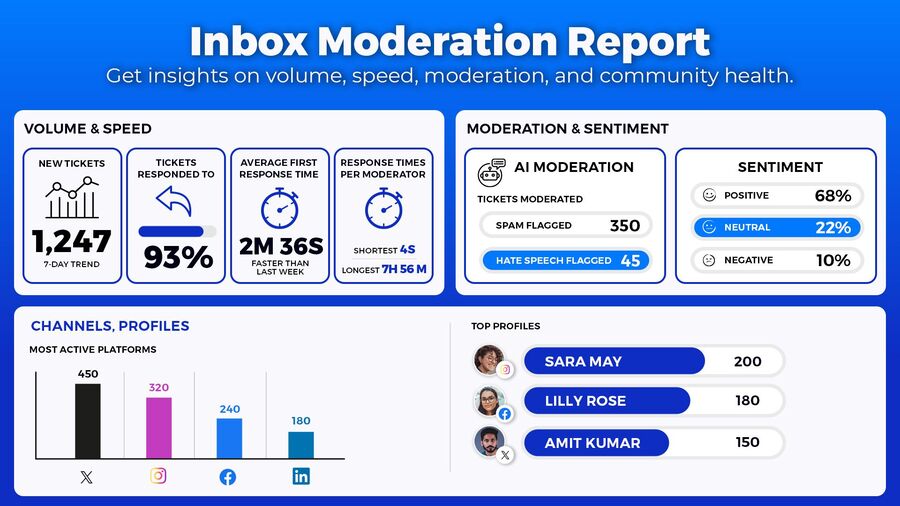
For brands managing multiple profiles, multiple platforms, or high volumes of interactions (including ads), moderation reports are essential for keeping customer experience under control.
Speaking of which.
Why social media moderation reporting matters for brands
Content moderation reporting matters because it allows brands to:
- Prove response-time performance to stakeholders
- Identify overloads and staffing gaps
- Spot recurring issues before they escalate
- Maintain consistent customer experience across profiles and markets
- Measure how moderation impacts brand perception
Every unanswered comment or delayed reply is usually one of two things: a missed opportunity or a potential reputation risk. Customers expect fast, helpful responses on social media, often faster than on email or phone support. (Which I think brands often don’t realize.)
For teams handling hundreds or thousands of comments and messages weekly, moderation reports are key to preventing those reputational risks and seizing more opportunities in customer conversations.
Overview of NapoleonCat’s Inbox activity reports
NapoleonCat’s social media moderation performance reports are built around Inbox activity and designed for real-world social media management.
They give you insight into:
- Volume of incoming comments and messages
- Response times and reply rates
- Moderator workload and performance
- Tag usage, sentiment, and conversation themes
- Platform- and profile-level performance
The reports are available directly in NapoleonCat, and you can also export them for deeper analysis, sharing with clients, or internal reporting.
Rather than focusing on vanity metrics, Inbox activity reports focus on operational efficiency and customer experience, i.e., the areas that matter most when you’re managing conversations at scale.
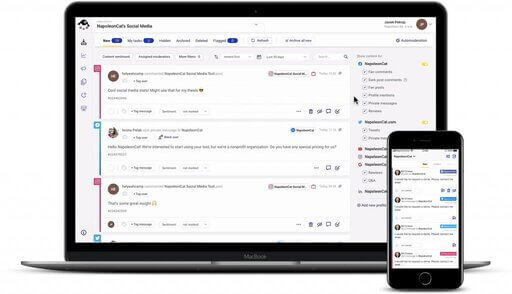
One inbox for all social media interactions
Manage all your comments, messages, and more – with an all-in-one social media tool that supports Facebook, Instagram, TikTok, LinkedIn, YouTube, Google My Business, and more.
Social networks covered by moderation reports
NapoleonCat’s moderation reports cover the same networks supported by the Social Inbox, including:
- Facebook pages (organic posts and ads)
- Instagram profiles (comments, DMs, ads)
- TikTok profiles (organic posts and ads)
- LinkedIn company pages & personal profiles
- YouTube channels
- Google Business Profiles (reviews)
The cross-platform coverage makes it easy to analyze moderation performance consistently, even when each platform behaves differently.
The Inbox Activity reports include:
- Profiles report
- Moderators report
- Export Inbox posts
- Inbox tag statistics
(I explain those in more detail below.)
So, you can compare response times between Facebook and Instagram, track review handling on Google Business Profiles, or monitor comment spikes on TikTok without switching tools.
Profiles report: Measuring performance across individual accounts
The Profiles report helps you understand how each social media account performs from a moderation perspective.
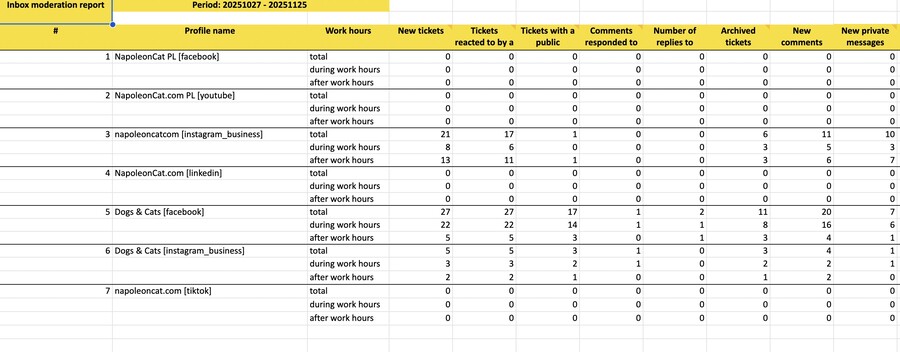
It shows metrics such as:
- Number of incoming comments and messages
- Response times (including longest and shortest)
- Moderation volume per profile and more
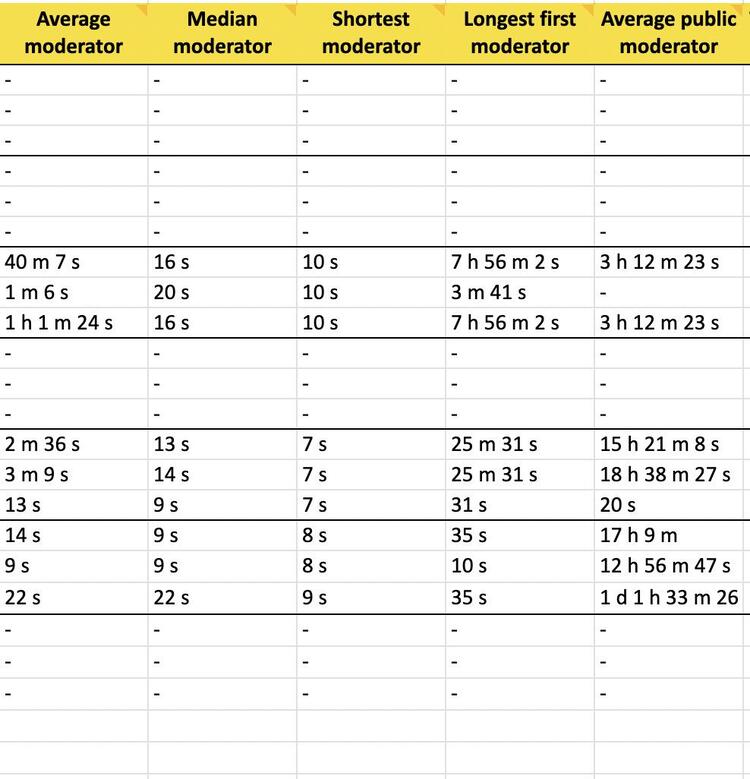
This is especially useful for brands with multiple social media platforms and locations, agencies managing many client accounts, or international teams handling multiple markets.
Putting all moderation stats into one spreadsheet and making it easy to spot accounts receiving unusually high volumes of comments, profiles with slower response times, or differences in performance between regions or brands.
Automate social media moderation reports
See response times, workloads, sentiment, and conversation volume across all your social channels — without exporting data or building spreadsheets.
Moderators report: Tracking team efficiency and response quality
The Moderators report focuses on the people behind the Inbox. It shows how individual team members contribute to moderation, including:
- Number of assigned and handled conversations
- Average daily reactions
- Response times per moderator
- Share of total moderation workload
It’s invaluable information for team leads and managers to evaluate team performance, balance workloads, spot bottlenecks or training needs, and even support employee performance reviews with hard data.
Let me make one thing clear though – the goal here isn’t micromanagement. It’s visibility and transparency, making sure no one is overwhelmed and no messages fall through the cracks.
Export Inbox posts: Analyzing conversations at scale
For times when you need more than dashboard-level insights, you have the Export Inbox Posts feature. You can export all Inbox conversations, including comments and replies, tags, and timestamps, for deeper analysis.
This is particularly useful when:
- Auditing moderation quality
- Analyzing customer language and recurring issues
- Sharing raw conversation data with other departments or BI tools
Exports turn social conversations into a data source that goes way beyond social media moderation and can inform product, marketing, and customer support decisions. And when you combine the data with what’s inside the Social CRM profiles, you get a complete and really detailed picture of what’s going on inside your comment sections.
Inbox tag statistics: Understanding themes and sentiment
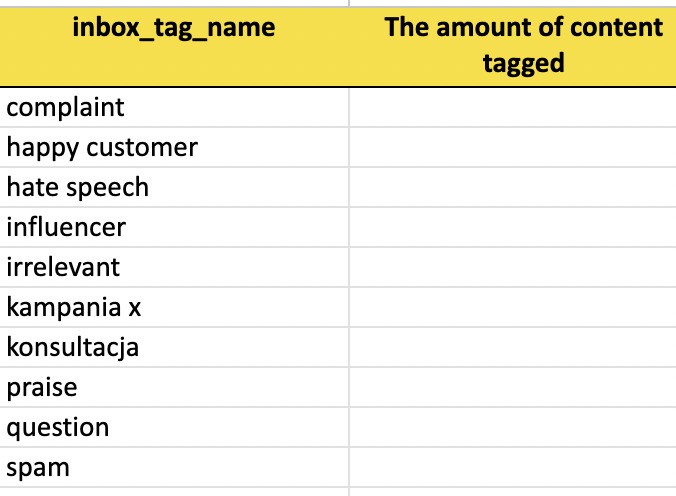
Tags are one of the many moderation tools in NapoleonCat, letting you categorize conversations according to their contents – for example as part of a campaign, a complaint, a sales opportunity, or spam. The Inbox tag statistics report turns them into what marketers like to call “actionable insights”.
The Inbox tag statistics report shows:
- Which tags are used most often
- How tag use changes over time
- What types of conversations dominate your Inbox
It also shows sentiment moderators tagged versus sentiment tagged automatically by AI if you have the AI Assistant turned on in the Inbox.
With consistent tagging, you can quickly answer questions like:
- How many conversations are complaints vs. questions?
- Are delivery issues increasing this month?
- How much spam are we filtering out?
- What’s the prevailing sentiment in the comments?
In other words, tag statistics will help you transform qualitative conversations into quantitative insights.

Automatically Block Spam with AI Precision
Automatically hide or delete spam and hate comments on your posts and ads across all your social media profiles, powered by advanced AI.
How to interpret key moderation metrics (and why they matter)
Social media moderation reports include several key metrics that directly affect customer experience – and they go beyond response times (which are obviously also important). Some of the metrics I’d consider the most important are:
- New tickets (aka conversation volume): How many conversations appear across your social media pages. This lets you plan work across teams (and also make the right hiring decisions if necessary).
- Comments responded to: How many of those got a response, aka your response rate. This could mean a few things, including moderator engagement but also the quality of comments – so it usually needs to be evaluated with more details in mind.
- Average moderator (aka average response time): How quickly your team replies after a message or comment arrives. This is the key indicator for good customer service on social media, but again, you need to take more information into account here – for example, is someone overwhelmed on the team? Or do you maybe need to back your team up with Auto-moderation?
- Moderator activity: Who handles what, and how efficiently – including who took the longest and shortest to respond on average. This really helps understand team workload and composition, and what to change or improve to help moderators get more efficient.
- Sentiment and tags: Lets you understand what kind of engagement you’re really getting on social media and how your followers and customers see your brand. And this can lead to really important decisions about the brand and product (for example, if most of your comments are complaints).
Fast response times build trust. High response rates signal reliability. Balanced workloads prevent burnout. But beyond those, NapoleonCat’s social media moderation reports go much more granular, showing you comment types, actions taken, and giving you a really concrete view of both the customer engagement and moderation activity.
Together, all these metrics tell a clear story: what your customers say and how well your brand is actually listening.
How these reports improve your customer engagement strategy
This is the “what your customers say” part of the story. And when you measure moderation, you can definitely improve it.
Social media moderation reports help you:
- Identify peak interaction periods
- Adjust staffing to match demand (and/or support your team with automation and AI)
- Create response templates for common issues
- Improve consistency across moderators
Over time, this will lead to faster replies, more helpful answers, fewer escalations, and – ultimately – higher customer satisfaction.
Using moderation reports to optimize team workflows
And on the other end of this is – you guessed it – the “how well your brand is actually listening” part. And social media moderation performance reports will reveal where team workflows actually work, and where they break down.
They’ll help you spot:
- Overloaded moderators
- Profiles that need dedicated ownership
- Time periods with delayed responses
Letting you redesign shifts, introduce automation rules, adjust ticket assignment logic, and even set realistic response-time SLAs with your agency clients.
The Inbox Activity reports are a treasure trove of insights into how efficient your moderation team is and what you can do to improve their daily work.
(Repeat after me: “improve”, not “micromanage”. Got it? Good.)
Using moderation reports to detect issues early (spam, crises, trends)
Sudden spikes in Inbox activity often signal something important. Social media moderation reports make it easier to detect:
- Spam waves
- Product issues
- PR crises
- Viral content attracting unusual attention
When you track volume, tags, and response patterns, your team can act early – before problems escalate publicly.
How AI Assistant enhances reporting data with sentiment & classification
NapoleonCat’s AI Assistant adds another layer of insight to social media moderation reporting.
AI-powered features in NapoleonCat help automatically classify messages, detect sentiment, and support consistent tagging (which you can also use to trigger automated actions like spam, inappropriate content and hate speech removal). The AI Assistant tags sentiment, spam, and hate speech (depending on what you enable in the Social Inbox.)
This will enrich your reporting data and help reduce manual effort in the moderation team, potentially improving their performance, too. Instead of reading every message to understand trends, your team can rely on AI-supported classification to surface important patterns.
Automatically Block Spam with AI Precision
Automatically hide or delete spam and hate comments on your posts and ads across all your social media profiles, powered by advanced AI.
How to generate social media moderation reports in NapoleonCat
To generate a social media moderation performance report in NapoleonCat:
- Go to Reports and look for Inbox activity reports in the left-hand menu
- Create new report
- Select a time range, language, working hours, and social media profiles you want to include in the report
- Then select the report type to include (Profiles, Moderators, Tags, or Inbox Activity – each will be a separate tab in your report spreadsheet)
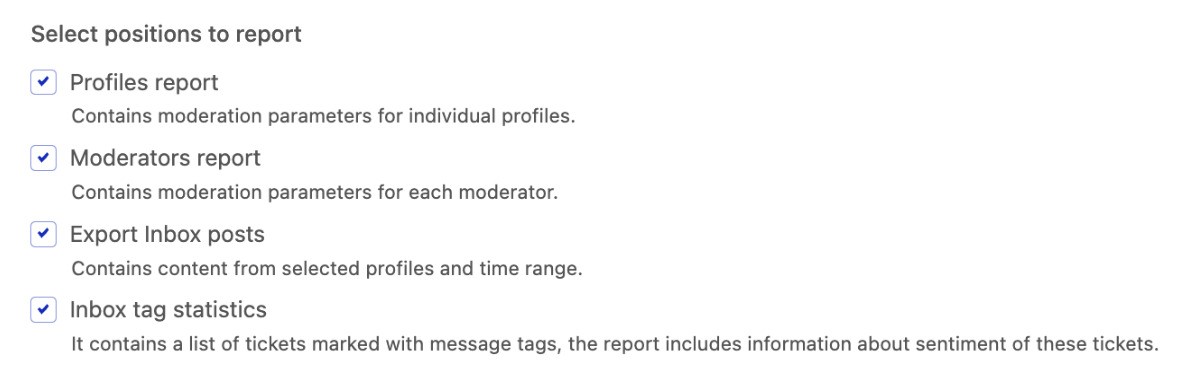
Review your data in the dashboard or export it – you can then share your reports with the so-called stakeholders (like your boss) or your clients.
Best practices for using moderation reports to drive performance
Social media moderation performance reports are great when they’re not just cool-looking numbers in Excel spreadsheets – but actual insights and lessons guiding your business decisions. So, to get the most value from your social media moderation reports:
- Review and compare them regularly, not just when there are issues to resolve (or worse, fires to put out). Moderation reports work best when they’re part of an ongoing optimization process.
- Combine quantitative data with qualitative review for a fuller understanding of what’s going on.
- Use tags consistently across your moderation team for more reliable analyses.
- Set clear benchmarks for response times and rates (and adjust them so they’re realistic).
- Share insights beyond the social media team. This is not a case of “what happens on social media stays on social media”. We’re talking about building your brand reputation here and improving customer satisfaction – something every team should be involved in.
Conclusion
Replying quickly to your followers and customers on social media is important – but it’s also just the tip of the iceberg. You need tools to manage social media conversations strategically. And social media moderation reports are exactly such tools, letting you do that down to really small (but important) details.
What’s more, the social media moderation reports are just some of the features you have access to with NapoleonCat. Working together with the Social Inbox, Auto-moderation, engagement analytics and the Social CRM, they can truly transform the way you and your team work on managing your brand’s social media profiles. Including the results you get out of it.
(As usual, you can try NapoleonCat completely for free for 14 days to see.)
Automate social media moderation reports
See response times, workloads, sentiment, and conversation volume across all your social channels — without exporting data or building spreadsheets.
Social Media Moderation Reports – FAQs
Below are the answers to some of the most popular questions regarding this niche topic of social media moderation reports 😉
What are social media moderation reports?
They are analytics reports focused on how brands handle comments, messages, reviews, and other incoming interactions on social media.
Which social networks are included in NapoleonCat’s moderation reports?
Reports cover Facebook, Instagram, TikTok, LinkedIn, YouTube, and Google Business Profiles.
What types of data can I track with these reports?
You can track conversation volume, response time, response rate, moderator activity, tag usage, and more.
How often should I generate moderation reports?
Most teams review them weekly or monthly, depending on interaction volume. What’s really important is to do it regularly, so you can actually work on the process and team workflows.
Can I measure individual moderator performance?
Yes. The Moderators report shows workload and response metrics for each team member.
Do the reports include sentiment analysis?
Yes, sentiment insights are supported through NapoleonCat’s social media moderation reports, including manually and AI-assigned sentiment tags.
Can I export all comments and messages from my Inbox?
Yes, you can export them for qualitative analysis, too.
Are the reports available for both organic content and ads?
Yes, you can track moderation performance for organic and paid content on Facebook, Instagram, and TikTok.
Can I customize which metrics or tabs appear in the report?
Yes, you can select the different report sections to appear in your report spreadsheet.
You may also like:
- Need a LinkedIn Comment Moderation Tool? Here’s One You Shouldn’t Miss
- How to Automatically Delete Spam on LinkedIn
- How to Automate Social Media Moderation
- Support Your Team With a Social Media Moderation Tool They Deserve
- The Best AI Comment Moderation Tool
- The Best Facebook Comment Moderation Tool
- Best Content Moderation Tools to Protect Your Brand Online
- The Best Facebook Moderation Tool for eCommerce
- The Best YouTube Comment Moderation Tool
- The Best Instagram Comment Moderation Tool
- The TikTok Comment Moderation Tool You Didn’t Know You Needed (Or Maybe You Did)
- Creating Facebook and Instagram Analytics Reports: A Guide
- How to Create a LinkedIn Analytics Report in 1 Minute