

Table of Contents
- What is an AI comment moderation tool?
- How AI comment moderation works
- Benefits of using an AI comment moderation tool
- Key features to look for in AI comment moderation software
- Challenges and limitations of AI moderation (and how to solve them)
- Introducing NapoleonCat’s AI-powered moderation suite
- How NapoleonCat’s Social Inbox streamlines comment management
- Automate repetitive tasks with NapoleonCat’s Auto-moderation
- Enhance your workflow with NapoleonCat’s AI Assistant
- How to set up AI comment moderation in NapoleonCat
- Best practices for effective AI-supported moderation
- Final thoughts: The future of AI comment moderation
- AI Comment moderation tool - FAQs
Just as you deal with one spammy message, three more show up in your social media inbox. Plus a questionable comment thread that’s about to turn into a soap opera. You know it, I know it – it’s the reality of social media comment moderation.
But I come with good news – AI comment moderation tools now exist to keep our sanity intact. So, let’s talk about them.
- What is an AI comment moderation tool?
- How AI comment moderation works
- Benefits of using an AI comment moderation tool
- Key features to look for in AI comment moderation software
- Challenges and limitations of AI moderation (and how to solve them)
- Introducing NapoleonCat’s AI-powered moderation suite
- How NapoleonCat’s Social Inbox streamlines comment management
- Automate repetitive tasks with NapoleonCat’s Auto-moderation
- Enhance your workflow with NapoleonCat’s AI Assistant
- How to set up AI comment moderation in NapoleonCat
- Best practices for effective AI-supported moderation
- Final thoughts: The future of AI comment moderation
- AI Comment moderation tool – FAQs

AI-powered comment & DM moderation
Set up smart auto-replies for your organic posts and ads. Automatically hide or delete spam and hate speech – with an all-in-one social media tool.
What is an AI comment moderation tool?
An AI comment moderation tool automatically analyzes and manages comments, messages, and interactions on your social media platforms using artificial intelligence.
That’s for the definition.
Instead of a human having to read every comment (and slowly questioning humanity in the process), AI scans incoming interactions, categorizes them, and even triggers predefined actions — like hiding spam, flagging harmful content, replying automatically, or routing comments to the right person.
It has way more capacity than any human team and learns along the way, helping detect new patterns in the comments.
With AI comment moderation, you don’t need to manually sift through every comment. The tool does the heavy lifting, and with a surprising level of nuance.
How AI comment moderation works
Under the hood, AI moderation tools use a mix of machine learning, natural language processing (NLP), and sentiment analysis to determine what a comment means and how to classify it. Here’s a simplified version:
- Scanning. The AI ingests incoming comments and messages in real time.
- Understanding context. Using NLP, the tool analyzes the text, tone, keywords, and intent. This helps differentiate between harmless comments and harmful ones, e.g., “This product is sick!” (positive) vs “Your customer service makes me sick.” (negative).
- Categorizing content. The AI assigns the comment to categories: spam, positive feedback, complaints, inappropriate content, questions, and so on.
- Triggering actions. Once classified, depending on the software, the AI can trigger automations, for example:
- hide or delete the comment,
- automatically reply,
- tag it for follow-up,
- escalate it to a human moderator.
- Learning and improving. The more you use it, the better it gets. AI learns from patterns, rules, and corrections, so your social media moderation gets smarter over time.

Automatically Block Spam with AI Precision
Automatically hide or delete spam and hate comments on your posts and ads across all your social media profiles, powered by advanced AI.
Benefits of using an AI comment moderation tool
AI comment moderation will save you a ton of time – but it’s more than just that. Here’s what you get:
- Faster response times. AI reacts instantly, meaning no customer is left hanging, even on weekends, holidays, or 2 AM on a Tuesday.
- Better protection for brand reputation. AI catches harmful content (spam, trolling, profanity, impersonation attempts, scams) before it ever sees the light of day.
- Consistent moderation. Humans get tired, distracted, or overcaffeinated. AI keeps things consistent regardless of mood or workload.
- Reduced workload for your team. Your moderators don’t have to drown in repetitive questions or spammy comments. AI handles the routine for them, so they can focus on important customer conversations – and, in the end, provide better customer service.
- Improved customer satisfaction. Faster replies mean happier customers. And happier customers mean anything from higher engagement to higher sales. (And I know you know it.)
- Scalable moderation. Whether you receive 100 comments a week or 10,000, AI can handle it, without you hiring an army of moderators. And, honestly, no matter how many moderators you hire, AI will always have more capacity.
(Disclaimer: I’ve probably said it before, but let me say it again – AI comment moderation is not there to replace your human moderators (except maybe in some cases). It’s designed to help them deal with the stuff they don’t have to do – so they can do more of the things that require human interaction, empathy, and creativity.
Key features to look for in AI comment moderation software
Some “AI moderation” tools are basically glorified keyword filters. So, here’s what to look for:
- Natural language understanding. A good tool should detect intent, not just words.
- Sentiment analysis – helps prioritize negative comments and replies.
- Multi-platform support – because your audience definitely isn’t sitting on just one platform.
- Automation rules and custom workflows that you can tailor moderation to your brand’s needs.
- Auto-replies – for FAQs, repetitive questions, or when you need to acknowledge comments ASAP.
- Human override and approval, to prevent AI from going rogue.
- Analytics and reporting, so you know what’s working (and what isn’t).
- Integration with your moderation inbox, so all tools work together, instead of living in separate worlds.
PS. Lucky for you, NapoleonCat’s Auto-moderation ticks all of these boxes. (And then some.) I’ll tell you all about it in just a sec.
Challenges and limitations of AI moderation (and how to solve them)
AI is powerful, but it’s not perfect – of course it has limitations. Let me show you a few:
- Sarcasm and humor. AI might struggle with some more sophisticated examples, though it’s getting better and better by the minute, you might actually be surprised. So, it’s more something to keep an eye on rather than something it can’t do.
Solution: You can flag comments in NapoleonCat based on some keywords and review them before anything is removed.
- Cultural and language nuances. Same thing, AI’s becoming fluent at slang, dialects, or emojis – but they might sometimes throw it off.
Solution: You can customize Auto-moderation rules based on keywords to make sure the right action takes place, while AI keeps learning.
- Risk of over-blocking. Some tools can hide harmless comments if the wording seems suspicious.
Solution: Flexible rule settings + human verification = no accidental censorship.
- Complex customer service cases. AI can reply to FAQs, but it won’t solve a billing issue or a refund request. That’s still something a human customer service representative needs to attend to.
Solution: Auto-moderation can route complex cases directly to a human rep – for example, based on specific keywords.
- Lack of context in long conversations. AI can misinterpret some comments without thread-level context. And in customer conversations, context is really important.
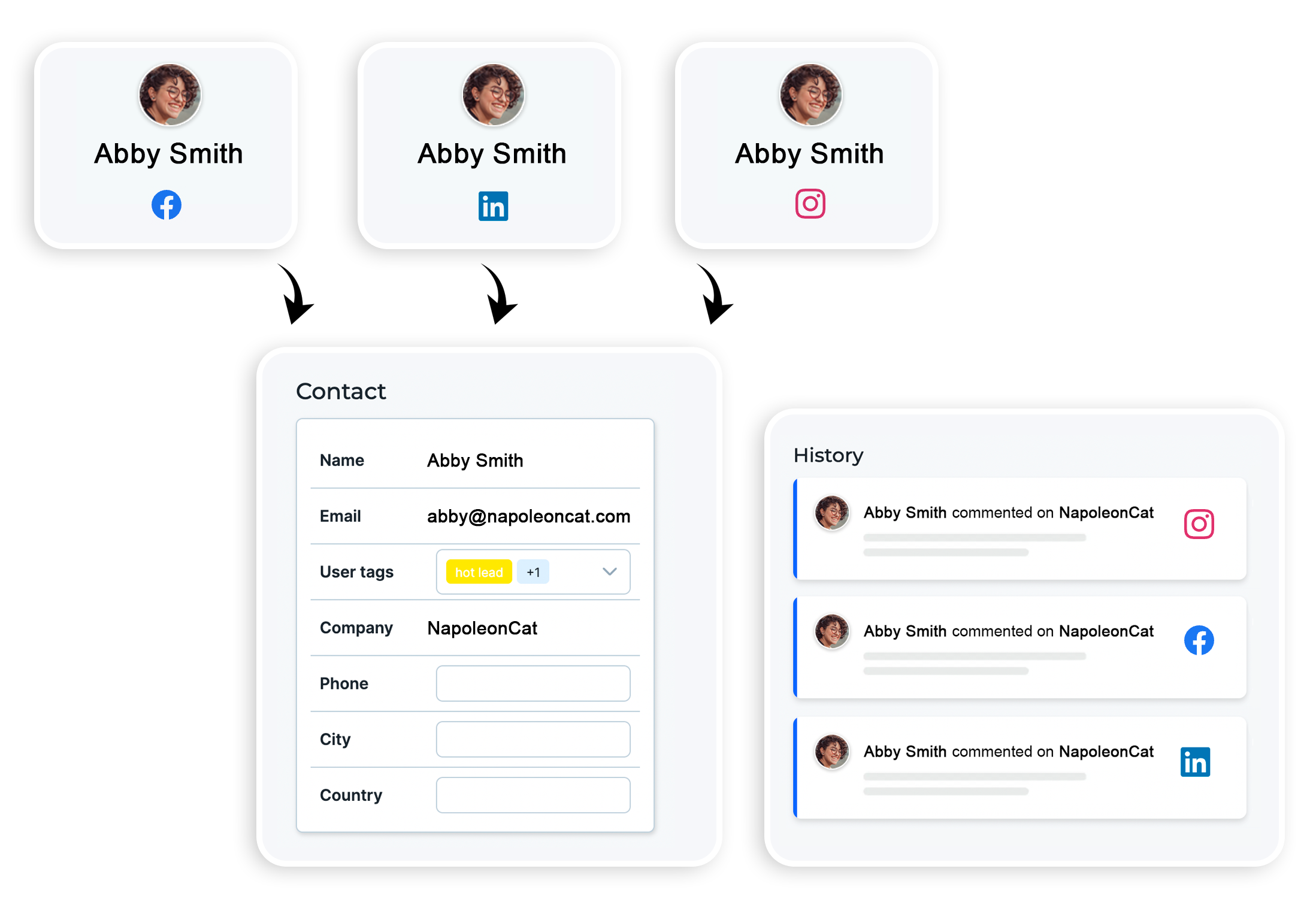
Solution: NapoleonCat’s Social Inbox keeps entire threads visible for clarity. And its Social CRM includes entire conversation histories in individual customer profiles.
And this brings us right to NapoleonCat’s AI-powered comment moderation for social media – let me tell you more about it.
Introducing NapoleonCat’s AI-powered moderation suite
NapoleonCat combines classic automation with AI-powered assistance to give you a full, flexible, truly useful moderation toolkit. It’s built for teams, agencies, ecommerce, busy solo marketers – basically anyone who receives more than 10 comments a day (because even 10 can be a lot). Mind you, this limit is totally arbitrary – you can use NapoleonCat no matter how many comments you get.
The suite includes:
Auto-moderation
NapoleonCat’s Auto-moderation is a rule-based automation engine that handles repetitive tasks – deleting spam, replying to FAQs, tagging customers, routing conversations, filtering comments, and more.
AI Assistant
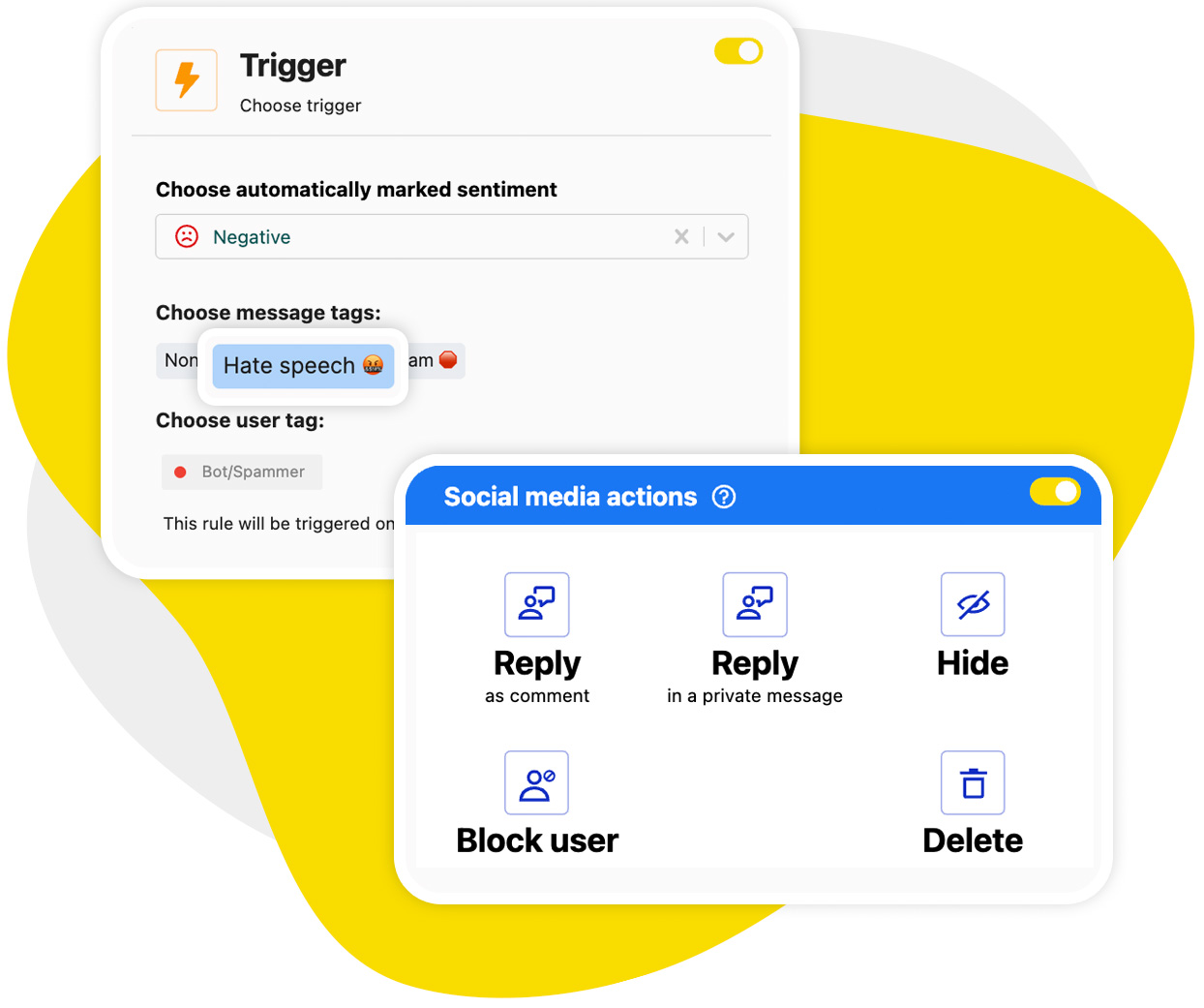
The AI Assistant detects sentiment, spam patterns and hate speech in the comments, and tags it accordingly. Based on the tags, you can trigger Auto-moderation rules – like spam removal or rerouting comments to moderation team members.
Together, they’ll help you stay organized, save time, and keep conversations healthy and positive, without burning out your team.
But that’s not all NapoleonCat offers.
How NapoleonCat’s Social Inbox streamlines comment management
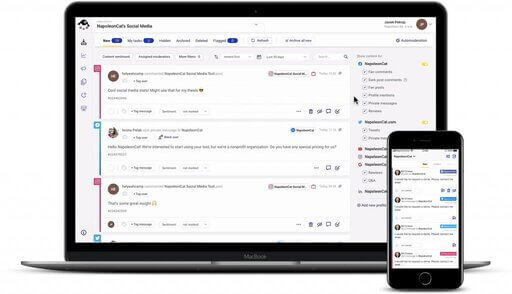
It all starts in the Social Inbox – the central hub where all your comments, messages, reviews, and mentions land in one organized place.
And it makes social media comment moderation so much easier:
- Unified inbox across platforms: Facebook, Instagram, TikTok, YouTube, LinkedIn, Google reviews – they all show up in one place.
- Threaded conversations: Without digging through platform notifications.
- Customer conversation history: In the Social CRM profiles, anyone on your team can track previous conversations for valuable context.
- Filtering and tagging: You can tag comments and users for even more valuable context.
- Team collaboration: Assign tickets, add internal notes, and track progress.
With everything centralized, moderation is structured, and manageable – and much faster, even on the busiest days. (Hello, Black Friday! 🖤)
One inbox for all social media interactions
Manage all your comments, messages, and more – with an all-in-one social media tool that supports Facebook, Instagram, TikTok, LinkedIn, YouTube, Google My Business, and more.
Automate repetitive tasks with NapoleonCat’s Auto-moderation
Auto-moderation is your moderation team’s always-on, never-tired social media assistant. Some things it can do automatically:
- Hide comments containing spam or harmful content
- Delete scam messages
- Reply to FAQs (pricing, hours, availability, shipping info, etc.)
- Forward comments to customer support
- Auto-like positive comments
- Send private messages
- Assign comments to designated team members
- Tag users or categorize threads
- Filter out troll behavior or bot replies
And because it’s rules-based, you stay in complete control, and the rules are really flexible, with multiple combined triggers for laser-sharp relevance.
Want to hide comments with profanity? Or auto-reply only during weekends? Block all “Promote it on xyz” spam comments? You can do all of these and more by adjusting your Auto-moderation rules to your liking. And the AI Assistant will help filter out the triggers.
Enhance your workflow with NapoleonCat’s AI Assistant
What the AI Assistant does (for now, because it’s about to be capable of so much more – stau tuned! 👀) is lets you pick certain types of comments and use them to automatically trigger Auto-moderation rules.
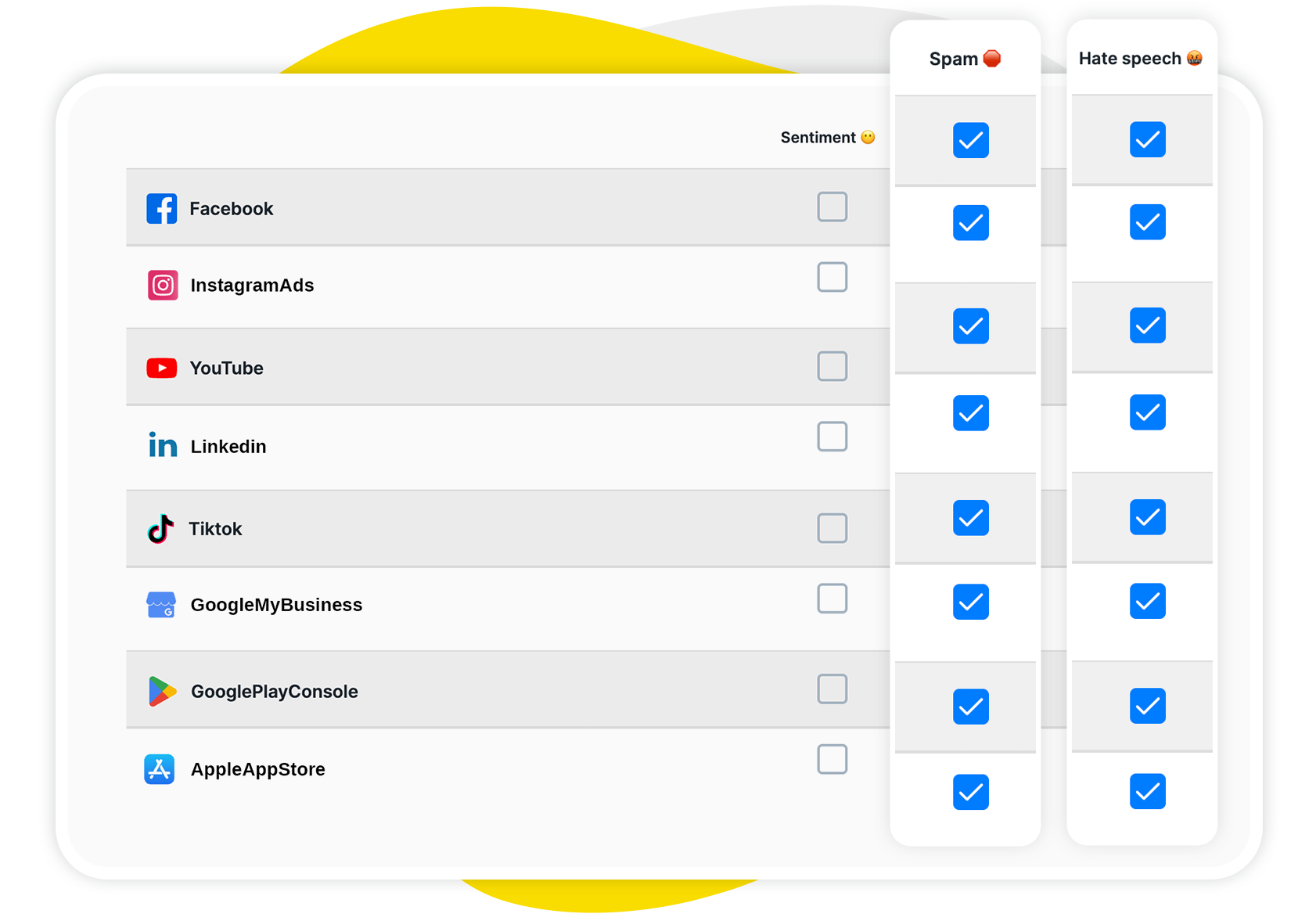
While it runs in the background, it can detect:
- Positive and negative comments
- Spam comments
- Hate speech
When you set up your Auto-moderation rules with the AI tags as input, any time it detects any of the above in your social media conversations, it will automatically trigger rules to hide or remove them, reply, flag, etc. Making Auto-moderation even more efficient and hands-free.
How to set up AI comment moderation in NapoleonCat
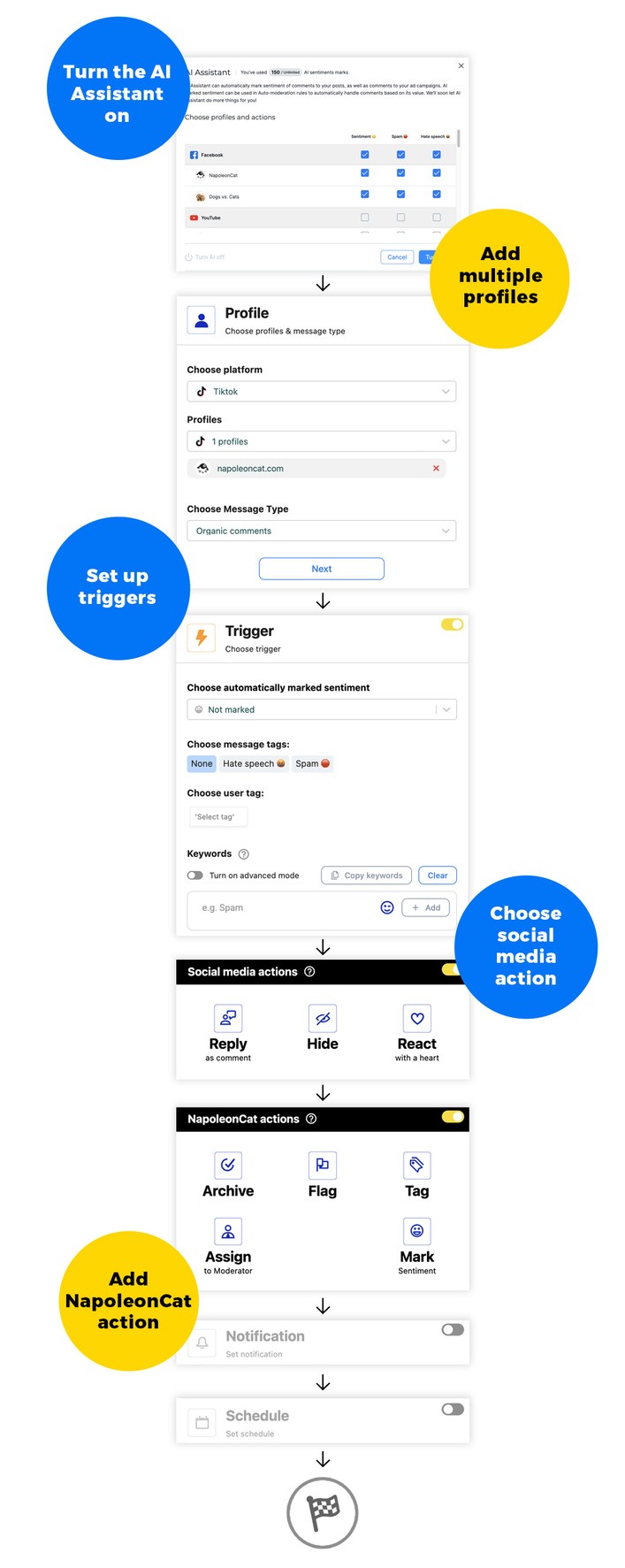
Setting up AI moderation in NapoleonCat is straightforward:
Step 1: Connect your social media accounts
Add your accounts on Facebook, Instagram, TikTok, YouTube, Google reviews, and more. You can add multiple accounts, based on your plan.
Step 2: Turn on the AI Assistant
Go to the Social Inbox and turn on the AI Assistant for selected social media profiles and depending on the rules you want to create.
Step 3: Go to Auto-moderation
Create your first rule. There are some templates available for removing offensive language from your comments section, so you can also use and customize those.
Step 3: Set the rule trigger
To use what the AI Assistant detects, select the spam or hate speech tags, and choose the sentiment if appropriate.
You can add extra triggers on top, like specific keywords to make sure the rule targets those as well. And you can set multiple triggers for the same rules at once.
Step 4: Define the action(s)
Some will be happening on social media, while others will happen internally in NapoleonCat. Depending on what a specific social media platform allows, you can:
- hide or delete a comment
- reply automatically
- reply to a comment in a private message
- like a comment
- block a user
The actions in NapoleonCat are available for all social media platforms and they include:
- assigning a comment to a team member
- tagging a comment
- flagging a comment
You can also set an email notification any time a rule is triggered if you want to always be up to date.
Step 5: Craft your auto-replies
If the rule sends replies to comments, create several reply variants, so Auto-moderation can randomly rotate them (and seem less like automation). You can create an unlimited number of replies.
Step 6: Set the timing
Adjust the schedule for the rule – it can run 24/7 or in specific time slots only (for example, only on the weekends or for the duration of a campaign.
Step 7: Test and refine
Launch the rule and monitor the first few days, then adjust if necessary.
Best practices for effective AI-supported moderation
Here are some tips and tricks to make sure you’re making the most of your AI comment moderation:
- Combine human + AI oversight. AI should handle routine tasks, humans should handle nuance and relationships. I mean, that’s a fair deal, if you ask me.
Also, review flagged comments to reduce false positives and improve AI accuracy.
- Create rules based on what’s really going on. With the level of customization you get in NapoleonCat’s Auto-moderation, you can really nail down specific scenarios and respond with relevant actions.
- Adjust rules frequently. With new spam patterns and social media trends, make sure your Auto-moderation follows. This will also help your AI learn.
- Document your rules – especially if you work for an agency or in a multi-person team. But really, document them always to save you some trouble if things do not go according to plan.
Final thoughts: The future of AI comment moderation
As the volume of online conversations grows and the number of platforms multiplies, AI simply becomes essential if you want to stay responsive and protect your brand across social media.
With tools like NapoleonCat’s Auto-moderation and AI Assistant, you can easily scale engagement and improve customer experiences. And reclaim hours of work every single day.
And speaking of the future, you’ll soon be able to do even more with NapoleonCat’s AI comment moderation.
But today, you can already test what it can do now – 14 days completely for free.
And the future of moderation in general? Smarter and faster, with human moderators supported by AI, and not overwhelmed by it.
AI-powered comment & DM moderation
Set up smart auto-replies for your organic posts and ads. Automatically hide or delete spam and hate speech – with an all-in-one social media tool.
AI Comment moderation tool – FAQs
Let’s answer some of the most common questions about AI comment moderation.
What types of comments can an AI comment moderation tool detect?
It can detect spam, profanity, scams, offensive language, harassment, impersonation attempts, repetitive questions, negative sentiment, and more.
It can also classify neutral and positive comments.
Can AI moderation fully replace human moderators?
Technically, it can. But in reality, that’s not a good idea, as AI can (yet) make independent decisions that can impact the business, like, e.g., issuing a refund. It also can’t – obviously – build human relationships.
How accurate are AI comment moderation tools?
Very accurate for clear patterns (spam, profanity, repetitive questions). They might be slightly less accurate with things like obscure cultural nuance, but it learns very quickly. And you still have review options to help it.
Will AI mistakenly hide or delete positive comments?
With well-configured rules and sentiment analysis, this is highly unlikely. NapoleonCat also lets you review questionable actions.
Is AI comment moderation safe for brand reputation?
Yes – in fact, it protects your brand by preventing risky comments from appearing publicly.
How do AI moderation tools handle sarcasm or slang?
They’re getting better and better at detecting it, actually, with surprising results. Human oversight is still recommended for edge cases, though.
Do AI moderation tools work across multiple social media platforms?
NapoleonCat does – including Facebook, Instagram, TikTok, YouTube, LinkedIn, and Google reviews.
How quickly can an AI moderation tool respond to comments?
Instantly – often within seconds of the comment appearing.
Can I customize the rules and triggers for AI moderation?
Yes, absolutely. NapoleonCat lets you tailor rules, triggers, filters, and actions to fit your exact moderation needs.
You may also like:
- 40+ AI Prompt Examples for Marketers (and More)
- AI vs Human Responses on Social Media: Facts & Figures
- 10 Best AI Tools for Social Media Content Creation
- Best Auto Commenter for Social Media: Full Guide
- Facebook Messenger Auto Reply: Expert Guide
- Best Facebook Auto Commenter – a Guide
- Best TikTok Auto Commenter – Expert Guide
- Best Instagram Auto Commenter
- Best YouTube Auto Commenter – Expert Guide
- How to Use Automated Customer Service on Social Media
- How to Automate Social Media Replies (And When You Should)
- Instagram Auto-Comments: When and How Should You Use Them?
- How to Set Up a Smart Auto-Reply in Instagram Comments
- How to Set Up a Smart TikTok Comments Auto-Reply
- How to Set Up Auto-Reply in Facebook Comments
- How to Set Up Auto-Reply in YouTube Comments