
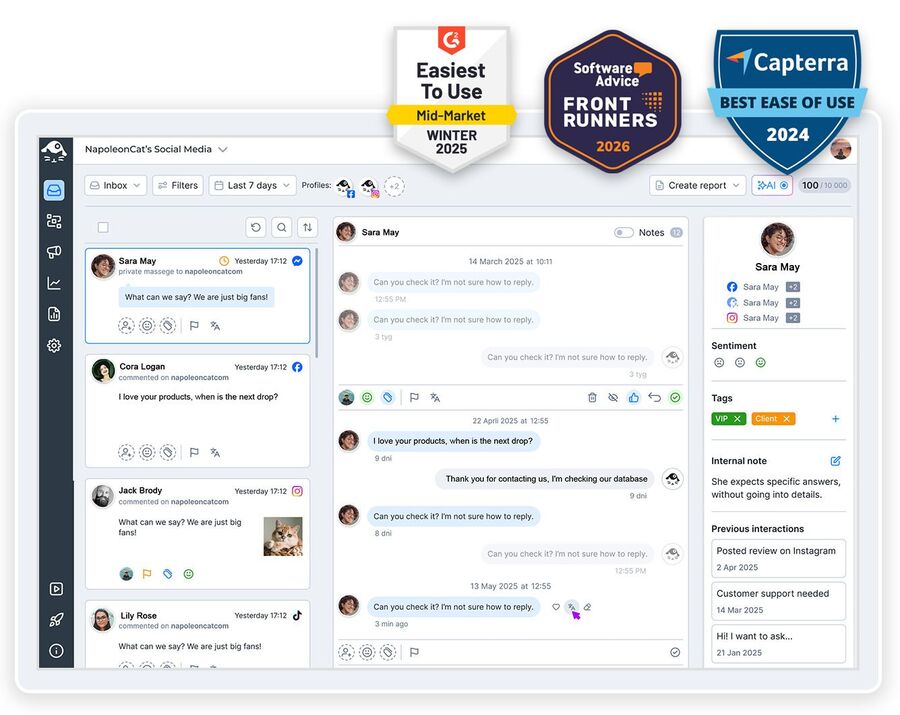
Ten locations, ten Google Business Profiles, and ten places a bad review can sit for a week before anyone spots it. Manage multiple Google Business Profiles from one inbox instead – every review and every question, from every location, in one queue.
Manage Multiple Google Business Profiles in One Tool
Trusted by:




Supported platforms








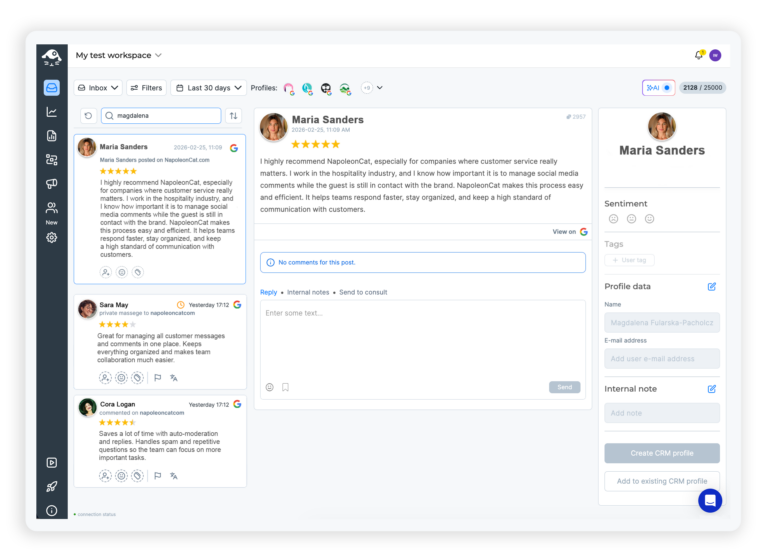
Social inbox: Every review and question from every location in one inbox
Every review and every Q&A question from every profile you manage lands in the Social Inbox, lined up chronologically alongside the comments and messages from your other platforms.
Reply from there, tag it, assign it to someone, leave them a note about what happened. No hopping between profiles to find out who said what.
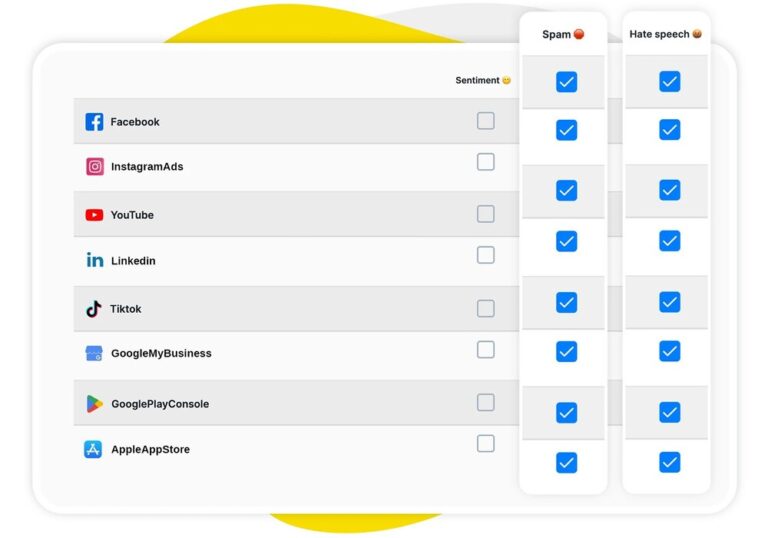
AI assistant: See which locations have an angry review without reading every one
When you’re running dozens of locations you’re not reading everything, and you shouldn’t have to.
The AI Assistant tags sentiment, spam and hate speech as things arrive, so the negative ones surface instead of sitting three pages down in a queue nobody has time for. You find out which branch has a problem this morning, not at the end of the month.
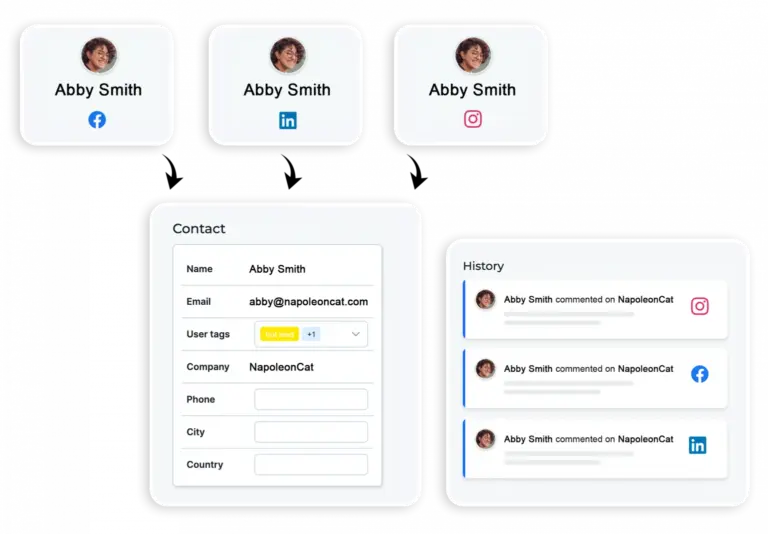
Social CRM: See whether this reviewer has already dealt with another location
Someone leaving a two-star review at one branch may have messaged a different one a month ago.
Their Social CRM profile puts the whole history in one place – every conversation across your locations and platforms, your team’s notes, and how the relationship has gone so far. It changes how you answer.
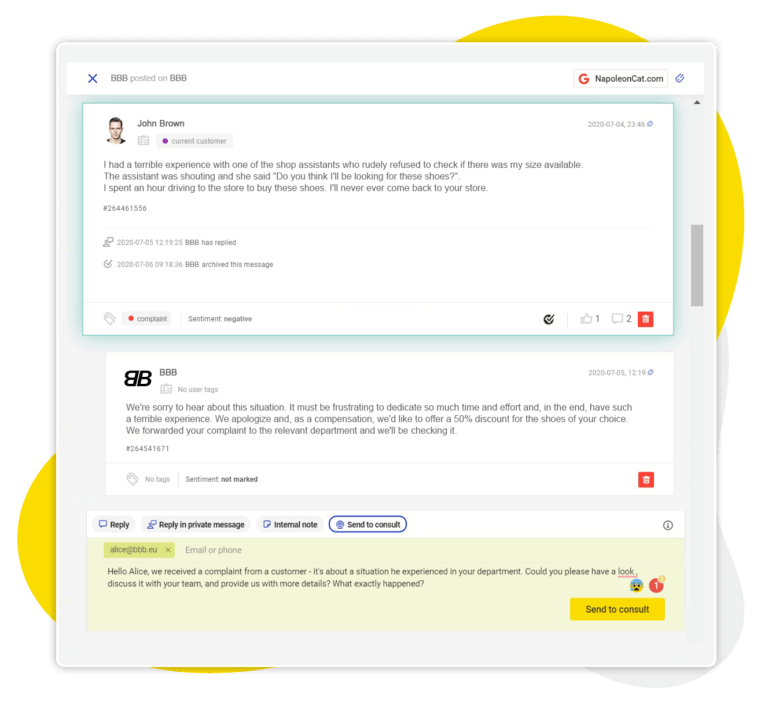
Team access and permissions: Send a review to the right branch, and keep managers to their own locations
A review about one store belongs with the person who runs it. Assign it to them, add a note explaining the context, and let them write the reply.
Workspaces and role-based permissions mean each location manager sees their own profiles and nothing else (and if you’re an agency, clients get a view-only login).
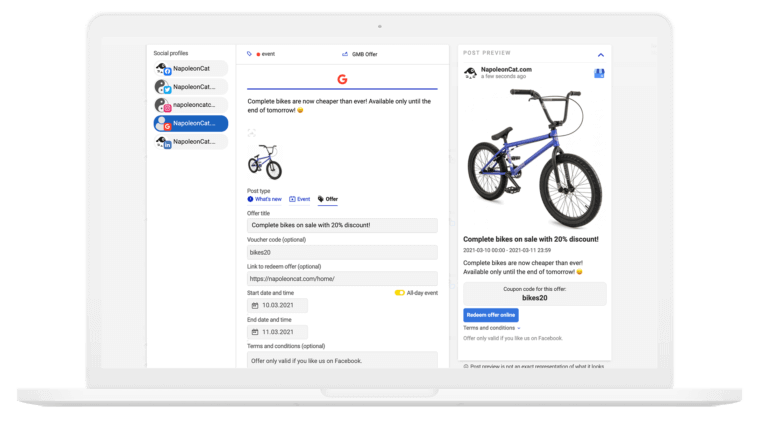
Publisher: Send an update, event or offer to all your locations at once
Writing the same change-of-hours update for every location, one at a time, is nobody’s idea of a good afternoon. Schedule What’s New, Event and Offer posts to every Google Business Profile from one calendar, with the button already set, and let your team approve them before they go out.
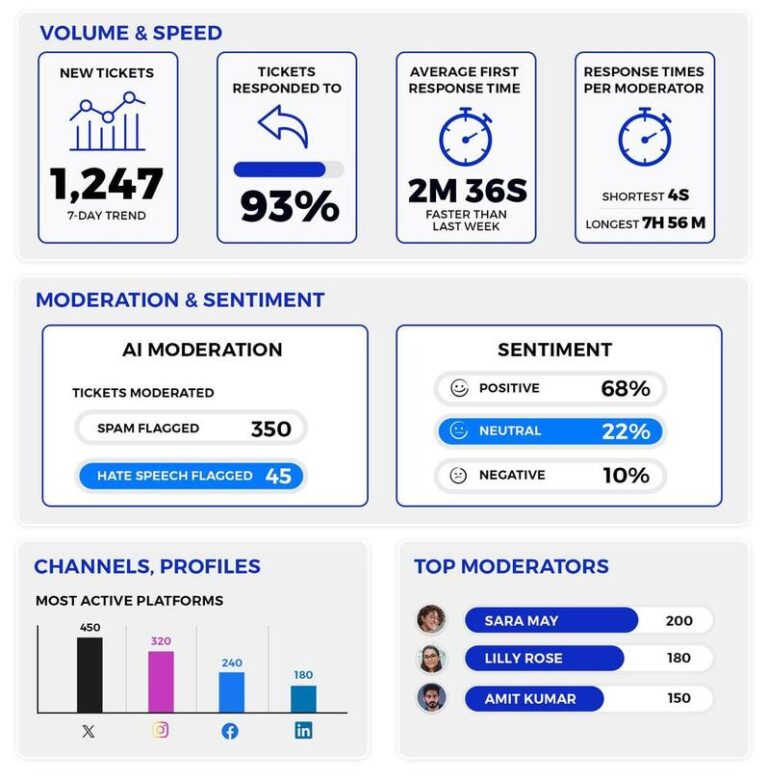
Moderation reports: See how fast each location answers, and which ones don’t
You know what they say – you can’t fix what you don’t measure. Moderation reports show how long each profile takes to reply, how much came in, and who handled it, so the branch that leaves reviews sitting for a week stops being a surprise. Download it whenever you need it.
Stop checking your locations one by one




Here’s why our clients love NapoleonCat
Join multi-location businesses that answer reviews and post updates without switching profiles.

NapoleonCat saves up to one-third of a full-time position. That’s time we would otherwise spend manually moderating thousands of comments each month using the Meta Business Suite, profile by profile and comment by comment. Time we can now use for growth. NapoleonCat is the best tool of its kind on the market, and it’s still constantly evolving and improving by introducing new AI features.

It’s hard to imagine our work without a tool that includes so many valuable features. It won’t be an overstatement when I say that NapoleonCat saves us multiple full-time positions that would be dedicated to just moderating comments or manually generating reports.

NapoleonCat gives us the full picture of social media interactions. It’s easier to pick up urgent threads that need taking immediate action. And with conversation history, it’s much easier to continue the work of another team member while they’re out of office.

We work with multiple clients, and with NapoleonCat, we don’t waste time switching between multiple software tools. We can also deliver reliable data from a single source. We tested other social media moderation and analytics tools before, but none of them lived up to what NapoleonCat delivers. They’re the best, and I personally love using the tool. 🙂

NapoleonCat is now an indispensable tool that we use for moderation and analytical purposes, as well as content publishing. We’re curious to see new capabilities of the tool and test its new uses, for example, to moderate TikTok ad comments, as we predict this social media channel to become more and more important for our clients.

It’s the first social media engagement tool we have ever tried that is truly intuitive and that makes it easy for us to include the clients in the process. The service and support is great and personal. And the value for money is great!

We were looking for a tool that would allow us to consolidate and manage comments and private messages from Messenger in one place. Analytics and reports were also very important to us, as they would show us the level of our social media customer service. That’s why, in 2017, we decided to choose NapoleonCat.
How NapoleonCat compares for managing multiple locations
| Feature | NapoleonCat | Hootsuite | Sprout Social | Agorapulse |
|---|---|---|---|---|
| Unified inbox (reviews, comments, messages) | ✅ Yes | ⚠️ Limited | ⚠️ Limited | ✅ Yes |
| Sentiment detection | ✅ AI-supported tagging | ⚠️ Basic | ⚠️ Sentiment labels | ⚠️ Basic |
| Contact history across profiles (Social CRM) | ✅ Yes | ⚠️ Limited | ✅ Yes | ⚠️ Basic |
| Auto-assignment to team members | ✅ Yes (rule-based) | ✅ Yes | ✅ Yes | ✅ Yes |
| Internal notes on a review or message | ✅ Yes | ✅ Yes | ✅ Yes | ✅ Yes |
| Separate Workspaces per client or location | ✅ Yes | ✅ Yes | ⚠️ Higher tiers | ✅ Yes |
| Moderation reports (response time, volume) | ✅ Yes | ⚠️ Basic | ✅ Yes | ⚠️ Basic |
| 1:1 onboarding | ✅ Included on higher plans | ❌ Enterprise only | ⚠️ Add-on / enterprise | ⚠️ Higher tiers |
| EU-based, GDPR-first hosting | ✅ Yes | ❌ CA-based | ❌ US-based | ✅ EU-based |
FAQs
How do you manage multiple Google profiles in one place?
You connect each Google Business Profile you already manage, and everything they receive – reviews and Q&A questions – arrives in one Social Inbox, in the order it came in. You reply, tag, assign and leave notes from there. Posting works the same way: one calendar, one update, every location. NapoleonCat works with the profiles you already have access to; it doesn’t create or verify listings for you.
Can you have two Google Business Profiles at the same address?
Generally no, unless there are genuinely separate businesses at that address, or separate departments that Google recognizes as distinct. That’s Google’s guideline rather than ours, and duplicate listings for one business tend to get merged or suspended. Once your listings are sorted out, NapoleonCat is what keeps them manageable day to day.
How do I merge two Google Business Profiles?
Merging happens on Google’s side, in your Business Profile account, and Google decides whether two listings really are duplicates. It isn’t something a third-party tool can do for you. What we can help with is the aftermath: once you’re down to the right set of profiles, they all sit in one inbox instead of several dashboards.
Can I reply to Google reviews from NapoleonCat?
Yes. Reviews and Q&A questions from every connected profile come into the Social Inbox and you answer them there. Worth being straight about the limits: replying is the action Google gives us on Business Profiles, so there’s no hiding or deleting reviews from here, and there’s no automatic moderation for Google Business the way there is for Facebook, Instagram, TikTok, YouTube and LinkedIn.
Does it work for an agency handling locations for several clients?
That’s most of the point. Workspaces keep each client’s profiles, team and reporting separate, and role-based permissions mean a location manager sees their own profiles and nothing else. Clients can have a view-only login if you want them to see the work without touching it.
Which plan do I need for this, and what does it cost?
The Social Inbox is what does the work on this page, and it starts on Pro at $109 a month – that gets you the all-in-one inbox and AI reply suggestions. Expert, at $139 a month, adds automation for the platforms that support it, which is worth knowing if you also run Facebook, Instagram, TikTok, YouTube or LinkedIn. Standard doesn’t include the inbox, so it won’t cover this. Those prices are for two users and five profile slots; more of either costs more. The AI Assistant is free up to 100 tickets a month, with unlimited tagging as a paid add-on. Every plan starts with a 14-day free trial, no credit card required.
One tool for every Google Business Profile you run
Free 14-day trial: full access, zero commitment.
No credit card required