
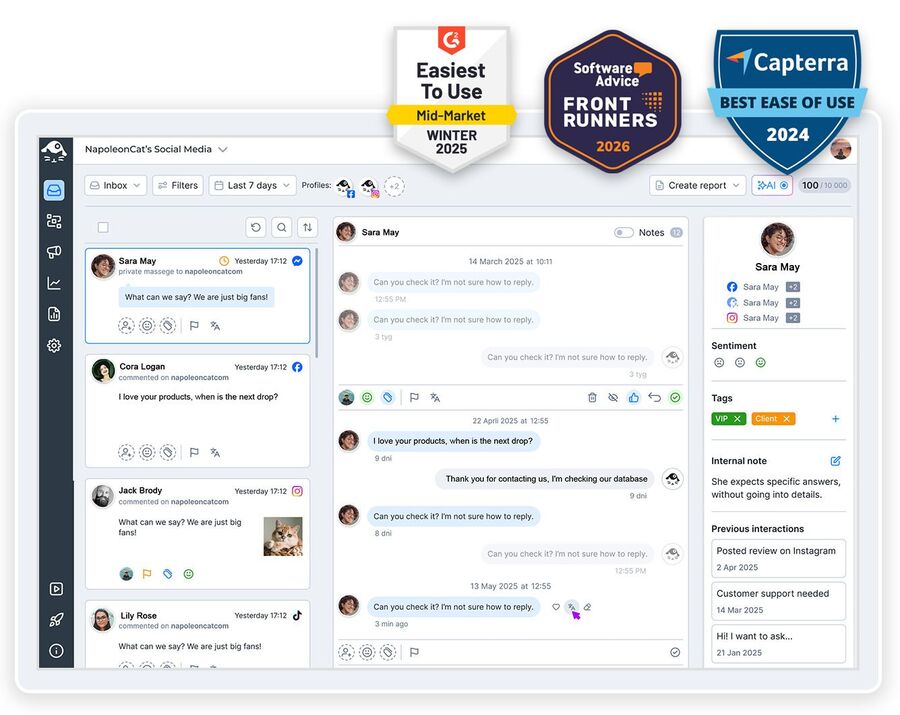
Don’t let spammers and trolls mess up your TikTok ad results. Try NapoleonCat’s TikTok ad comments automation tool – and you’ll never go back to spam under your ads.
TikTok Ad Comments Automation Tool – Auto-Replies & Spam Blocking
Trusted by:




Supported platforms








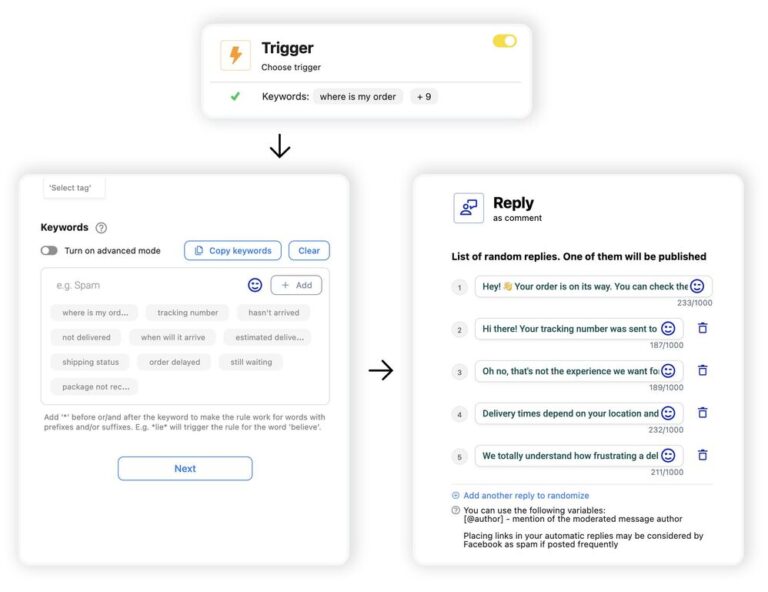
Automated replies: Answer FAQs under every TikTok ad instantly 24/7
Never miss a comment from someone who’s ready to become a new customer. With Auto-moderation in NapoleonCat, you can set up replies to commonly asked questions – the ones people actually keep asking under your ads.
Automation rules are easy to set up and highly customizable, so you can cover popular scenarios according to what you really need.
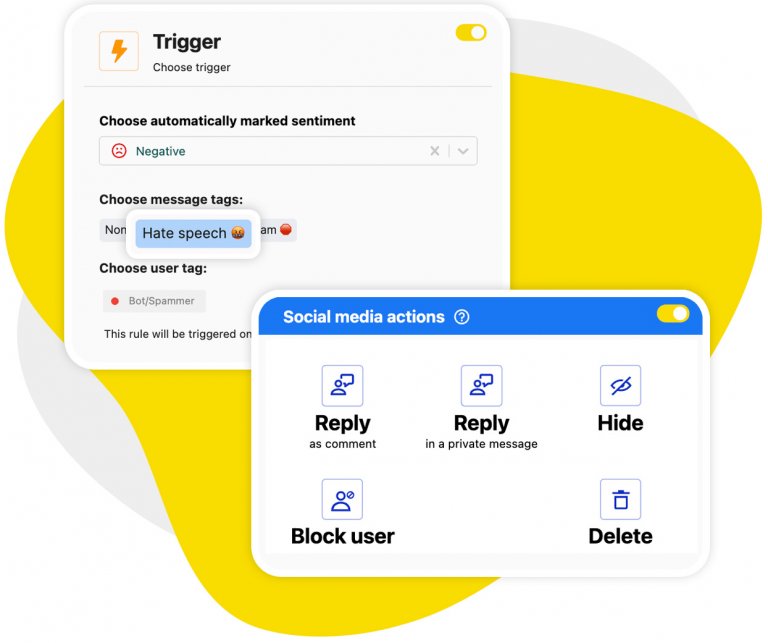
Automated spam blocking: Hide spam and hate on your TikTok ads before anyone sees it
Nobody needs spam – that’s for sure. So turn on Auto-moderation to block it from your TikTok ads, instantly, 24/7. Your moderation team will never have to worry about manual spam removal again, while your ads won’t keep displaying spam comments as part of your paid reach.
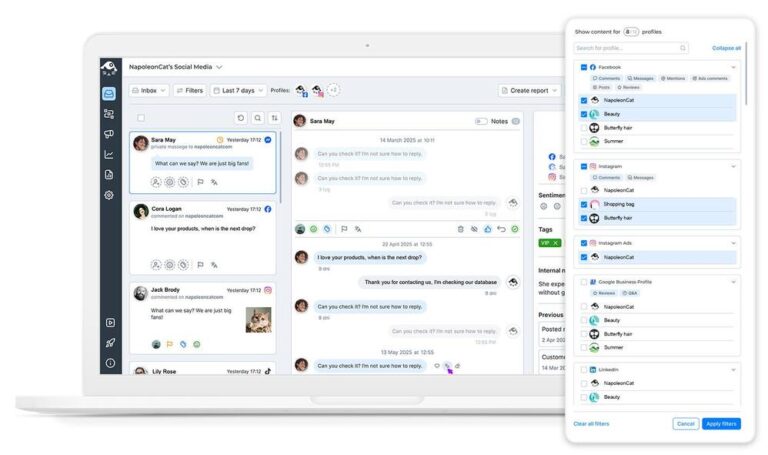
Social Inbox: Manage comments on TikTok ads and organic posts in one view
In NapoleonCat’s Social Inbox, you can manage all comments on your TikTok ads next to comments on organic content and interactions on other platforms. Lined up chronologically, so you won’t miss anything, and can reply, remove, or send to a team member all from one place.
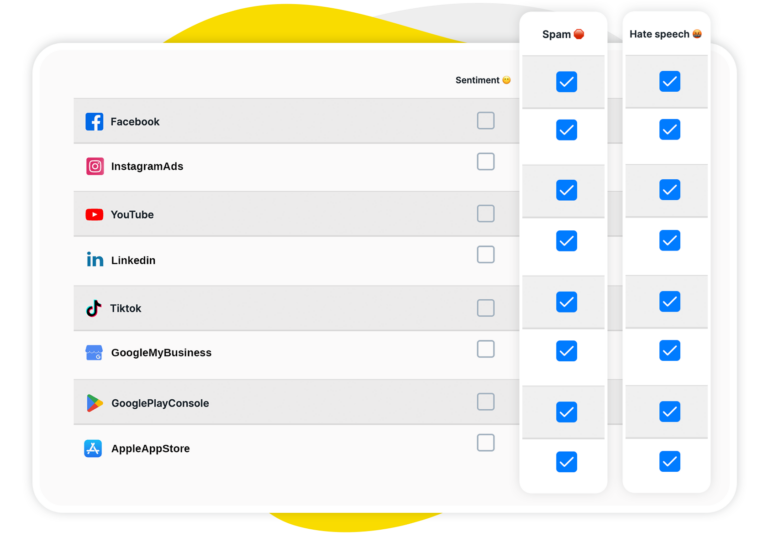
AI Assistant: Auto-detect spam, hate and negative sentiment on TikTok ad comments
You also have your very own AI Assistant in the Inbox that can do some of that work for you.
It automates spam detection and sentiment tagging, so any time you open the inbox, you clearly see what needs to be delegated asap, how to prioritize comments, and what should be removed in bulk with an appropriate automation rule.
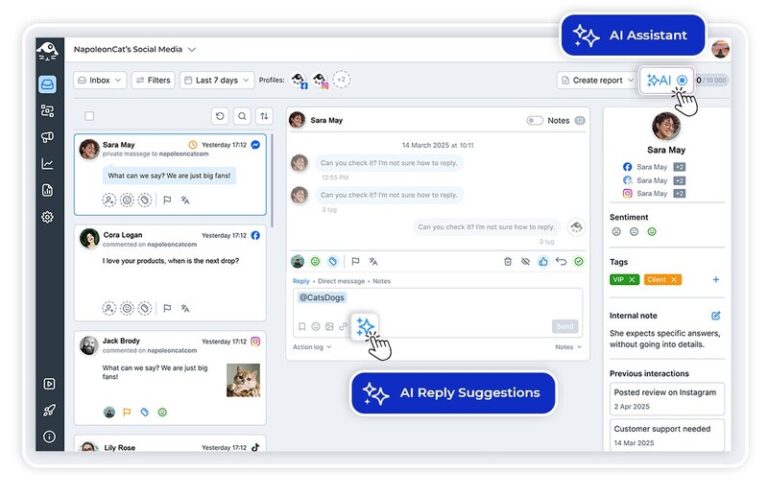
AI Reply suggestions: Handle tricky ad comments with on-brand answers in seconds
For the comments you need to answer yourself, AI can also help you do it faster by generating a reply suggestion.
Not just any reply – it will analyze your reply history and relevant brand and product content you give it to come up with replies that are on-brand and on point. You’re still the one to send it – there’s just no typing involved.
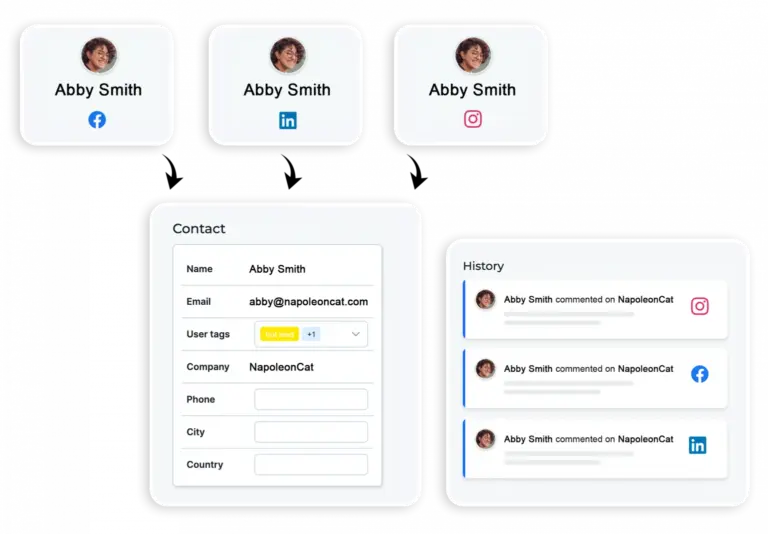
Social CRM: See each ad commenter’s full history before you reply
For some helpful context before you reply, you can first check the commenter’s Social CRM profile. From there, you can access all your previous social media conversations, not just on TikTok, plus any comments from your team, and even your relationship sentiment.
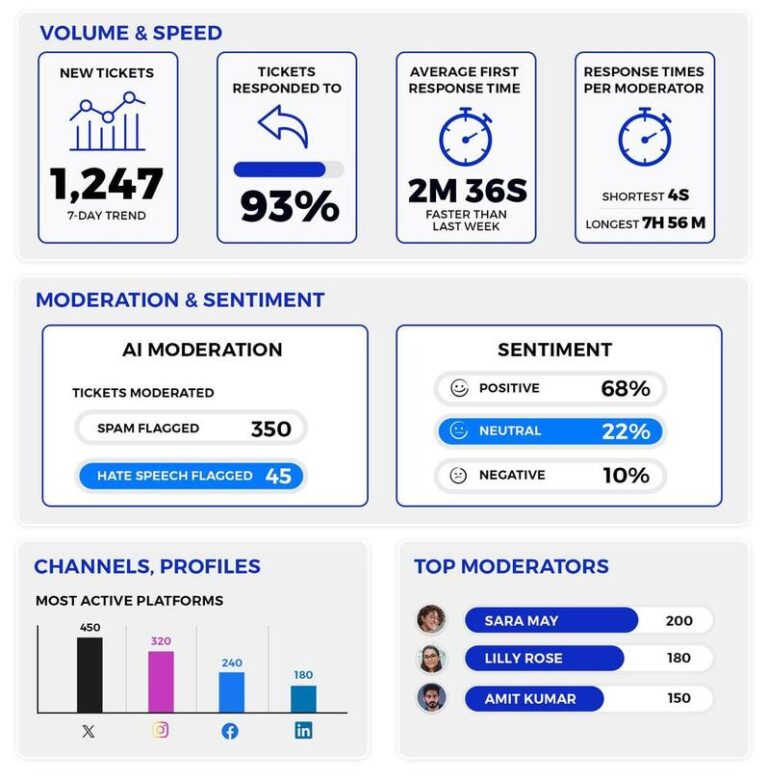
Moderation reports: Track ad comment activity and automation effectiveness
How long is it taking to reply to comments, which automations are needed most, which profiles or ads need more attention? Tweak your moderation process based on actual data from the moderation reports, available in NapoleonCat.
Say goodbye to TikTok ad spam




Here’s why our clients love NapoleonCat
Join businesses that save hours every week on TikTok ad comment moderation.

NapoleonCat saves up to one-third of a full-time position. That’s time we would otherwise spend manually moderating thousands of comments each month using the Meta Business Suite, profile by profile and comment by comment. Time we can now use for growth. NapoleonCat is the best tool of its kind on the market, and it’s still constantly evolving and improving by introducing new AI features.

It’s hard to imagine our work without a tool that includes so many valuable features. It won’t be an overstatement when I say that NapoleonCat saves us multiple full-time positions that would be dedicated to just moderating comments or manually generating reports.

NapoleonCat gives us the full picture of social media interactions. It’s easier to pick up urgent threads that need taking immediate action. And with conversation history, it’s much easier to continue the work of another team member while they’re out of office.

We work with multiple clients, and with NapoleonCat, we don’t waste time switching between multiple software tools. We can also deliver reliable data from a single source. We tested other social media moderation and analytics tools before, but none of them lived up to what NapoleonCat delivers. They’re the best, and I personally love using the tool. 🙂

NapoleonCat is now an indispensable tool that we use for moderation and analytical purposes, as well as content publishing. We’re curious to see new capabilities of the tool and test its new uses, for example, to moderate TikTok ad comments, as we predict this social media channel to become more and more important for our clients.

It’s the first social media engagement tool we have ever tried that is truly intuitive and that makes it easy for us to include the clients in the process. The service and support is great and personal. And the value for money is great!

We were looking for a tool that would allow us to consolidate and manage comments and private messages from Messenger in one place. Analytics and reports were also very important to us, as they would show us the level of our social media customer service. That’s why, in 2017, we decided to choose NapoleonCat.
See how NapoleonCat compares to its alternatives:
| Feature | NapoleonCat | Hootsuite | Sprout Social | Metricool |
|---|---|---|---|---|
| Automated moderation of TikTok ad comments | ✅ Yes (auto-reply, hide, like) | ⚠️ Limited | ❌ No | ❌ No |
| Rule-based auto-replies under ads | ✅ Advanced (keywords, sentiment, tags, time rules) | ⚠️ Limited rules | ⚠️ Limited filtering | ❌ No |
| AI spam & hate auto-removal | ✅ AI-based auto-removal | ⚠️ Limited (third-party add-on) | ❌ No auto-removal | ❌ No |
| Sentiment detection & tagging | ✅ AI-supported tagging | ⚠️ Basic sentiment | ⚠️ Sentiment labels | ❌ No |
| AI reply suggestions in the inbox | ✅ Yes (from Pro plan) | ✅ Yes | ✅ Yes | ❌ No |
| Ad comments and organic comments in one inbox | ✅ Yes | ⚠️ Limited | ⚠️ Limited | ⚠️ Basic inbox |
| Commenter history (Social CRM) | ✅ Yes | ⚠️ Basic | ⚠️ Basic | ❌ No |
| Moderation reports (response time, volume) | ✅ Yes, on every plan | ⚠️ Basic | ✅ Yes | ⚠️ Basic |
| Pricing model | ✅ Per account – from $79/mo (2 users, 5 profiles) | Per user – from $99/user/mo | Per seat – from $79/seat/mo | Per account – from $20/mo |
| 1:1 onboarding & training | ✅ Included | ⚠️ Higher tiers only | ⚠️ Add-on / enterprise | ❌ No |
| EU-based, GDPR-first hosting | ✅ Yes | ❌ CA-based | ❌ US-based | ✅ EU-based |
FAQs
How does automated TikTok ad comment moderation actually work?
You set up Auto-moderation rules that run on triggers like keywords, links, sentiment, or tags added by the AI Assistant. When a comment under your TikTok ad matches a rule, NapoleonCat takes the action you chose – posts a reply, hides the comment, or assigns it to a moderator. The rules run around the clock, so comments are handled the moment they appear, not the next morning.
What is TikTok ads automation, and what can you actually automate?
TikTok ads automation usually means one of two things. On the media-buying side it’s about budgets, bidding, and creative rotation, and that happens inside TikTok Ads Manager. On the engagement side – the part that decides whether the traffic you paid for converts – it’s about what happens in the comments under those ads. That’s what NapoleonCat automates: instant replies to recurring questions, automatic hiding or deleting of spam and hate, routing comments to the right moderator, and reporting on all of it. Both halves matter, but only one of them is usually left running unattended.
Will spam comments be hidden or deleted?
That’s your call, and you can decide rule by rule. Hiding keeps the comment invisible to everyone except its author, which usually stops the spammer from noticing and trying again. Deleting removes it completely. Many teams hide first and review later in the Social Inbox, where hidden comments stay visible to them.
Is TikTok comment automation against TikTok’s rules?
No, as long as the tool you use works through TikTok’s official API. That’s the line worth understanding: engagement bots that farm likes, views, and followers, or that log into your account with your password, break TikTok’s terms and can get the account restricted. TikTok comment automation of the kind NapoleonCat does is the opposite – it uses the official TikTok Business API, acts only on your own profiles and ads, and does the moderation work your team would otherwise do by hand: replying, hiding, deleting, and assigning comments.
Do I have to set up moderation separately for every TikTok ad?
No. Rules can cover a whole connected profile, so new ads are protected as soon as they go live. You can also narrow a rule down to specific campaigns or posts when a particular ad needs its own treatment – for example, a promotion that attracts a lot of pricing questions.
Can NapoleonCat handle TikTok DMs as well?
Not on TikTok – TikTok’s API doesn’t give third-party tools access to direct messages, so no external tool can manage them reliably. NapoleonCat covers TikTok comments on organic posts and ads, and if you need DM automation, it’s available for Instagram and Messenger.
Won’t automated replies make my brand sound robotic?
You write the automated replies yourself, so they sound exactly the way your brand does, and you can set up different ones for different questions, ads, and time frames. For everything that needs a human answer, AI reply suggestions (available from the Pro plan) draft a response based on your reply history and brand content, and you decide what actually gets sent.
Which NapoleonCat plan do I need for TikTok ad comment automation?
Moderating comments on TikTok ads is available from the Pro plan up, and automated moderation of ad comments from the Expert plan up. Every plan comes with a 14-day free trial and no credit card is required to start.
Get your TikTok ad comments under control
Free 14-day trial: full access, zero commitment.
No credit card required