

There are many tools for automatic Facebook moderation out there – and then there’s NapoleonCat. Take a look at what you can do with flexible moderation, AI assistance, reports, and more.
Automatic Facebook Moderation – Comments, DMs & Ads
Trusted by:




Supported platforms








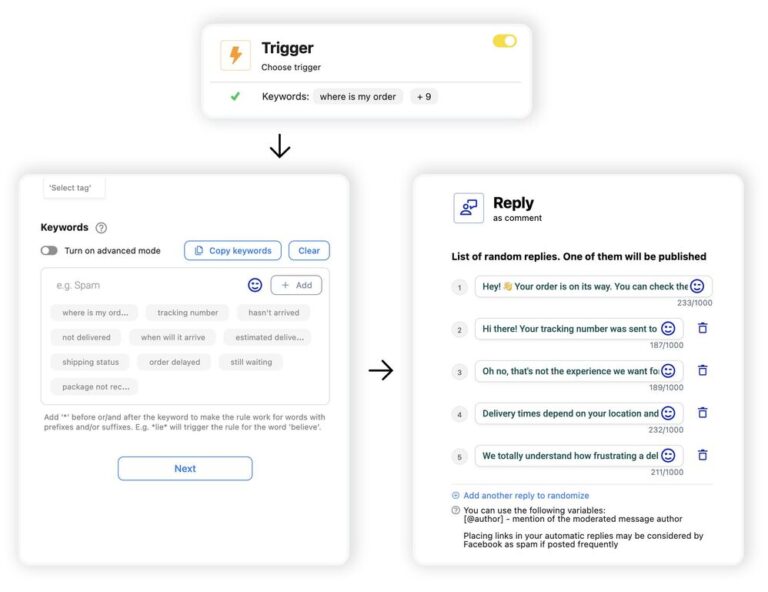
Set up smart auto-replies for comments and DMs based on keywords, links, and AI-marked tags
With NapoleonCat’s Auto-moderation, you can go beyond sending everyone the same automated reply every time. Set up different automated rules in our content moderation tools based on specific triggers – like keywords, tags, links, and specific posts and ads – and add multiple reply variants for each one.
The system will randomly rotate them, making sure people don’t keep seeing the same thing under every comment.
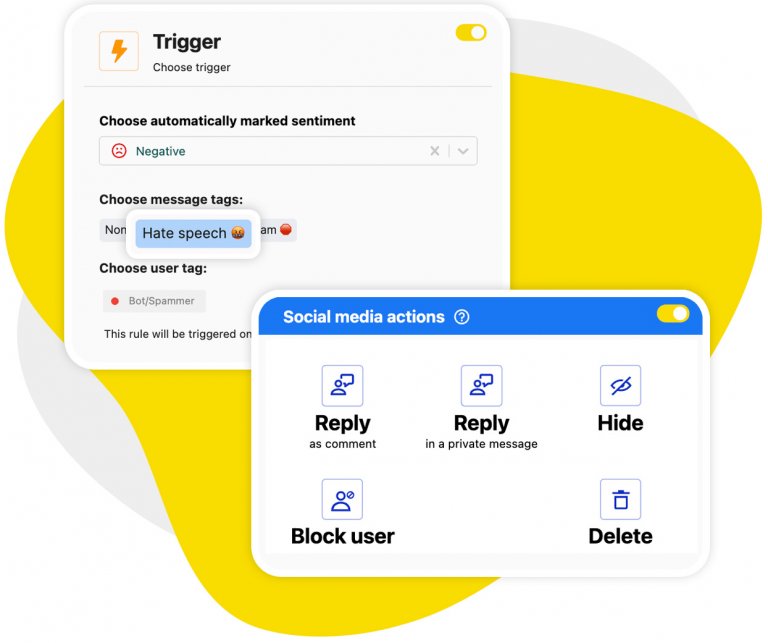
Automatically hide and delete spam comments on organic posts and ads
With Auto-moderation, you can also easily automate spam removal from your organic posts and Facebook ads. They’ll be hidden from public view or removed entirely the moment they’re posted.
And your team will finally move on from spending hours manually deleting spam to spending more time having actual conversations with your customers – which is what a social media moderation tool is for.
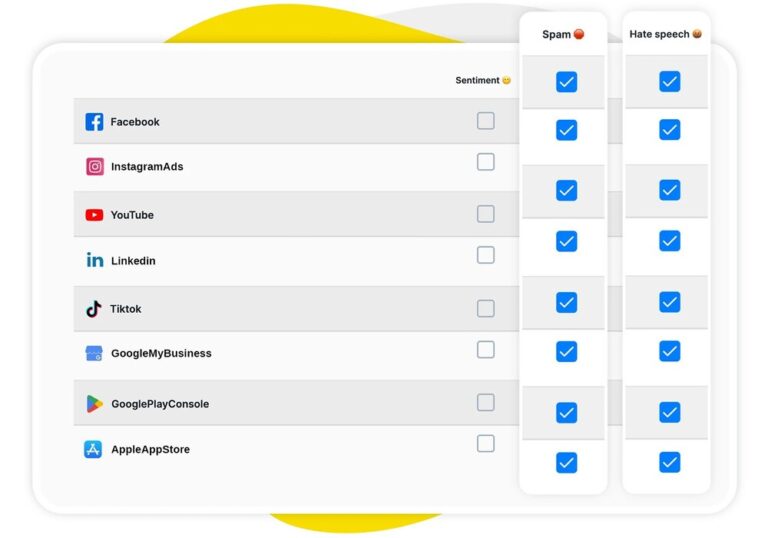
Automatically flag spam and hate speech with the AI Assistant
What makes automated spam removal on Facebook even easier is the AI Assistant in the Social Inbox. It reliably detects and tags spam and hate under your posts and ads 24/7.
Then Auto-moderation takes over to instantly hide or remove it, and the process goes on behind the scenes, while spam is gone from your Facebook conversations for good.
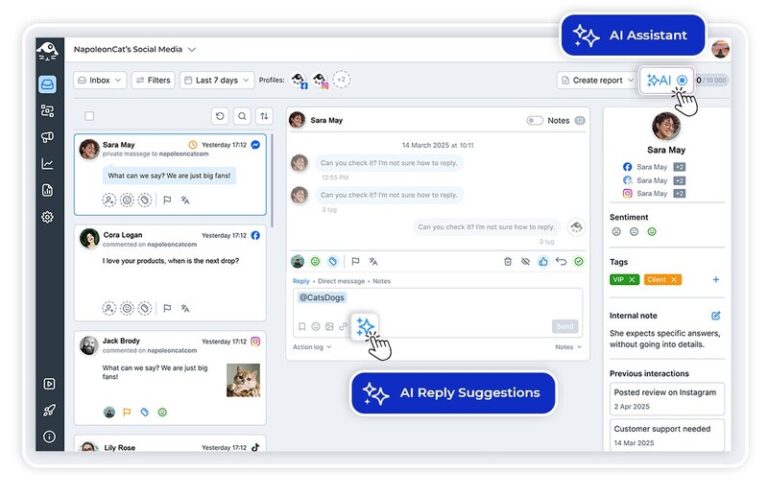
AI Reply: Let AI draft your responses to comments, DMs, and reviews
AI can also help you reply faster – without sounding robotic. It learns your style and voice and uses the content you provide it, like FAQs, help articles, policies, and more, to suggest replies that read like you and contain all relevant information.
You just click “send” (or edit the reply first if you need to).
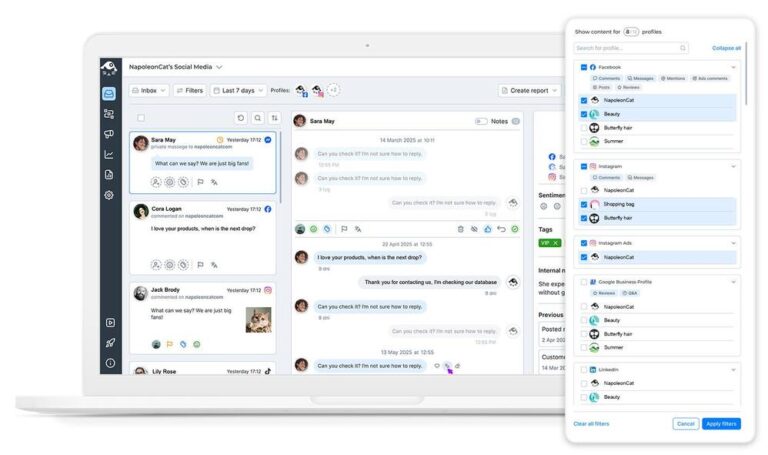
Social Inbox: Manage all your Facebook interactions in one view
For smooth Facebook moderation overall, you have the Social Inbox in NapoleonCat. All Facebook comments, private messages, and even reviews are there, all in one dashboard, across all the Facebook pages you manage.
Reply straight from the Inbox, assign to moderators to handle, and don’t miss a single important Facebook interaction (even if it happens under one of the dozens of Facebook ads you currently run).
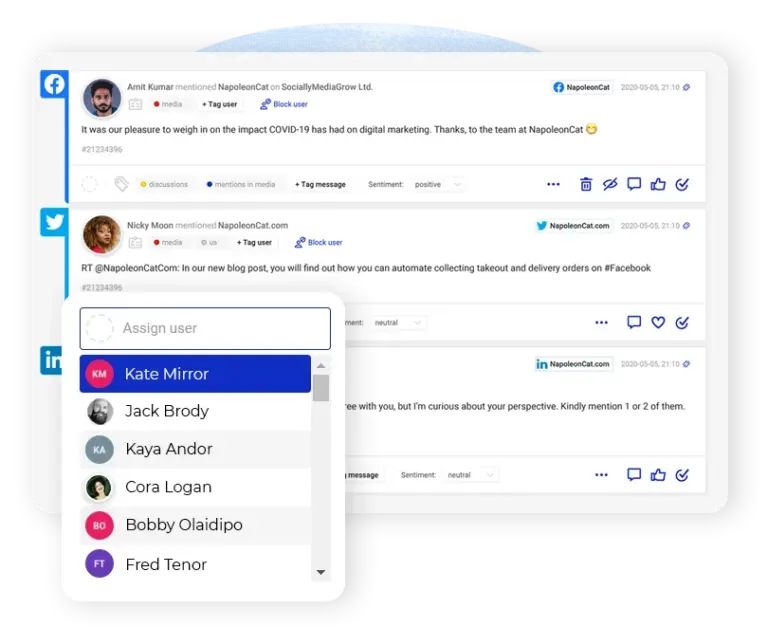
Team collaboration: Route the edge cases to the right moderator without losing track
NapoleonCat is built for teams. Assign comments and DMs manually right from the Social Inbox, or do it automatically. You can set up Auto-moderation rules that route interactions based on keywords, tags, and more, to the people who will handle them best.
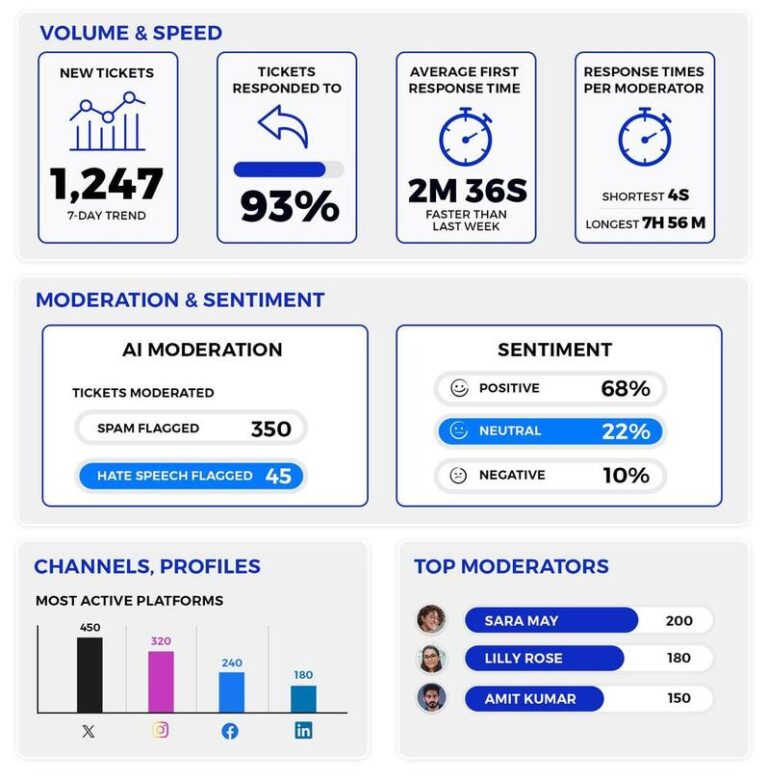
Moderation reports: See exactly what was hidden or deleted, and why
Know how your automatic Facebook moderation actually works, along with the performance of your moderation team. Moderation reports will show you your efficiency across Facebook pages, moderators, and automation tags, so you can make sure you’re doing it right (and improve what needs it).
Automated Facebook moderation that does what you need it to




Here’s why our clients love NapoleonCat
Join businesses that save hours every week with automatic Facebook moderation.

NapoleonCat saves up to one-third of a full-time position. That’s time we would otherwise spend manually moderating thousands of comments each month using the Meta Business Suite, profile by profile and comment by comment. Time we can now use for growth. NapoleonCat is the best tool of its kind on the market, and it’s still constantly evolving and improving by introducing new AI features.

It’s hard to imagine our work without a tool that includes so many valuable features. It won’t be an overstatement when I say that NapoleonCat saves us multiple full-time positions that would be dedicated to just moderating comments or manually generating reports.

NapoleonCat gives us the full picture of social media interactions. It’s easier to pick up urgent threads that need taking immediate action. And with conversation history, it’s much easier to continue the work of another team member while they’re out of office.

We work with multiple clients, and with NapoleonCat, we don’t waste time switching between multiple software tools. We can also deliver reliable data from a single source. We tested other social media moderation and analytics tools before, but none of them lived up to what NapoleonCat delivers. They’re the best, and I personally love using the tool. 🙂

NapoleonCat is now an indispensable tool that we use for moderation and analytical purposes, as well as content publishing. We’re curious to see new capabilities of the tool and test its new uses, for example, to moderate TikTok ad comments, as we predict this social media channel to become more and more important for our clients.

It’s the first social media engagement tool we have ever tried that is truly intuitive and that makes it easy for us to include the clients in the process. The service and support is great and personal. And the value for money is great!

We were looking for a tool that would allow us to consolidate and manage comments and private messages from Messenger in one place. Analytics and reports were also very important to us, as they would show us the level of our social media customer service. That’s why, in 2017, we decided to choose NapoleonCat.
See how NapoleonCat compares to its alternatives:
| Feature | NapoleonCat | Hootsuite | Sprout Social | Agorapulse |
|---|---|---|---|---|
| Rule-Based Auto-Moderation (Keywords, Sentiment, Links, Tags) | ✅ Advanced (per post, account, and time frame) | ⚠️ Limited rules | ⚠️ Limited filtering | ⚠️ 1 rule per profile (unlimited on Custom) |
| Automatic Spam & Hate Speech Removal | ✅ AI-based auto-removal | ⚠️ Limited (rules / add-on) | ❌ No auto-removal | ⚠️ Higher tiers |
| AI Sentiment Detection & Tagging | ✅ AI-supported tagging | ⚠️ Basic sentiment | ⚠️ Sentiment labels | ⚠️ Advanced plan, display only |
| Auto-Replies With Rotating Reply Variants | ✅ Yes | ⚠️ Limited | ⚠️ Limited | ⚠️ Saved replies from Advanced plan |
| Moderation Of Facebook Ad Comments | ✅ Yes (organic + ads) | ⚠️ Limited | ❌ No | ⚠️ Professional plan and up |
| Comment-To-DM Automation | ✅ Yes | ❌ No | ❌ No | ⚠️ Limited |
| AI Reply Suggestions In The Inbox | ✅ Yes (AI Reply) | ✅ Yes | ✅ Yes | ⚠️ Custom plan only |
| Comments, DMs & Facebook Reviews In One Inbox | ✅ Yes | ⚠️ Limited | ⚠️ Limited | ✅ Yes |
| Rule-Based Assignment To Moderators | ✅ Yes | ✅ Yes | ✅ Yes | ✅ Yes |
| Moderation & Team Performance Reports | ✅ Yes | ⚠️ Basic | ✅ Yes | ⚠️ Professional plan and up |
| Pricing Model | ✅ Per account (2 users and 5 profiles included) | ❌ Per user | ❌ Per seat | ❌ Per user |
| EU-Based, GDPR-First Hosting | ✅ Yes (data stored in the EEA) | ❌ CA-based | ❌ US-based | ✅ EU (AWS Ireland) |
| Starting Price | From $79/mo billed yearly (2 users, 5 profiles) | From $99/user/mo billed yearly | From $79/seat/mo (Essentials); $199/seat/mo (Standard) | From $79/user/mo billed yearly |
FAQs
What can automatic Facebook moderation actually do for me?
It handles the repetitive part of your comment section for you: replying to frequently asked questions, hiding or deleting spam and hate speech, redirecting sensitive conversations to Messenger, and assigning the rest to the right moderator. Rules run around the clock, so comments don’t sit unanswered overnight or over the weekend.
What is automated content moderation?
Automated content moderation means software applies your moderation rules to incoming comments, DMs, and reviews instead of a person working through them by hand. You define the trigger – a keyword, a link, an AI tag, comment sentiment, a specific post or ad – and the action, such as hiding, deleting, replying publicly, replying by DM, or assigning the thread to a moderator. Done well it does not replace your moderators; it clears the repetitive volume so their time goes to the conversations that actually need a person. In NapoleonCat that layer is Auto-moderation, and it runs across Facebook, Instagram, TikTok, LinkedIn, YouTube, X, and Google Business Profile, on organic posts and on ads.
Can I moderate comments under Facebook ads, not just page posts?
Yes. NapoleonCat covers comments on organic posts and on Facebook ads, including dark posts, in the same Social Inbox and under the same Auto-moderation rules. That’s usually where the worst spam lives, and it’s the hardest to find in Meta’s native tools.
What is Facebook Moderation Assist, and how is it different from NapoleonCat?
Moderation Assist is Meta’s own free tool for Facebook Pages, found in the Professional dashboard. It can automatically hide comments based on who wrote them – no profile picture, no friends or followers, an account less than a week old, a recent history of removed comments – or on what the comment contains: links, images, videos, keywords and their variations, or profanity in a handful of languages. For one page with a straightforward spam problem, it is a reasonable place to start. Where it stops is worth knowing before you rely on it. Moderation Assist works on organic content only, so comments under your Facebook ads sit outside it completely, and it matches patterns rather than meaning, so it cannot tell an irritated customer from a happy one. NapoleonCat moderates ad comments alongside organic ones, adds AI detection of spam, hate speech, and sentiment, can reply publicly or move a conversation into Messenger, routes threads to the right moderator, and reports on what was hidden or deleted and why – across every page and network you manage rather than one page at a time.
How is the AI Assistant different from Auto-moderation?
The AI Assistant detects and labels – it reads incoming comments and DMs and tags them by sentiment, spam, and hate speech. Auto-moderation acts on those labels, hiding or deleting the comment, sending a reply, or assigning the thread to a moderator. One categorizes, the other executes, and they’re most powerful used together.
Will automated moderation make my replies sound robotic?
Not if you set it up well. Each rule can hold several reply variants that rotate randomly, so the same canned sentence doesn’t appear under every comment. And for anything that needs a real answer, AI Reply drafts a suggestion based on your past replies, FAQs, and knowledge base, which you can edit before sending.
How do I know what the automation hid or deleted?
Moderation reports show what happened and why – broken down by Facebook page, by moderator, and by automation tag, alongside engagement volumes and response times. Use them to check that your rules are behaving the way you expect and to spot the ones worth tightening or relaxing.
Is my data safe, and where is it stored?
NapoleonCat is an EU-based company and stores data within the European Economic Area, and we’re GDPR-compliant as a vendor – which matters if your legal or procurement team reviews new tools. It’s a practical difference from US-hosted alternatives when you’re moderating conversations that contain customer data.
Is there a Meta comment management solution that covers Facebook and Instagram together?
Yes. Because the same rules and the same inbox cover both, you set your moderation once and it applies to your Facebook Pages and Instagram profiles, on organic posts and on ads. That is usually the reason people look for a Meta comment management solution rather than two separate tools: one rule set, one queue, one report, instead of doing the same configuration twice and hoping they stay in sync.
How quickly can I get automatic Facebook moderation running?
Connect your Facebook pages and set up your first rule in minutes – the rule builder walks you through triggers and actions step by step, and there are rule templates for the most common scenarios. The trial lasts 14 days with no credit card required, and you can book a demo if you’d rather have someone set up the first rules with you.
Put your Facebook moderation on autopilot
Free 14-day trial: full access, zero commitment.
No credit card required