
Save hours on social, every day.
Automate moderation and replies, schedule posts, and pull reports - all in one tool.
Buffer prices social media management differently from most of the category: you pay per social channel you connect, and on the Team plan you can invite as many people as you like at no extra cost. That single decision explains most of what follows, including why Buffer is cheapest for people with few channels and many users, and why per-channel billing works against you when you have many channels and few people.
Below is the full price list, the volume tiers that are easy to misread, and the four things that sit in the FAQ and the help centre rather than on the pricing table. Every figure below was checked on Buffer’s own pricing page, its machine-readable pricing file, its help centre and its terms of service in November 2026.
Key Takeaways
- Buffer bills per channel, never per seat. Essentials is $6 per channel a month and includes one user. Team is $12 per channel and includes unlimited users.
- The volume tiers are marginal, not flat. Channels 1 to 10 cost the full rate, 11 to 25 cost $4 each on both paid plans, 26 to 50 cost $3. Buffer’s own worked examples confirm it: 50 channels on Essentials is $195, not 50 times $3.
- Above ten channels, Essentials and Team cost the same per channel. Both drop to $4, so the gap between the two plans stops growing and stays at $60 a month.
- The free plan is a real plan, not a trial. Three channels, ten queued posts per channel, one user, 30 days of analytics history, and the Community comment inbox included.
- “Unlimited” posting has a published number. Buffer’s fair use policy caps it at 5,000 posts per channel.
- The 14-day trial does not need a card. If you never enter payment details you drop to the free plan instead of being charged.
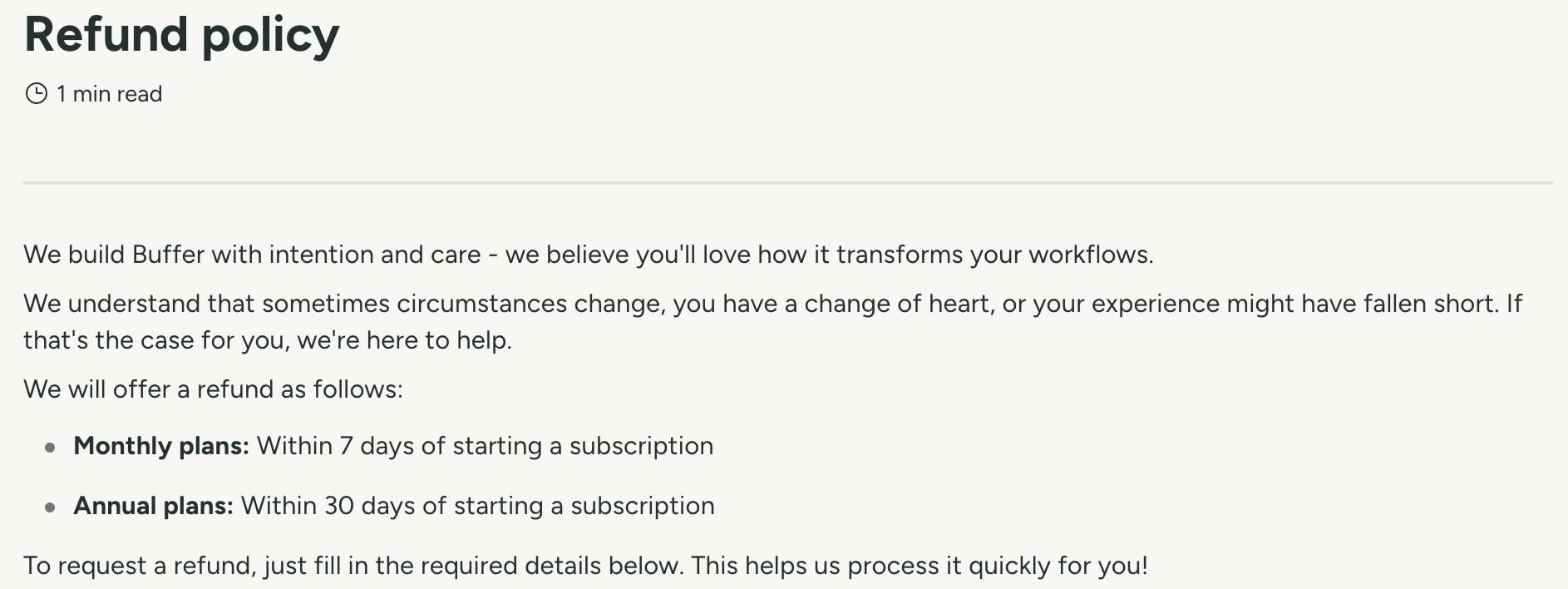
- Refunds exist but only inside a window. Seven days on monthly plans, 30 days on annual, per the help centre. The terms of service state fees are non-refundable except where the policy provides otherwise.
What Buffer costs in 2026
Three plans, one of them free.
| Plan | Monthly | Annual | Users | What you get |
|---|---|---|---|---|
| Free | $0 | $0 | 1 | Up to 3 channels, 10 queued posts per channel, 100 ideas, 30 days of analytics, Community inbox |
| Essentials | $6 per channel | $5 per channel | 1 | Unlimited channels and queued posts, advanced analytics, engagement tools |
| Team | $12 per channel | $10 per channel | Unlimited | Everything in Essentials plus unlimited team members, approval workflows and access controls |
Buffer last updated these prices in November 2025, which it states on the pricing page.
The volume tiers, and the mistake they invite
Per-channel rates fall as you connect more channels. The rates are marginal, which means each band applies only to the channels inside it, not to your whole account.
| Channels | Essentials | Team |
|---|---|---|
| 1 to 10 | $6 per channel | $12 per channel |
| 11 to 25 | $4 per channel | $4 per channel |
| 26 to 50 | $3 per channel | $3 per channel |
| 51 and above | $1 per channel | $2 per channel |
Read that as a flat rate and you will underestimate every bill above ten channels. Buffer’s own worked examples make the arithmetic explicit.
| Channels | Essentials monthly | Essentials annual | Team monthly | Team annual |
|---|---|---|---|---|
| 1 | $6 | $5 | $12 | $10 |
| 3 | $18 | $15 | $36 | $30 |
| 5 | $30 | $25 | $60 | $50 |
| 10 | $60 | $50 | $120 | $100 |
| 25 | $120 | $100 | $180 | $150 |
| 50 | $195 | $163 | $255 | $213 |
Two things fall out of that table. Fifty channels on Essentials works out at $3.90 each rather than $3, because the first ten still cost $6. And from eleven channels upward the two paid plans charge the same $4 per channel, so the price of adding unlimited users, approvals and access controls stops growing: from ten channels to fifty, the gap between the two plans stays at $60 a month however many you add.
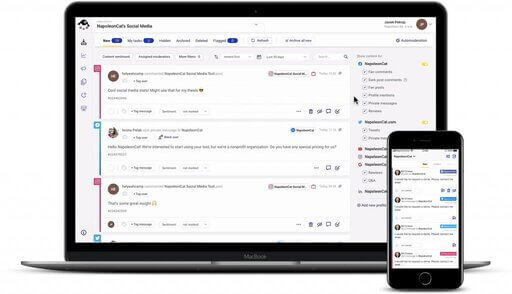
Manage and automate conversations across all your socials
Manage and automate social media interactions on Facebook, Instagram, TikTok, LinkedIn, YouTube, and Google My Business – with an all-in-one social media tool.
What the pricing table leaves out
Four figures a buyer needs before signing off a budget, none of them on the table itself. Three are in the FAQ underneath it and one is in the help centre.
- “Unlimited” posting is capped at 5,000 posts per channel. Buffer states the number and explains the wording: it describes the cap as unlimited because no customer has reached it.
- Annual billing is described two ways on the same page. The FAQ says annual billing gives a 20% discount. The rate table shows $6 falling to $5 and $12 to $10, which is 16.7%. The rate table is the operative number.
- Upgrading from free does not keep your free channels. If you move to a paid plan you pay for every connected channel, including the three you had before.
- Nonprofits get 50% off paid plans. Applied on request through the help centre.
The free plan, in detail
Buffer’s free plan is unusually generous for this category and it is worth stating plainly what it includes: three channels, ten queued posts per channel with the slot freeing up once a post publishes, 100 ideas, one user, unlimited use of the AI assistant, 30 days of analytics history, and the Community comment inbox with five AI reply suggestions a week and one saved reply.
What it excludes: first-comment scheduling, channel groups, the hashtag manager, custom video covers, notes, approval workflows, custom permissions, and reports beyond the 30-day Insights view.
Trial, refunds and cancellation
The trial runs 14 days on paid plans and a card is not required to start one. Buffer’s FAQ states that if you do not upgrade and have not entered payment details, the account is downgraded to free rather than charged. One trial per account, and it is unavailable on legacy Pro, Premium and Business plans.
Refunds are set out in the help centre: within seven days of starting a monthly subscription, within 30 days of starting an annual one, requested through a form. The terms of service take the opposite starting position, stating that fees are non-refundable unless the terms specifically provide otherwise, so the published window is the exception to the contractual default rather than a separate promise.
Buffer publishes both windows in the same help centre article.
Cancellation happens in billing settings or by email, and the plan stays active until the end of the period you have paid for. Only the account owner can reach billing or delete an account. A failed payment is retried four times over three weeks before the account is downgraded.
What happens when you downgrade to free
Buffer documents this properly. Channels above three are locked rather than disconnected, and you choose which three stay live. Queued posts already scheduled still publish, but you cannot add new ones until the queue falls below ten per channel. Ideas are capped at 100, analytics history shrinks to 30 days, and additional users lose access because free is owner-only. Nothing is deleted; deleting the account is a separate and irreversible action.
Buffer vs NapoleonCat: two different billing models
These tools are priced along different axes, so the comparison only works once you fix both numbers: how many channels, and how many people.
| What to compare | Buffer | NapoleonCat |
|---|---|---|
| Billing model | Per channel, unlimited users on Team | Per plan, users and profiles included in steps |
| Entry price | $6 per channel monthly, $5 annual, one user on Essentials | $89 a month, or $79 billed annually, for 2 users and 5 profiles on Standard |
| Five people, ten channels | $120 a month on Team, or $100 annual | $149 a month on Standard for 5 users and 10 profiles |
| Free plan | Yes, 3 channels, 1 user | No, 14-day trial, no card |
| Comment handling | Community: reply, filter and sort, saved replies, AI suggestions, comment score | Social Inbox on Pro from $109, manual moderation |
| Automated moderation | Not offered | Expert, from $139 a month, or $119 billed annually, for 2 users and 5 profiles |
| Ad comments | Buffer states Community cannot pull comments from ads | Facebook, Instagram, TikTok and YouTube |
| Platforms | 11 networks for publishing; Community covers 10 | Facebook, Instagram, TikTok, YouTube, LinkedIn company pages, Google Business Profile |
On price for scheduling, Buffer usually wins and there is no point pretending otherwise: a five-person team running ten channels pays $120 a month on Buffer Team against $149 for NapoleonCat Standard, and Buffer has a free tier where NapoleonCat has none.
The models diverge when the job stops being publishing. Buffer’s Community inbox lets you reply to comments across ten platforms, filter and sort them, and use saved replies and AI suggestions, and Buffer states it is included with every Buffer plan at no extra cost. Buffer describes it in its own FAQ as “a lightweight, free alternative” to a social inbox, built for creators rather than support teams.

The second limit matters more if you run paid social. Buffer states that it can only pull in comments from organic posts, so Community cannot be used to reply to comments on ads.

Its Community pages describe no hide or delete action and no rule-based automation. If what you need is spam and abuse hidden automatically under paid social, that is a different product, and in NapoleonCat it starts on the Expert plan at $139 a month. That is the argument for a Buffer alternative built around moderation rather than publishing.
Buffer pricing FAQ
How much does Buffer cost per month?
Essentials starts at $6 per channel a month, or $5 billed annually, and includes one user. Team is $12 per channel, or $10 annually, with unlimited users. There is also a free plan for up to three channels.
Is Buffer free?
Yes, permanently, for up to three channels with ten queued posts per channel, one user and 30 days of analytics. The Community comment inbox is included on the free plan.
Does Buffer charge per user?
No. Essentials includes one user and Team includes unlimited users at no additional cost. You pay for channels, not seats.
What is a channel in Buffer?
One social account you connect: a single Instagram profile, a Facebook page, a LinkedIn page. Five brands with an Instagram and a Facebook page each is ten channels.
Does Buffer have a free trial and does it need a card?
Fourteen days on paid plans, and no card is required. If you do not enter payment details the account moves to the free plan at the end of the trial.
Can I get a refund from Buffer?
The help centre offers refunds within seven days of starting a monthly plan and within 30 days of starting an annual one. The terms of service otherwise treat fees as non-refundable.
Is Buffer really unlimited?
Posting is capped at 5,000 posts per channel under the fair use policy. Buffer publishes the number and says no customer has reached it.
What do people say about Buffer on Reddit?
Simplicity is the most common compliment across Buffer reviews on Reddit, in 24% of comments, and price is raised favourably in another 24%. Complaints about posts failing to publish appear in 2 of 117 comments, which is markedly lower than on Trustpilot.
Does Buffer moderate comments?
Buffer’s Community inbox lets you reply to comments on ten platforms, filter and sort them, and use saved replies and AI suggestions. Buffer states it is included with every plan at no extra cost, and that Community cannot be used to reply to comments on ads. Buffer’s Community pages do not describe any way to hide or delete a comment, or to act on one by rule. For automatic hiding and deleting, NapoleonCat starts at $139 a month on the Expert plan.
Manage and automate conversations across all your socials
Manage and automate social media interactions on Facebook, Instagram, TikTok, LinkedIn, YouTube, and Google My Business – with an all-in-one social media tool.