
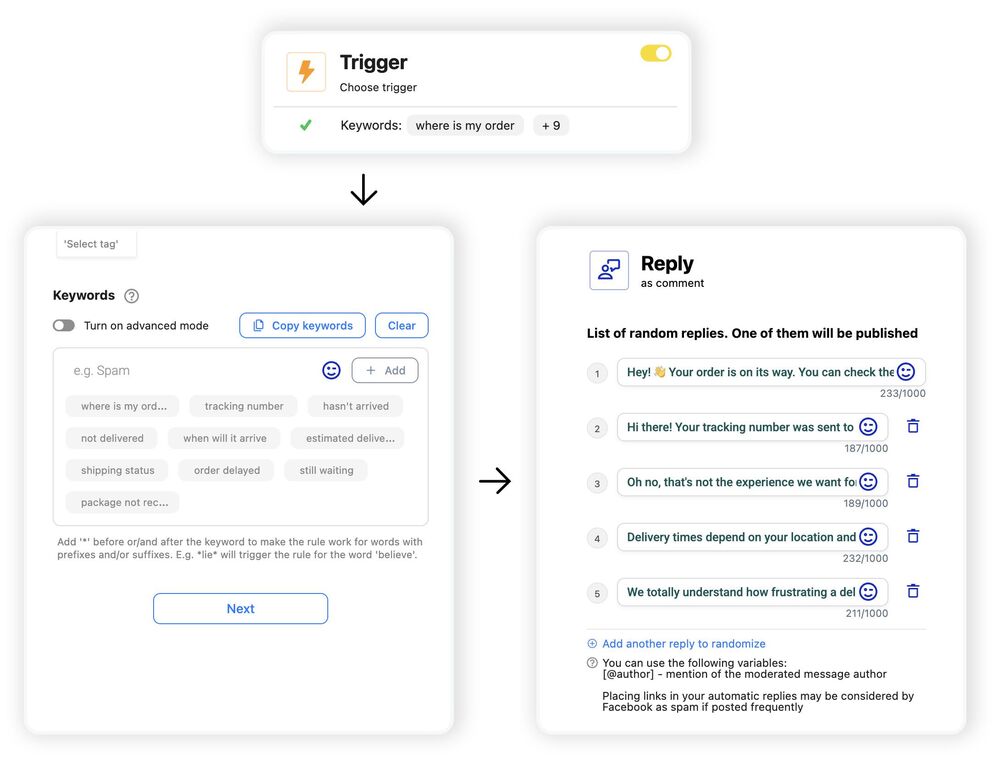
If you need a smart Facebook comment auto reply, here’s one that offers this and so much more. With NapoleonCat, you can automatically reply to Facebook comments in a customized way that native tools just don’t offer.
Facebook Comment Auto Reply – Automate Replies 24/7 with AI
Trusted by:




Supported platforms








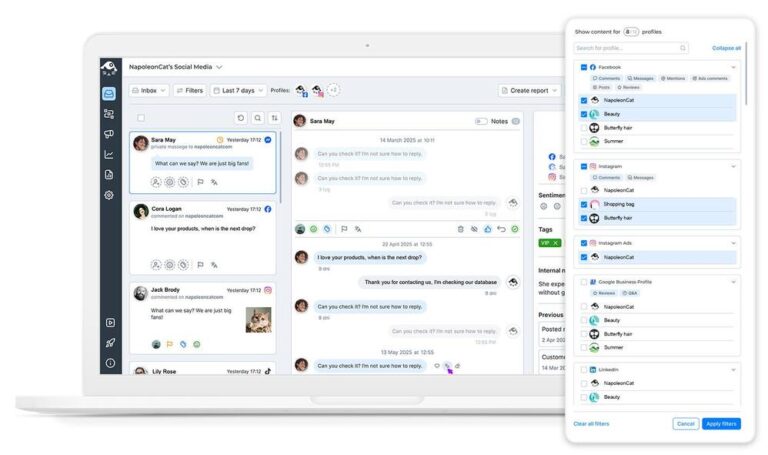
Manage every Facebook comment from one view
Manage all your Facebook comments and DMs next to other social media platforms in one dashboard – the Social Inbox. You can reply manually from there, hide and delete comments, assign them to moderators, and more, while everyone stays on top of moderation tasks.
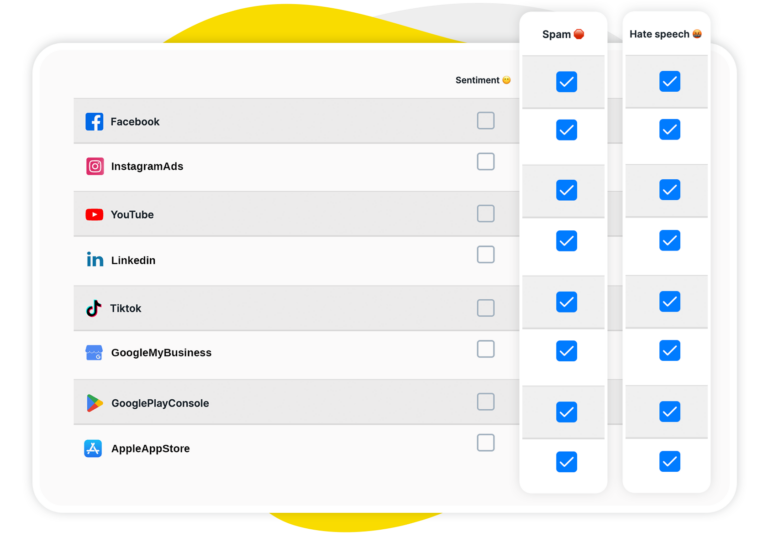
Auto-detect sentiment, spam and categorize Facebook comments with AI
The first step to Facebook comment automation is finding the right ones to automate. This is easy with your AI Assistant, which automatically detects and tags spam, hate, and negative and positive sentiment, right in your Social Inbox.
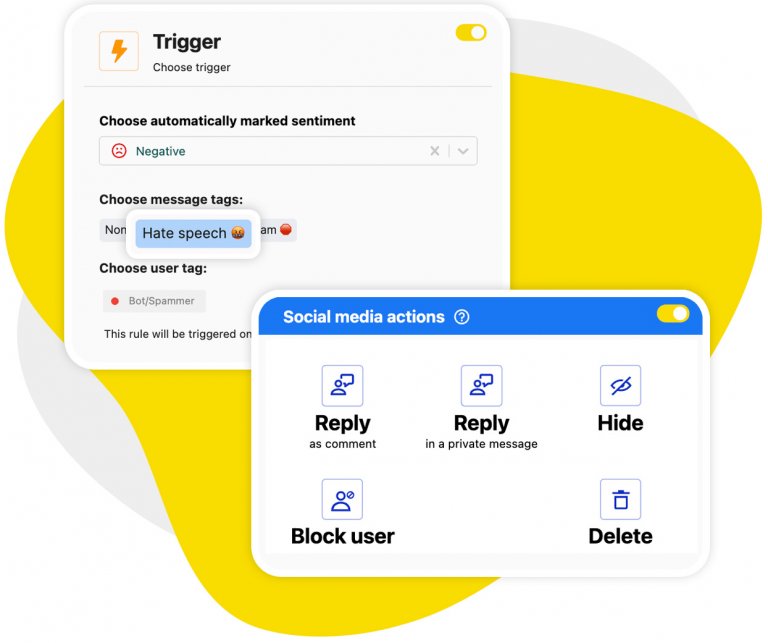
Set up automatic replies to Facebook comments 24/7
To set up automatic replies to Facebook comments, build Auto-moderation rules around triggers you define: the AI Assistant’s tags, your own keywords, and more. Create multiple reply versions that the system will randomly rotate, so your followers don’t see the same automated comment over and over again.
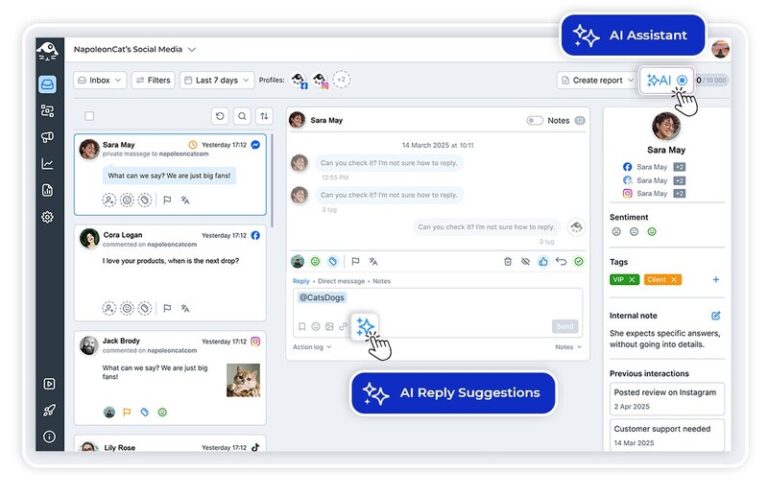
AI reply: Get smart, on-brand responses to Facebook comments instantly
Use AI’s help to automatically craft replies that are relevant and sound human. AI learns from your past replies and your FAQ and help content to generate reply suggestions you can then edit, approve, and send – much faster than you normally would.
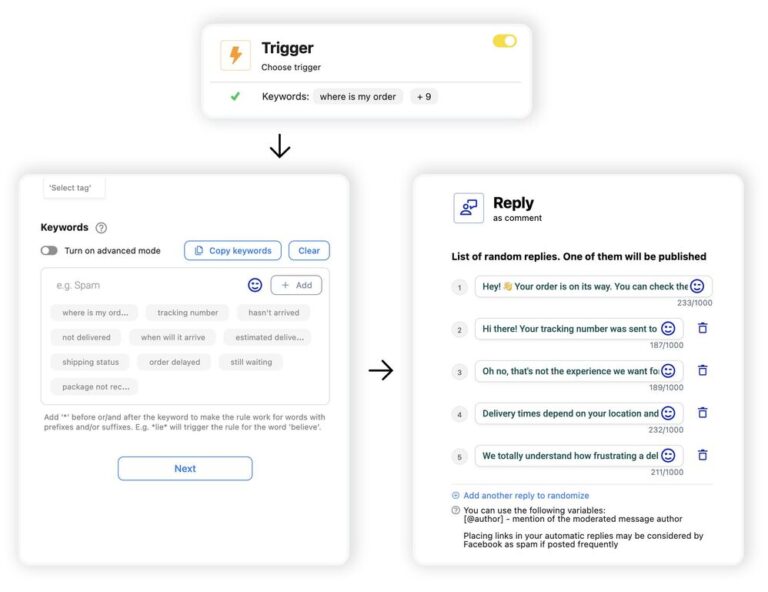
Custom auto-reply rules: Trigger replies based on keywords, sentiment, or context
With NapoleonCat, you can really tailor your response instead of sending the same Facebook auto reply to everyone. Trigger Auto-moderation workflows based on different words and phrases, AI or manually tagged sentiment, user tags, and more. And for the more complicated cases, automatically assign comments to human moderators.
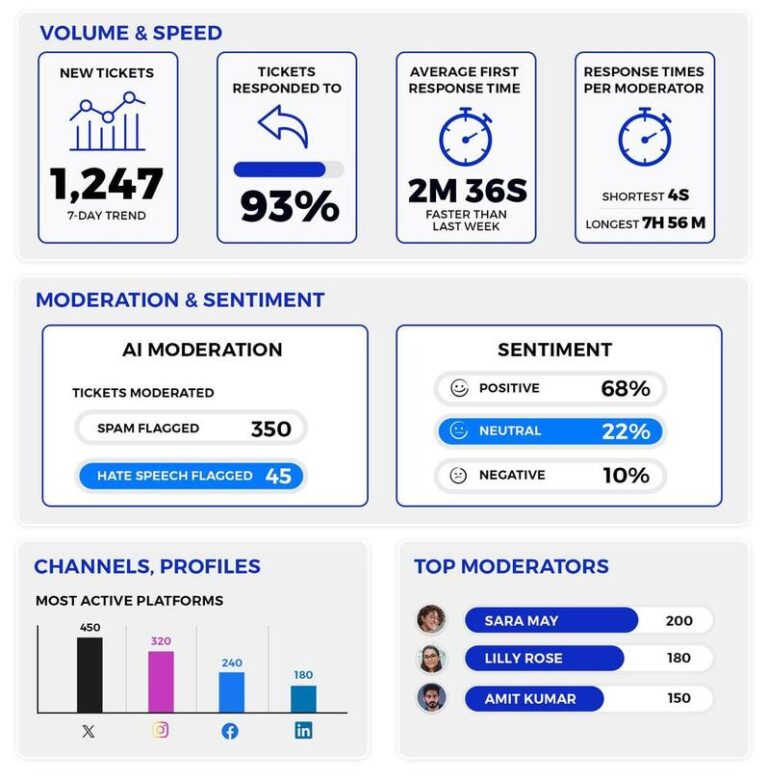
Scale Facebook engagement automatically and track what it delivers
Monitor how your moderation is doing, both human and automated. Automating the predictable replies is what lets you handle far more comments without adding people, and moderation reports are how you confirm the extra volume has not cost you quality. Introduce improvements based on what the numbers show, all to provide the best customer service possible.
Try all the Facebook tools NapoleonCat offers




Here’s why our clients love NapoleonCat
Join businesses that save hours every week with automated Facebook comment replies.

NapoleonCat saves up to one-third of a full-time position. That’s time we would otherwise spend manually moderating thousands of comments each month using the Meta Business Suite, profile by profile and comment by comment. Time we can now use for growth. NapoleonCat is the best tool of its kind on the market, and it’s still constantly evolving and improving by introducing new AI features.

It’s hard to imagine our work without a tool that includes so many valuable features. It won’t be an overstatement when I say that NapoleonCat saves us multiple full-time positions that would be dedicated to just moderating comments or manually generating reports.

NapoleonCat gives us the full picture of social media interactions. It’s easier to pick up urgent threads that need taking immediate action. And with conversation history, it’s much easier to continue the work of another team member while they’re out of office.

We work with multiple clients, and with NapoleonCat, we don’t waste time switching between multiple software tools. We can also deliver reliable data from a single source. We tested other social media moderation and analytics tools before, but none of them lived up to what NapoleonCat delivers. They’re the best, and I personally love using the tool. 🙂

NapoleonCat is now an indispensable tool that we use for moderation and analytical purposes, as well as content publishing. We’re curious to see new capabilities of the tool and test its new uses, for example, to moderate TikTok ad comments, as we predict this social media channel to become more and more important for our clients.

It’s the first social media engagement tool we have ever tried that is truly intuitive and that makes it easy for us to include the clients in the process. The service and support is great and personal. And the value for money is great!

We were looking for a tool that would allow us to consolidate and manage comments and private messages from Messenger in one place. Analytics and reports were also very important to us, as they would show us the level of our social media customer service. That’s why, in 2017, we decided to choose NapoleonCat.
See how NapoleonCat compares to its alternatives
| Feature | NapoleonCat | Hootsuite | Sprout Social | Sendible | Buffer |
|---|---|---|---|---|---|
| Rule-Based Auto-Moderation | ✅ Advanced (keywords, sentiment, ads, time rules) | ⚠️ Limited rules | ⚠️ Limited filtering | ❌ No | ❌ No |
| AI Spam & Hate Speech Removal | ✅ AI-based auto removal | ⚠️ Limited (rules / add-on) | ❌ No auto removal | ❌ No | ❌ No |
| Sentiment Detection | ✅ AI-supported tagging | ⚠️ Basic sentiment | ⚠️ Sentiment labels | ❌ No | ❌ No |
| AI Reply Suggestions (Inbox) | ✅ Yes (AI Reply) | ✅ Yes | ✅ Yes | ❌ No | ❌ No |
| Automation for Ad Comments | ✅ Yes (FB, IG, TT, YT ads) | ⚠️ Limited | ❌ No | ❌ No | ❌ No |
| Auto Assignment to Team Members | ✅ Yes (rule-based) | ✅ Yes | ✅ Yes | ⚠️ Basic | ❌ No |
| Automation for DMs | ✅ Yes | ⚠️ Limited | ⚠️ Limited | ❌ No | ❌ No |
| Custom Automation Scenarios (per post/account/time) | ✅ Fully customizable | ⚠️ Limited flexibility | ⚠️ Limited | ❌ No | ❌ No |
| GDPR & EU Data Compliance | ✅ EU-based, GDPR-first | ❌ North America-based | ❌ US-based | ❌ UK-based | ❌ US-based |
| Starting Pricing | From $79 (account, multi-user) | From $99 per user | From $199 per user | From $29 per user | From $5 per channel |
FAQs
How does Facebook comment auto-reply work in NapoleonCat?
You build rules in Auto-moderation that trigger on keywords, sentiment, specific posts, AI Assistant tags, and more. When a matching comment appears on your Facebook page, NapoleonCat replies, hides, deletes, or assigns it – automatically, 24/7.
Can you auto reply to Facebook comments without a third-party tool?
Up to a point, yes. Meta Business Suite includes built-in automations that can reply to comments on your Page’s organic posts using keyword triggers, and they cost nothing to use. Teams tend to outgrow them for three reasons: the native automations work one Page at a time, they don’t tag comments by sentiment or intent, and they can’t rotate between several versions of the same reply, so regulars start seeing identical wording. Comments under ads and dark posts sit outside them as well. NapoleonCat covers all of that from a single Social Inbox across every Facebook Page you manage, with the AI Assistant deciding what gets hidden, what gets answered automatically, and what goes to a person. If you’re handling a few comments a day on one Page, Meta’s native tools are genuinely enough. If it’s hundreds across several Pages and paid campaigns, that’s the point where a dedicated auto reply tool pays for itself.
Can I automate replies to Facebook ad comments?
Yes. Auto-moderation works on comments under your Facebook ads (as well as Instagram, TikTok and YouTube ads), so you can stay on top of paid campaigns without manually checking every ad placement.
Can I auto reply to Facebook comments on more than one Page?
Yes. Every Facebook Page you connect shows up in the same Social Inbox, and a single Auto-moderation rule can run across all of them or stay limited to one. This is usually the moment teams stop managing comments inside Facebook itself: once you’re switching between Pages to keep up, an auto reply that runs everywhere at once removes the switching entirely. Agencies and multi-brand teams normally set one baseline rule set to handle spam and the repeat questions, then layer Page-specific rules on top of it. If you need to automate Facebook comment replies for a client roster rather than a single brand, this is the part that scales.
Can NapoleonCat detect spam and hate speech on Facebook?
Yes. The AI Assistant automatically detects spam and hate speech and tags those comments inside the Social Inbox. From there, Auto-moderation can hide or delete them so they never disrupt your comment section.
Will automated replies feel robotic?
Not if you don’t want them to. You can add several reply variants per rule that NapoleonCat rotates randomly, and AI Reply suggestions learn from your past replies and brand content to sound on-brand. You can also edit any AI-generated reply before it goes out.
Can multiple team members manage Facebook comments?
Yes. The Social Inbox is a shared workspace – you can assign threads, leave internal notes, and define roles, so everyone knows what’s already been handled and what needs attention.
Is NapoleonCat an auto commenting AI for Facebook?
Yes – under the hood it’s the same engine that powers NapoleonCat’s auto commenting AI for Instagram and TikTok. The AI Assistant analyzes each Facebook comment for sentiment and intent, tags it, and your Auto-moderation rules reply, hide, or route it to the right person – automatically, from your own Page.
Can AI write my Facebook comment replies for me?
It can. The AI Assistant drafts context-aware reply suggestions your team sends in one click, and fully automated rules handle the repetitive cases – pricing questions, shipping updates, thank-yous – 24/7. You define the tone of voice once, so nothing sounds robotic.
What’s the difference between a Facebook comment bot and NapoleonCat?
Comment bots post fake engagement from fake accounts, which violates Facebook’s policies and gets Pages restricted. NapoleonCat replies from your own Page through the official Facebook API – real answers to real customers, policy-safe, with full team reporting.
Can I scale Facebook engagement automatically?
Yes, and that is exactly what Auto-moderation plus the Social Inbox are for. Auto-moderation answers the comments that follow a predictable pattern around the clock, triggered by your own keywords, by AI-detected sentiment, or by user tags, while your team keeps the conversations that genuinely need a person. The practical effect is that the number of comments you can answer stops being tied to how many hours your moderators are online, so you scale Facebook engagement automatically instead of by hiring. Replies are only one piece of it, because the same setup also covers scheduling, moderation and reporting from a single Facebook automation tool. Add several versions of each automated reply so people who come back to your page do not see identical wording twice.
Is there a free Facebook comment auto responder?
Meta’s own automations are free and will cover simple keyword replies on a single Page, so that is the honest starting point if your volume is low. Beyond that, most Facebook comment auto responder tools are paid, NapoleonCat included. The 14-day trial has every feature unlocked and does not ask for a card, which is normally long enough to see what share of your comments can be answered without anyone touching them. There is no permanently free plan.
Is there a free trial?
Yes – 14 days, all features included, no credit card required.
Auto-reply to Facebook comments around the clock
Free 14-day trial: full access, zero commitment.
No credit card required