
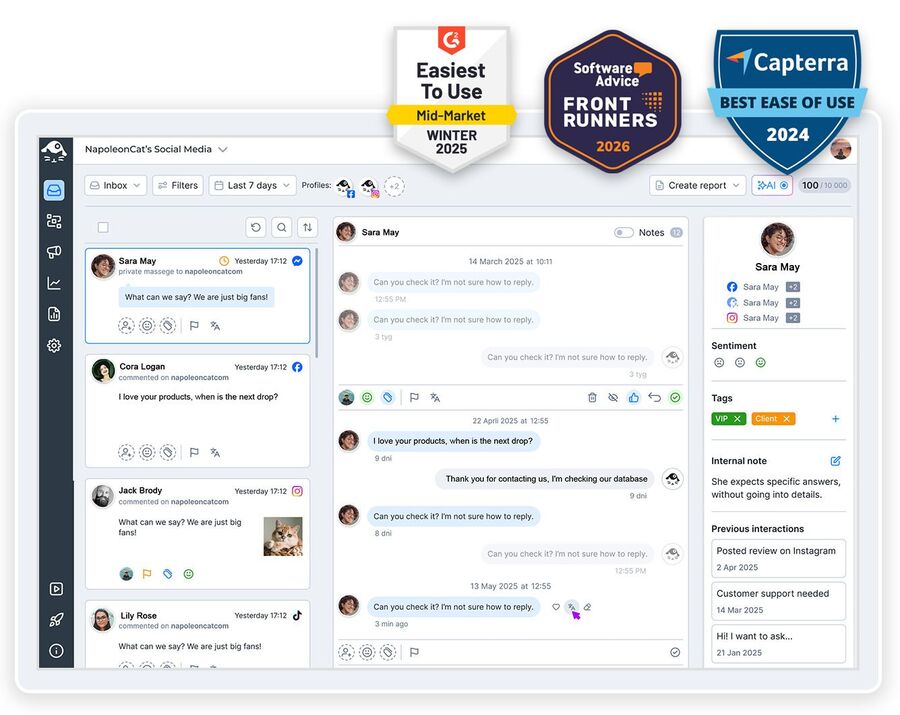
Facebook Ads comment moderation giving you a headache? Manage comments on your Facebook ads along with all your other social media comments in one social media moderation tool, and never miss a single one.
Facebook Ads Comment Moderation – Manage Ad & Dark Post Comments
Trusted by:




Supported platforms








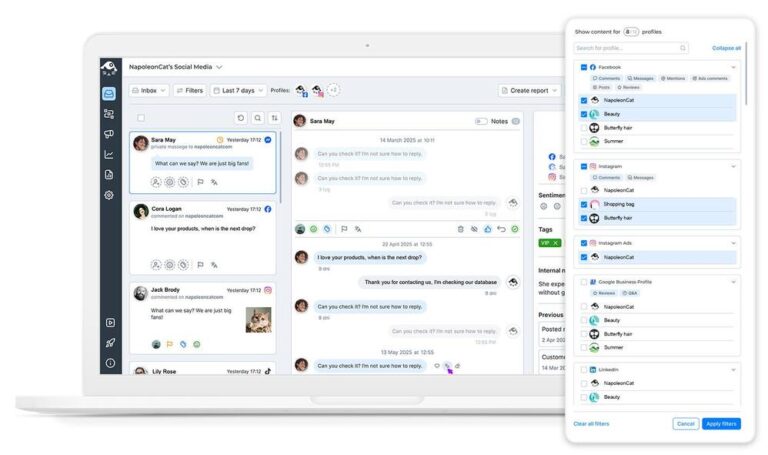
Manage comments on every Facebook ad and dark post in one view
Every Facebook ad comment can make its way to the same dashboard as comments and DMs from all your other social media profiles. In the Social Inbox, you can manage them from one view, individually or in bulk. You can even assign them to team members if someone leaves a complaint under your ad that needs resolving (and this way, you know you won’t miss it).
However many campaigns are live, managing comments on Facebook ads stays one job in one view, not one per ad account. And since the same inbox holds the comments under your Pages’ organic posts, Facebook comment management stays one job as well, not one tool for ads and a second for everything else.
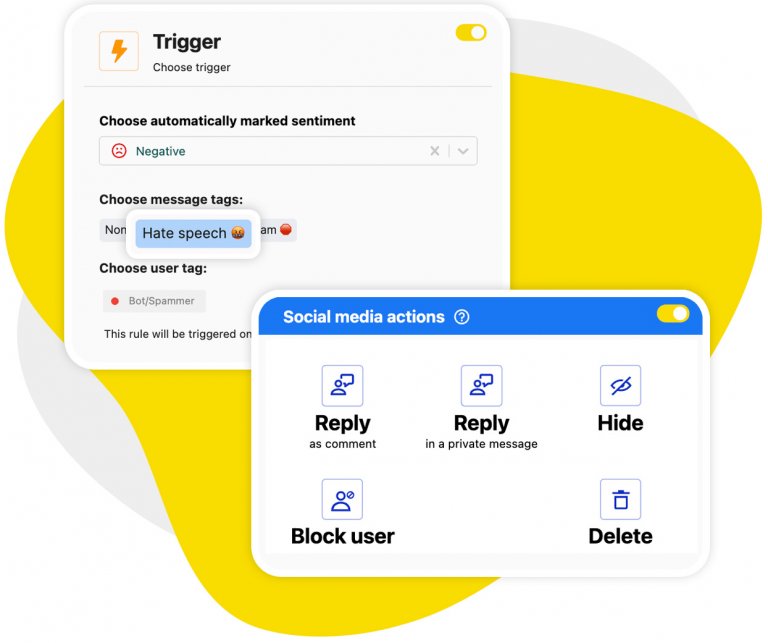
Auto-moderation: Automatically hide or delete unwanted comments on Facebook ads 24/7
Automate removing unwanted comments from your paid ads – spam, hate, links, trolling, and other things that literally use your ad money to reach your ad audience, often hurting your ad conversions in the process.
Set up Auto-moderation workflows based on keywords, AI tags, links, and more, and don’t worry about it. You don’t have to turn off comments on Facebook ads to keep them clean – set a rule once, and the spam disappears on its own. And it doesn’t have to stop at your ads. Switch the same rule on for your Page posts, and your Facebook comment moderation runs from one place instead of two.
Want comments gone entirely? Create an Auto-moderation rule with no keywords or specific triggers, and it will apply to every incoming comment on your Facebook ads – effectively turning them all off.
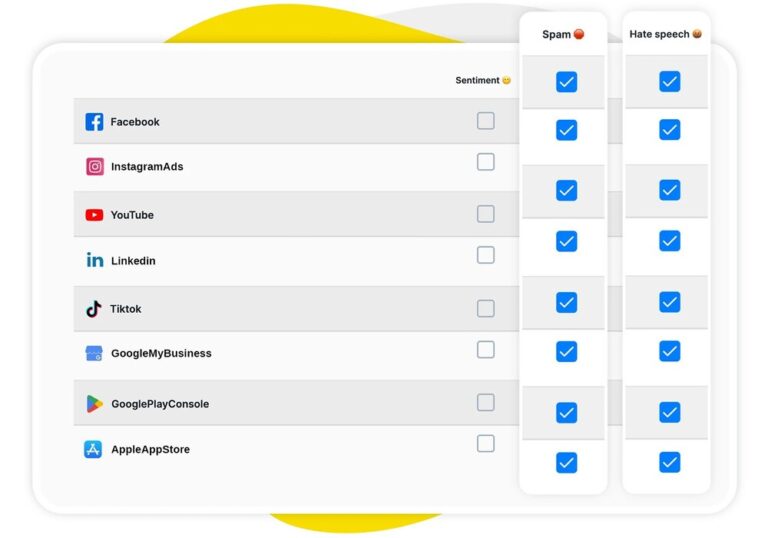
AI assistant: Auto-detect spam, hate speech, and negative sentiment on ad comments
Your AI Assistant in the Inbox does some of the work for you. It automatically detects spam, hate, and comment sentiment, so you can prioritize the next steps in the Inbox and plan your Auto-moderation scenarios.
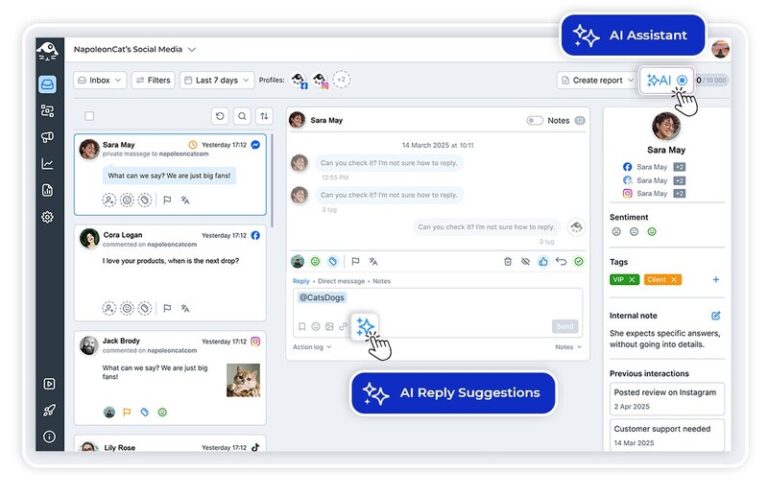
AI reply suggestions: Get smart response recommendations for every ad comment
AI can also write your replies – the way you would write them, just faster. It will suggest replies based on the way you replied in the past and what’s in the content you provide, like your FAQs and help articles. You can then edit, approve, and cut your response times without compromising their quality.
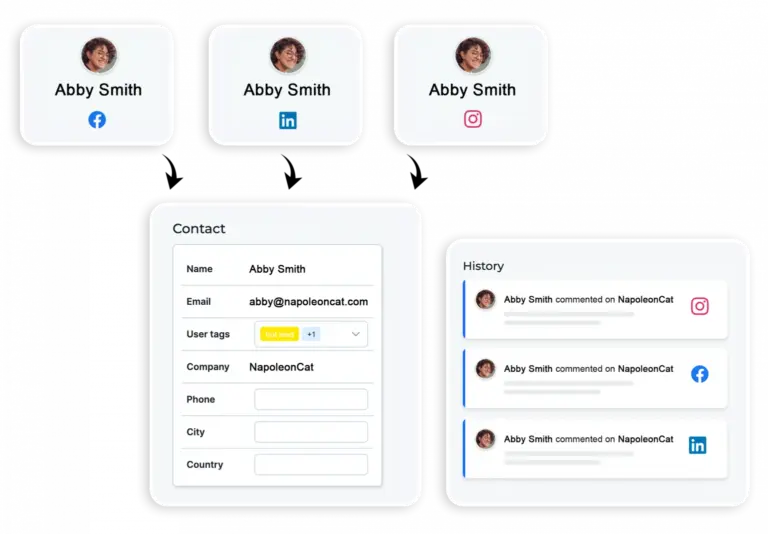
Social CRM: Track ad commenter history and customer interactions
In NapoleonCat, you can also see past conversations across ads and organic posts on different social media platforms by individual commenters. Go to their Social CRM profile and get the whole context of your past interactions, whether they happened under an ad, in a DM, or in an organic post.
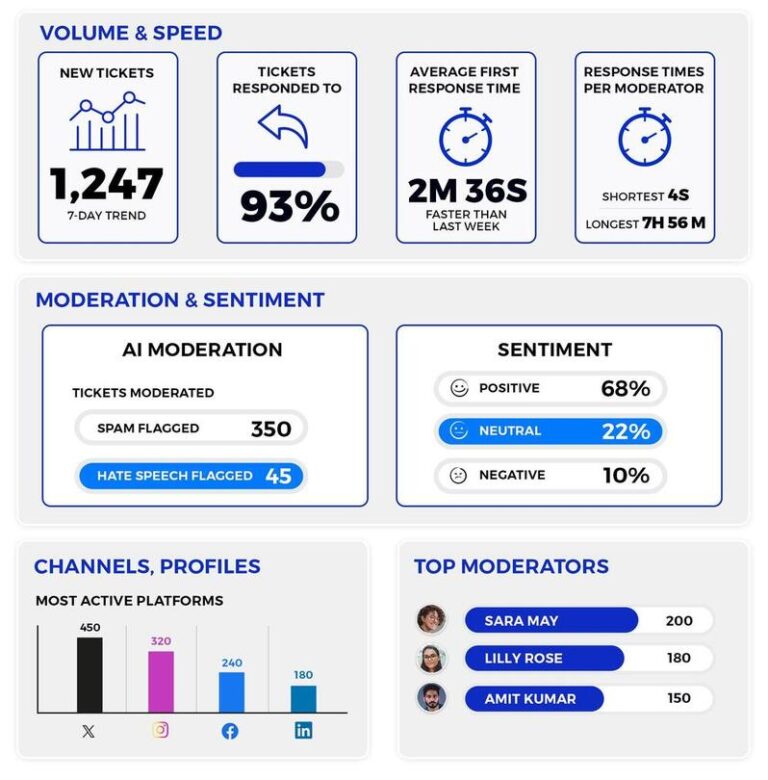
Moderation reports: Track ad comment activity and filtering effectiveness
Not only can you track and respond to the comments on your Facebook ads and dark posts, but you can also monitor how effective your ad comment moderation really is. With details on volume, best performers, and moderation gaps to fill. Reports cover your Page posts as well as your ads, so you can see whether your moderation is actually keeping up, on both sides.
Get more social media tools for your organic posts and ads




Here’s why our clients love NapoleonCat
Join businesses that save hours every week with automated Facebook ads comment moderation.

NapoleonCat saves up to one-third of a full-time position. That’s time we would otherwise spend manually moderating thousands of comments each month using the Meta Business Suite, profile by profile and comment by comment. Time we can now use for growth. NapoleonCat is the best tool of its kind on the market, and it’s still constantly evolving and improving by introducing new AI features.

It’s hard to imagine our work without a tool that includes so many valuable features. It won’t be an overstatement when I say that NapoleonCat saves us multiple full-time positions that would be dedicated to just moderating comments or manually generating reports.

NapoleonCat gives us the full picture of social media interactions. It’s easier to pick up urgent threads that need taking immediate action. And with conversation history, it’s much easier to continue the work of another team member while they’re out of office.

We work with multiple clients, and with NapoleonCat, we don’t waste time switching between multiple software tools. We can also deliver reliable data from a single source. We tested other social media moderation and analytics tools before, but none of them lived up to what NapoleonCat delivers. They’re the best, and I personally love using the tool. 🙂

NapoleonCat is now an indispensable tool that we use for moderation and analytical purposes, as well as content publishing. We’re curious to see new capabilities of the tool and test its new uses, for example, to moderate TikTok ad comments, as we predict this social media channel to become more and more important for our clients.

It’s the first social media engagement tool we have ever tried that is truly intuitive and that makes it easy for us to include the clients in the process. The service and support is great and personal. And the value for money is great!

We were looking for a tool that would allow us to consolidate and manage comments and private messages from Messenger in one place. Analytics and reports were also very important to us, as they would show us the level of our social media customer service. That’s why, in 2017, we decided to choose NapoleonCat.
Compare NapoleonCat with other Facebook ads comment moderation tools
| Feature | NapoleonCat | Hootsuite | Sprout Social | Metricool |
|---|---|---|---|---|
| Facebook Ads & Dark Post Comment Moderation | ✅ Yes (FB, IG, TikTok, YouTube & TikTok ads) | ⚠️ Limited, no AI for ads | ❌ No | ❌ No |
| AI Spam & Hate Removal | ✅ AI-based auto removal | ⚠️ Limited (third-party add-on) | ❌ No auto removal | ❌ No |
| AI Sentiment Tagging | ✅ Yes (AI-supported) | ⚠️ Basic sentiment | ⚠️ Sentiment labels only | ❌ No |
| AI Reply Suggestions | ✅ Yes | ✅ Yes | ✅ Yes | ❌ No |
| FAQ Auto-Replies | ✅ Yes (rotating replies) | ⚠️ Limited | ⚠️ Limited | ❌ No |
| Unified Social Inbox | ✅ Yes (comments, DMs, reviews, ads) | ✅ Yes | ✅ Yes | ⚠️ Basic |
| Moderation Reports | ✅ Detailed | ⚠️ Limited | ⚠️ Limited | ❌ No |
| GDPR & EU Data Hosting | ✅ EU-based, GDPR-first | ❌ Canada-based | ❌ US-based | ⚠️ EU-based |
| Starting Price | From $79 (2 users, 5 profiles) | From $99 per user | From $199 per user | From $20 |
FAQs
Why do comments on Facebook ads need moderation?
Because spam, hate, and troll comments under your ads literally use your ad budget to reach your audience – and they can hurt your ad conversions. Moderating ad comments protects both your brand image and your ad performance.
How do I see and manage comments on Facebook ads?
Natively it is fragmented – to see comments on Facebook ads you move between Ads Manager and your Page inbox, and comments on unpublished dark posts barely surface at all. In NapoleonCat, every one of your Facebook ad comments lands in the Social Inbox next to your organic comments, DMs, and reviews, across every page and ad account you manage. Filter to ads only, reply straight from the Inbox, hide or delete a comment, assign a thread to a teammate, or leave it to a rule. It turns Facebook comment management into one screen instead of three.
What are dark posts, and can NapoleonCat moderate them?
Dark posts are unpublished ads – they don’t appear on your Facebook page, but people still see and comment on them in their feeds. NapoleonCat pulls comments from dark posts into the same Social Inbox as your organic and published ad comments, so none of them slip under the radar.
Can NapoleonCat automatically hide negative comments on my ads?
Yes. You can set up Auto-moderation rules based on keywords, links, or AI-detected tags like spam, hate, or negative sentiment. Matching comments get hidden or deleted automatically, 24/7 – before your audience sees them. That is AI comment moderation for brands applied to ads: the same tags and rules you use on organic posts, with nothing to set up twice.
What can Facebook ad automation actually automate?
The useful kind of Facebook ad automation is about the comment section, not the campaign. Facebook ad comment automation in NapoleonCat runs on rules you set up: a trigger – a keyword, a link, an AI tag like spam or hate speech, comment sentiment, or one specific ad – and an action, such as hiding the comment, deleting it, replying by DM, or assigning it to a moderator. Rules run 24/7 or only during the hours you pick, and the same Facebook ad automation tool covers Instagram and TikTok ads, so one setup serves every paid channel. What it will not do is write your ads or manage your bids – it takes the repetitive moderation off your team, nothing more.
Does NapoleonCat moderate ad comments on other platforms too?
Yes. Besides Facebook ads, NapoleonCat also covers comments on Instagram, TikTok and YouTube ads – all in the same inbox as your organic content. That’s the advantage of a complete social media moderation tool over a single-platform one.
Will I see ad comments and organic comments in the same place?
Yes. The Social Inbox brings together comments from your ads, dark posts, and organic posts – plus DMs and reviews – across all your connected profiles. You can reply, hide, delete, or assign them to team members from one view.
Is there a free Facebook comment bot?
There are free Facebook comment bot tools around, and they are worth approaching carefully: many ask for permissions well beyond what they need, and anything that manufactures engagement rather than managing your own comments puts your ad account at risk. NapoleonCat is not a comment bot – it does not generate comments or likes. It automates your own Facebook ad comment moderation: rules you define hide spam, delete hate speech, or route a thread to the right moderator under your ads and dark posts, and the AI Assistant tags spam, hate speech, and sentiment so those rules have something reliable to fire on. If what you are really after is automatic replies to comments on your organic posts, that is a different job, and Facebook comment auto reply handles it. You can test all of it free for 14 days, no credit card required.
How do I know if my ad comment moderation is working?
Moderation reports show you comment volume, your team’s response times, top performers, and gaps to fill – so you can see exactly how effective your ad comment moderation is and where to improve.
Can you turn off comments on Facebook ads?
Yes, for many ad types. Meta added a Comment Controls setting in Ads Manager (at the ad level, under Engagement) where you can allow, limit, or turn off commenting entirely. It’s not available for every objective, placement, or account, though – and switching comments off also switches off the social proof that makes ads convert. Most brands get better results keeping comments on and letting NapoleonCat auto-hide the spam and hate instead.
How does comment management work for client ads, across several ad accounts?
Each client’s Pages and ad accounts connect separately, and everything they generate lands in the same inbox with the client visible on every comment. You set moderation rules per client, so one brand can delete competitor links while another only hides them. Comment management for client ads also means proof, and moderation reports break the numbers down per profile, which is what ends up in the monthly report you send
How to turn off comments on Facebook ads?
In Meta Ads Manager, open your ad (new or existing), scroll to the Engagement section, and set Comment Controls to turn comments off, then save. No toggle for your ad type? Or you’d rather disable comments on Facebook ads selectively – hiding only spam, hate speech, and competitor links? Set up one Auto-moderation rule in NapoleonCat and it moderates every ad and dark post 24/7.
What should you look for in a Facebook ad comment moderation tool?
Coverage first. Check whether it moderates the comments under your ads and dark posts, or only under your Page posts – comment moderation software is often built for organic content, and ad comments are the ones your budget is paying to show. Then check whether it acts on its own: hiding spam automatically is a different job from listing comments for you to click through. Last, check that every profile and ad account you run lands in one view, because comment moderation spread across three browser tabs is not really moderation.
Can I manage Facebook comments from one app?
Yes. NapoleonCat works as a Facebook comments manager for every Page and ad account you connect: comments from ads, dark posts and organic posts land in the same Social Inbox, with DMs and reviews beside them. You reply, hide, delete, tag or assign from that one screen, so managing Facebook comments stops meaning one tab for your Page and another for Ads Manager.
Take control of the comments on your Facebook ads
Free 14-day trial: full access, zero commitment.
No credit card required