
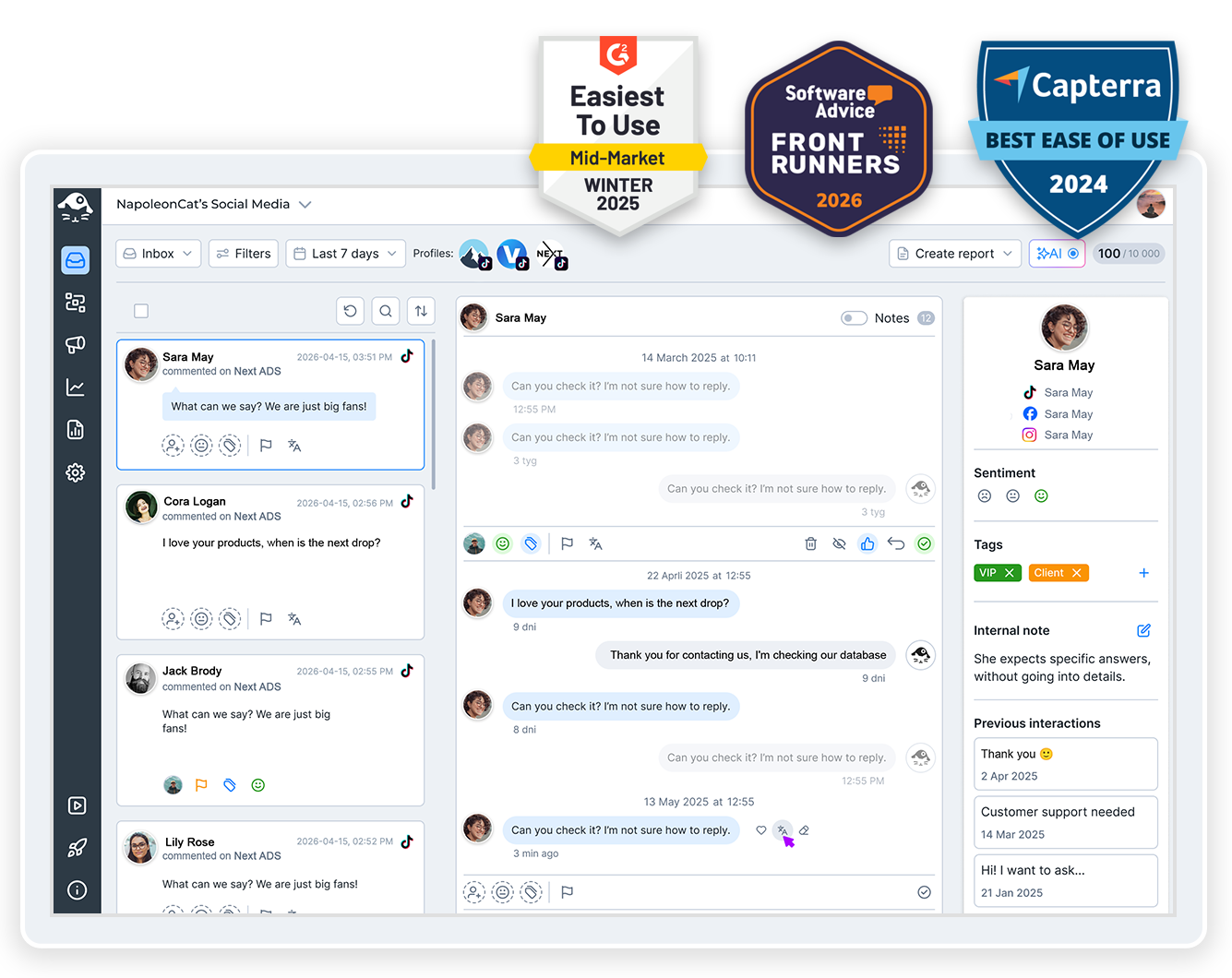
Running five TikTok accounts shouldn’t mean five logins and a morning spent switching between them. NapoleonCat lets you manage multiple TikTok accounts from one dashboard, with comments, ads, scheduling, and reporting included.
Manage Multiple TikTok Accounts – Run Them All in One Place
Trusted by:




Supported platforms








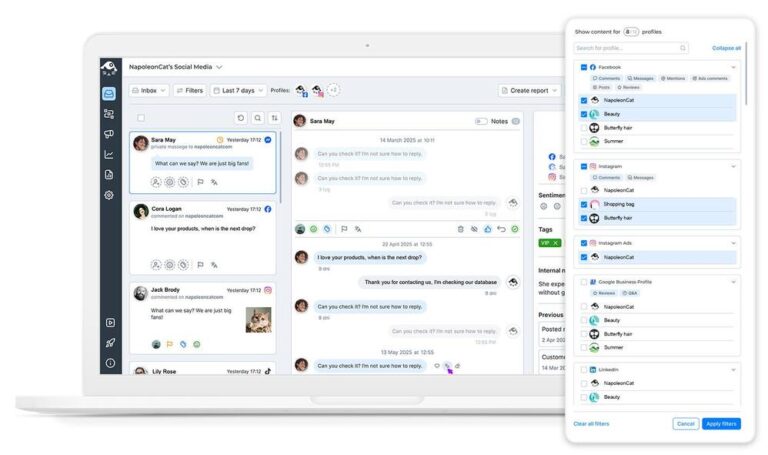
Social inbox: See every TikTok account’s comments in one inbox, ads included
Connect every TikTok account you run, ad accounts included, and every comment lands in one list. The Social Inbox keeps them chronological, next to your other platforms, with organic videos and TikTok ads in the same place.
Reply, like, hide, tag, or hand a thread to a moderator, without opening the TikTok app once.
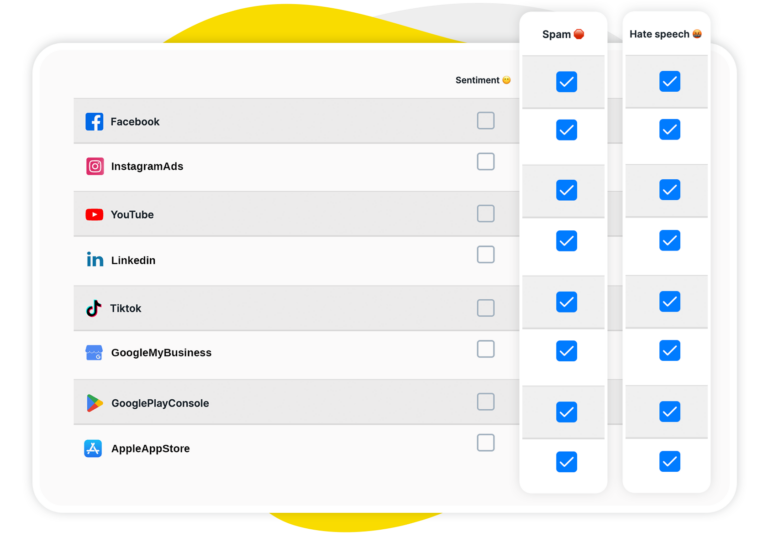
AI assistant: Skip reading a thousand comments – AI tags the spam and the hate for you
A lot of what lands on a TikTok account overnight doesn’t need an answer – it needs to disappear. Your AI Assistant sits in the background of the Inbox and tags spam, hate speech, and sentiment as comments arrive (positive ones, too).
So you open the Inbox already knowing what needs a person and what really doesn’t.
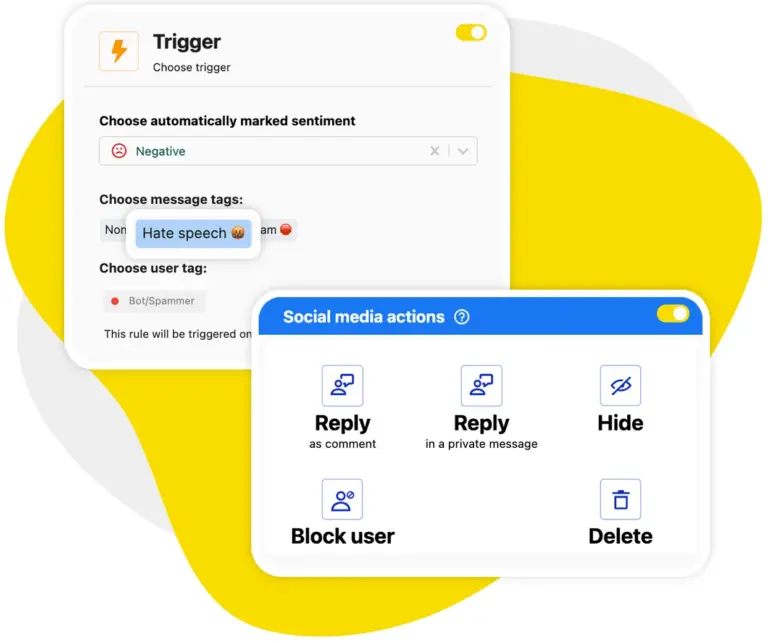
Auto-moderation: Hide spam and hate speech the moment it appears, on videos and ad comments
Nobody wants to spend the morning hiding spam by hand. Auto-moderation does it for you, on organic videos and on your TikTok ad comments, triggered by keywords or by the AI Assistant’s own tags. It works on comments as they come in, around the clock, across every account you’ve connected.
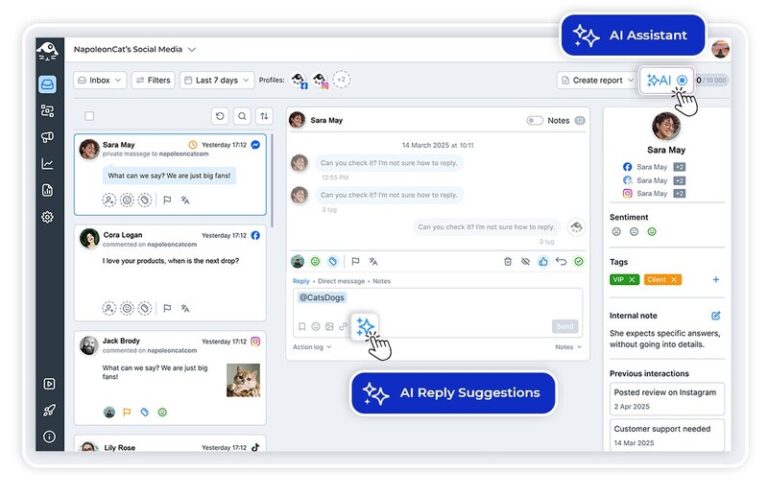
AI reply suggestions: Get a ready answer to the question every account keeps getting
Some comments still need you. For those, AI drafts the reply first – it reads your reply history and any brand or FAQ content you hand it, then writes something that sounds like your account instead of a bot. You change what you want to change. Then you send it.
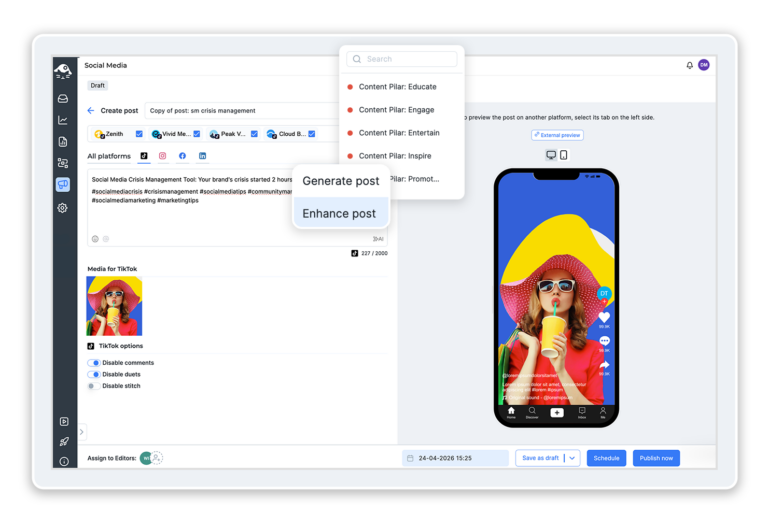
Publisher: Schedule videos to all your accounts and switch comments or duets off before they go live
Plan your videos in the Publisher and send the same one to several accounts at once, on a shared calendar your whole team can see. And before anything goes out, you can turn off comments, duets, and stitches on that video – decided while you schedule it, not after the damage is done.
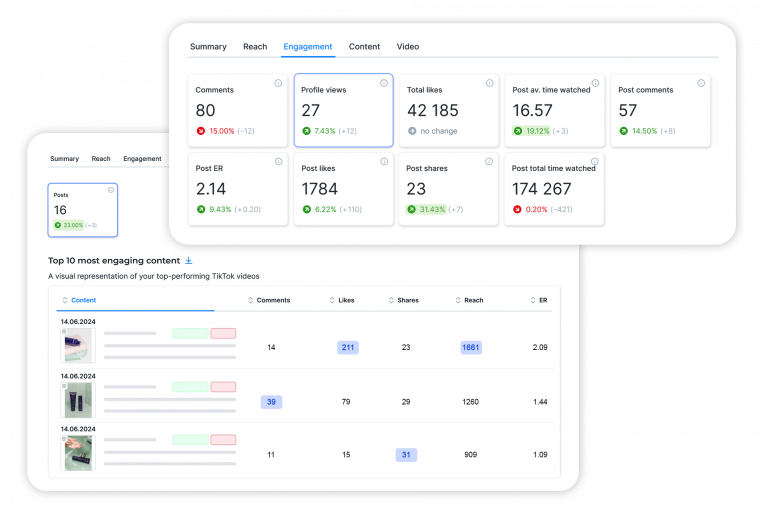
Analytics and reports: Compare how every TikTok account is doing in one view
Checking each account’s numbers one by one is how an afternoon disappears. Analytics lines your accounts up side by side over whatever period you pick, and reports package the numbers into a PDF that lands in the right inbox weekly, monthly, or quarterly.
Connect an account and its record starts building the same day, so the whole roster is comparable from the start.
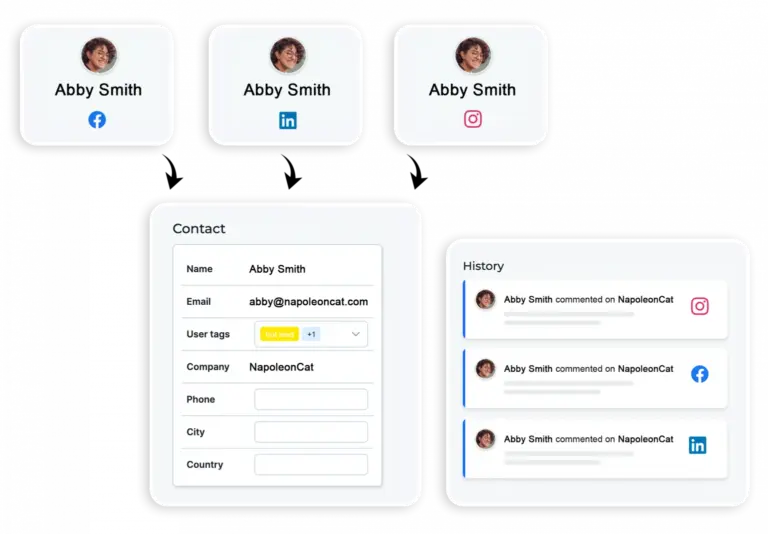
Social CRM: See everything a commenter has said to you across all your accounts
Before you reply, open that person’s Social CRM profile. You’ll see what they’ve asked before and on which account, what your team said back, any internal notes, and the sentiment on the relationship. Handy when the same commenter turns up under three of your videos in a week.
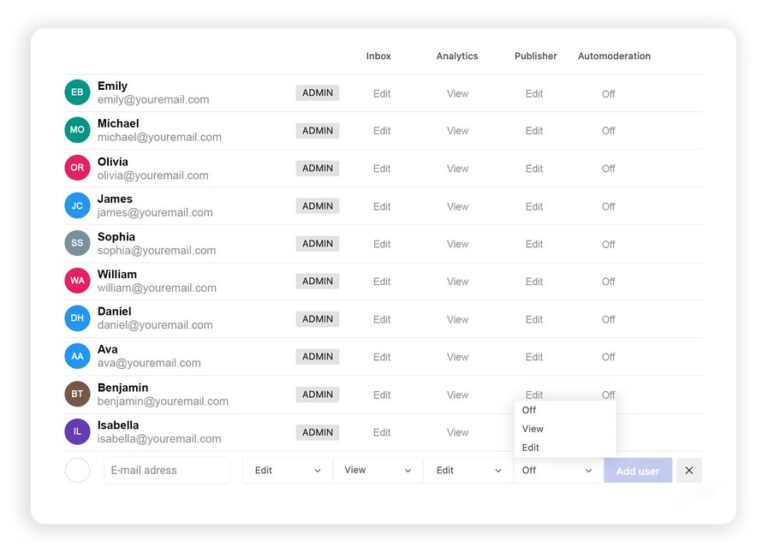
Team access: Give a creator their own account and nothing else
Working with creators, or just a bigger team? Set permissions per person and per module, so a creator handles their own account and never sees the rest of them. Split brands or clients into separate Workspaces and nothing crosses over.
Run every TikTok account from one screen




Here’s why our clients love NapoleonCat
Join the teams running a dozen TikTok accounts without a dozen logins

NapoleonCat saves up to one-third of a full-time position. That’s time we would otherwise spend manually moderating thousands of comments each month using the Meta Business Suite, profile by profile and comment by comment. Time we can now use for growth. NapoleonCat is the best tool of its kind on the market, and it’s still constantly evolving and improving by introducing new AI features.

It’s hard to imagine our work without a tool that includes so many valuable features. It won’t be an overstatement when I say that NapoleonCat saves us multiple full-time positions that would be dedicated to just moderating comments or manually generating reports.

NapoleonCat gives us the full picture of social media interactions. It’s easier to pick up urgent threads that need taking immediate action. And with conversation history, it’s much easier to continue the work of another team member while they’re out of office.

We work with multiple clients, and with NapoleonCat, we don’t waste time switching between multiple software tools. We can also deliver reliable data from a single source. We tested other social media moderation and analytics tools before, but none of them lived up to what NapoleonCat delivers. They’re the best, and I personally love using the tool. 🙂

NapoleonCat is now an indispensable tool that we use for moderation and analytical purposes, as well as content publishing. We’re curious to see new capabilities of the tool and test its new uses, for example, to moderate TikTok ad comments, as we predict this social media channel to become more and more important for our clients.

It’s the first social media engagement tool we have ever tried that is truly intuitive and that makes it easy for us to include the clients in the process. The service and support is great and personal. And the value for money is great!

We were looking for a tool that would allow us to consolidate and manage comments and private messages from Messenger in one place. Analytics and reports were also very important to us, as they would show us the level of our social media customer service. That’s why, in 2017, we decided to choose NapoleonCat.
How NapoleonCat compares for managing multiple TikTok accounts
| Feature | NapoleonCat | Hootsuite | Sprout Social | Agorapulse |
|---|---|---|---|---|
| Every TikTok account in one inbox (organic + ads) | ✅ Yes | ⚠️ Limited | ⚠️ Limited | ✅ Yes |
| TikTok ad comment moderation | ✅ Yes | ⚠️ Limited | ❌ No | ⚠️ Limited |
| Rule-based auto-moderation | ✅ Advanced (keywords, AI tags, time rules) | ⚠️ Limited rules | ⚠️ Limited filtering | ⚠️ Basic rules |
| Automatic spam and hate speech hiding | ✅ AI-based, 24/7 | ⚠️ Limited (rules / add-on) | ❌ No auto-removal | ⚠️ Limited |
| Sentiment detection | ✅ AI-supported tagging | ⚠️ Basic | ⚠️ Sentiment labels | ⚠️ Basic |
| AI reply suggestions | ✅ Yes | ✅ Yes | ✅ Yes | ⚠️ Limited |
| Scheduling to several TikTok accounts at once | ✅ Yes | ✅ Yes | ✅ Yes | ✅ Yes |
| Moderation reports (response time, volume per account) | ✅ Yes | ⚠️ Basic | ✅ Yes | ⚠️ Basic |
| 1:1 onboarding | ✅ Included | ❌ Enterprise only | ⚠️ Add-on / enterprise | ⚠️ Higher tiers |
| EU-based, GDPR-first hosting | ✅ Yes | ❌ CA-based | ❌ US-based | ✅ EU-based |
FAQs
Can you manage two TikTok accounts at the same time?
Yes, and more than two. You connect the TikTok accounts your brand or your clients own, and all of them show up in the same inbox, so there’s nothing to switch between. And to be clear about what it isn’t: NapoleonCat manages the accounts you already run – it isn’t a way around TikTok’s own limits on accounts or devices. Every plan starts with five profile slots, and you can add more.
Does NapoleonCat work with TikTok ad comments?
Yes. Comments under your TikTok ads land in the same inbox as your organic ones, and the same auto-moderation rules can hide spam under both. TikTok Ads connects as its own profile in Managed Profiles, so connect the ad account alongside the regular TikTok account.
Can I hide spam on all my TikTok accounts automatically?
Yes. Set an auto-moderation rule once – a trigger plus an action – and it runs on every account you point it at, around the clock. On TikTok a rule can hide a comment, reply to it, or react with a heart; deleting isn’t available on TikTok. Rules act on comments that arrive after the rule is switched on, not on comments already sitting under a video.
What is the best app for managing multiple TikTok accounts?
It depends on what eats your day. If it’s mostly scheduling, most tools will do the job. If it’s comments – spam under organic videos and under your ads – you want one that hides them automatically, keeps every account in one inbox, and reports per account. That’s what NapoleonCat is built around, and it’s free for 14 days with no credit card, which is long enough to find out how much of your day the comments were quietly taking.
How far back does TikTok data go when I connect an account?
TikTok gives us seven days of statistics and 60 days of posts on connect, and no follower history at all, so your record starts the day you connect. Older data can be backfilled for up to 24 months, charged at $5 per month of data scanned.
How much does it cost to manage multiple TikTok accounts?
Standard starts at $89 a month, or $79 a month billed annually, for two users and five profiles – publishing, analytics, and reports. Reading and answering comments needs Pro ($109, or $89 billed annually), and automatic hiding plus AI moderation come with Expert ($139, or $119 billed annually). AI Assistant tagging is free up to 100 tickets a month; unlimited tagging is a paid add-on. Every plan starts with a 14-day free trial, no credit card.
All your TikTok accounts in one place
Free 14-day trial: full access, zero commitment.
No credit card required