
Looking for an Instagram automated spam block that’s reliable and efficient? Try NapoleonCat’s Auto-moderation, and don’t waste any more time removing spam manually from Instagram.
Instagram Automated Spam Block – Hide & Delete Spam 24/7
Trusted by:




Supported platforms








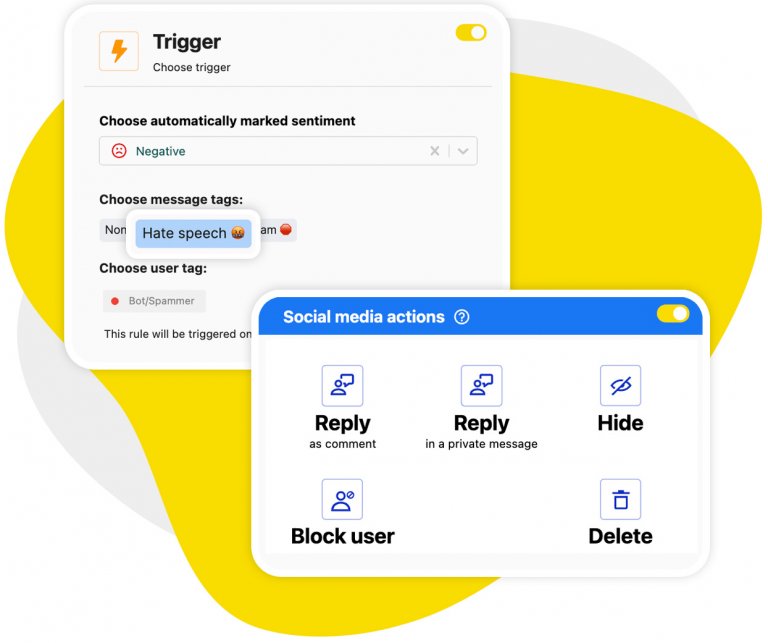
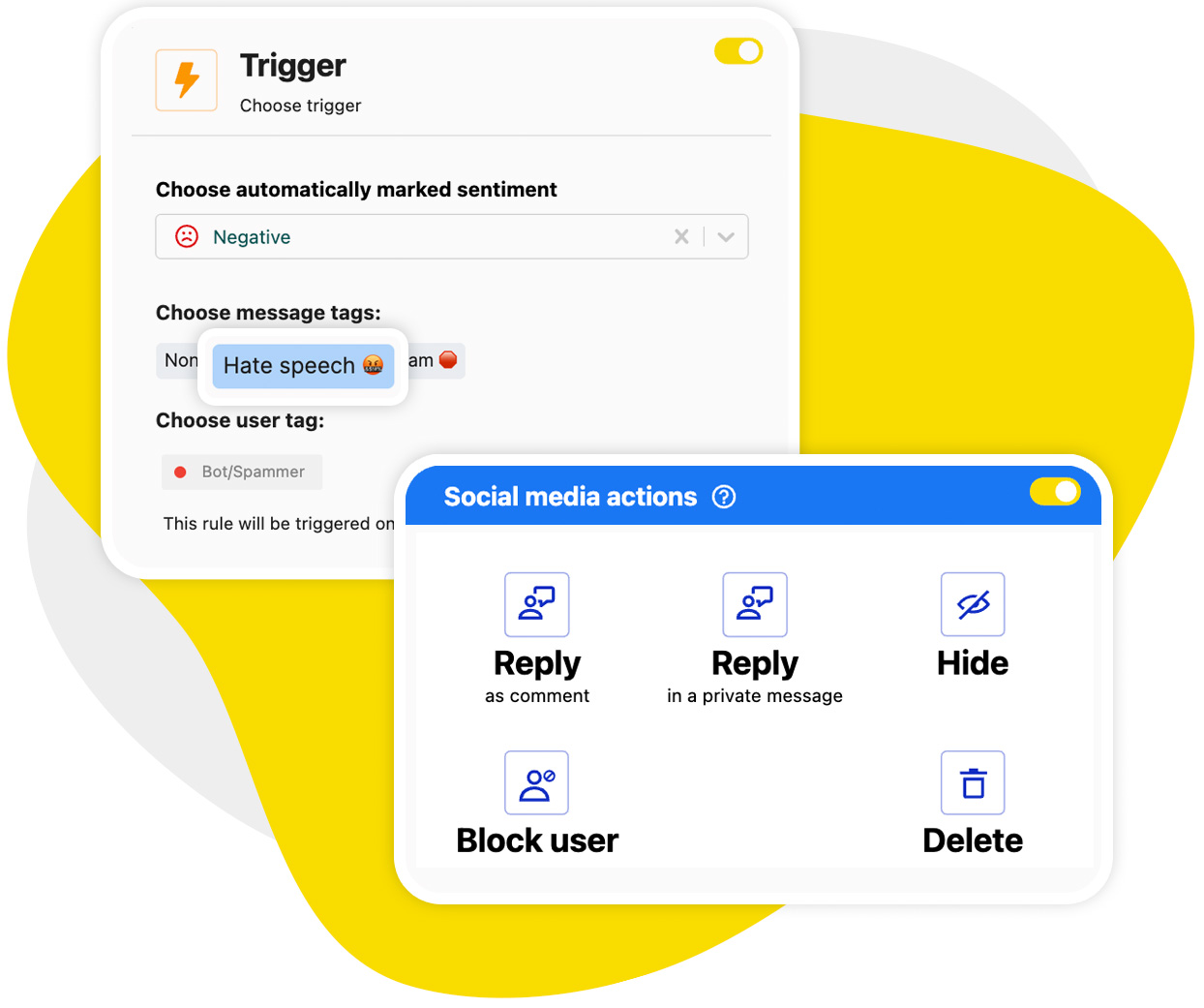
Auto-moderation: Hide or delete Instagram spam comments automatically 24/7
With Auto-moderation, you can say goodbye to manual spam removal and hiding comments all day long. Comments get removed automatically the moment they’re posted, based on AI detection and any keywords you add yourself. Reliably and around the clock.
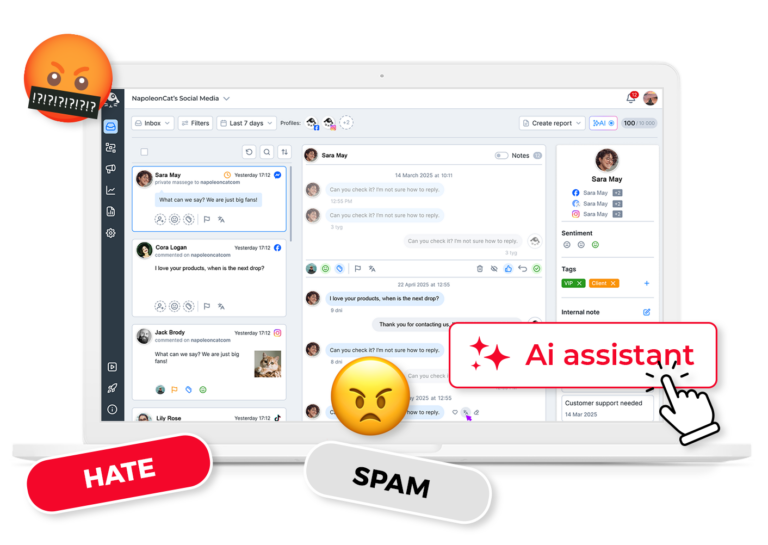
AI Assistant: Auto-detect spam, hate speech, and bot comments on Instagram, on top of the keywords you set
Your AI Assistant works in the background to immediately detect and tag spam and hate on your Instagram profiles.
You’ll see the tags in your Inbox, and when you set up Auto-moderation to be triggered by them, they’ll just disappear in the depths of Instagram’s spam jail, and your audience will never see them.
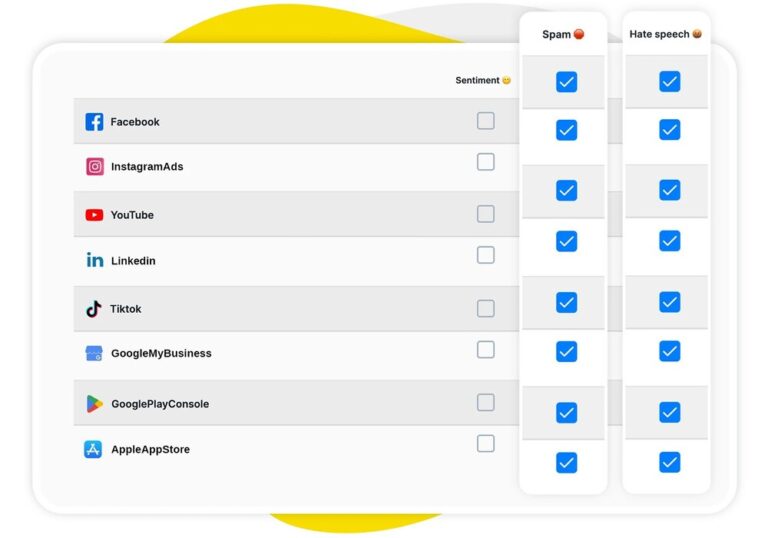
Spam block on ads: Stop spam on Instagram ad comments before your audience sees it
The automated spam block in NapoleonCat works both for your organic content and your Instagram ads (and also, Facebook ads and TikTok ads).
If you’ve ever had to remove spam from multiple ads, or worse, had spam using your paid reach to get in front of your ad audience, you’ll know that this is a huge time-saver (and protects your ad spend, too).
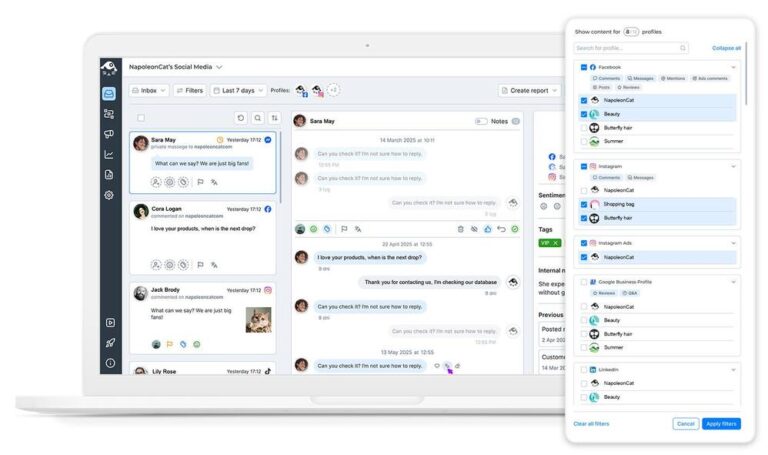
Social Inbox: Manage comments and DMs from all your Instagram accounts in one dashboard
All comments and DMs you get on Instagram are visible in the Social Inbox – across multiple Instagram accounts and including other social media channels. From there, you can reply, remove, tag, leave comments, and delegate comment and DM threads to individual moderators.
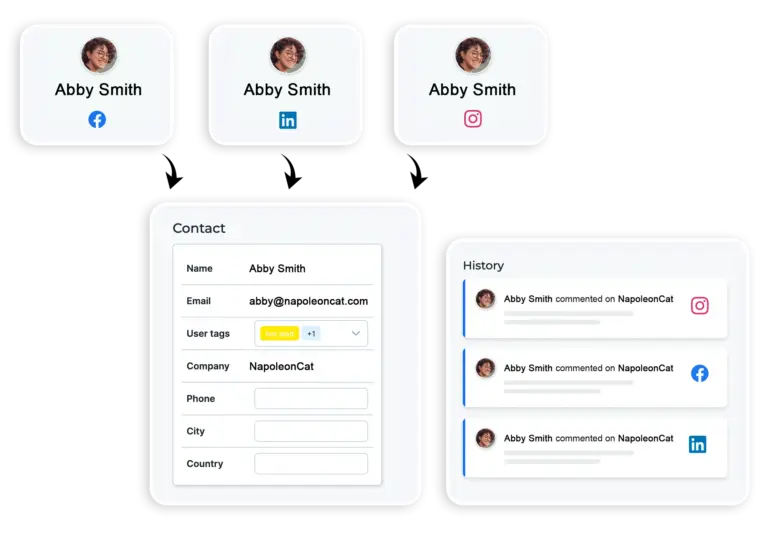
Social CRM: Spot repeat spammers with each commenter’s full interaction history
You can also see social media conversations by individual commenter in their Social CRM profiles.
You’ll clearly see who’s a notorious spammer with their past interactions across your social media profiles, notes from the team, and perhaps a clear “spammer” tag someone’s already added. (You can use it to block that person’s comments with Auto-moderation, too.)
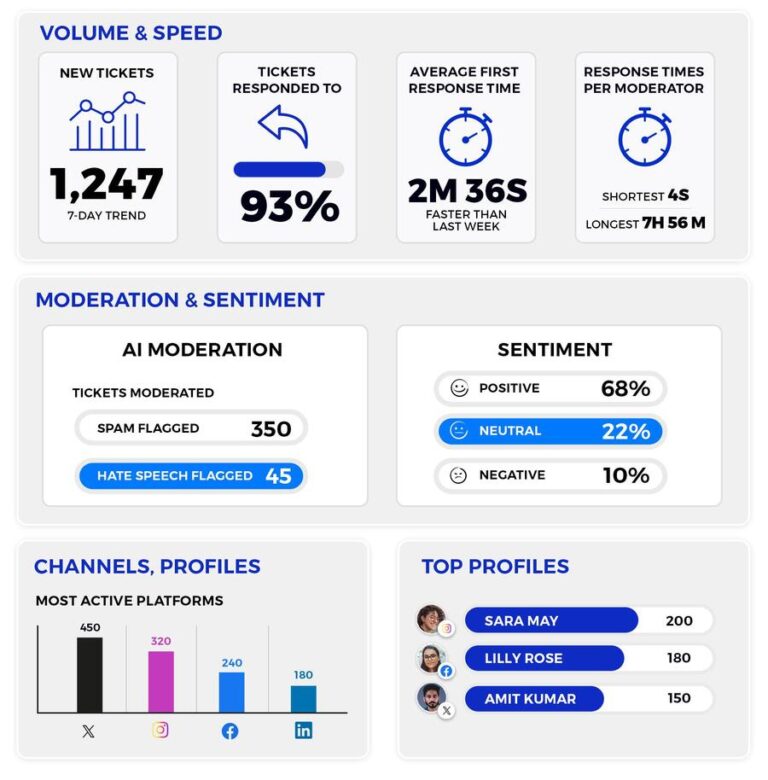
Moderation reports: See exactly how much spam was removed automatically
Finally, monitor your moderation – spam and genuine conversations included. See exactly how much spam you’re getting and how efficient the automated removal is. (You’ll be relieved you don’t have to do it manually anymore!)
Forget about Instagram spam – for good




Here’s why our clients love NapoleonCat
Join businesses that save hours every week on Instagram spam removal.

NapoleonCat saves up to one-third of a full-time position. That’s time we would otherwise spend manually moderating thousands of comments each month using the Meta Business Suite, profile by profile and comment by comment. Time we can now use for growth. NapoleonCat is the best tool of its kind on the market, and it’s still constantly evolving and improving by introducing new AI features.

It’s hard to imagine our work without a tool that includes so many valuable features. It won’t be an overstatement when I say that NapoleonCat saves us multiple full-time positions that would be dedicated to just moderating comments or manually generating reports.

NapoleonCat gives us the full picture of social media interactions. It’s easier to pick up urgent threads that need taking immediate action. And with conversation history, it’s much easier to continue the work of another team member while they’re out of office.

We work with multiple clients, and with NapoleonCat, we don’t waste time switching between multiple software tools. We can also deliver reliable data from a single source. We tested other social media moderation and analytics tools before, but none of them lived up to what NapoleonCat delivers. They’re the best, and I personally love using the tool. 🙂

NapoleonCat is now an indispensable tool that we use for moderation and analytical purposes, as well as content publishing. We’re curious to see new capabilities of the tool and test its new uses, for example, to moderate TikTok ad comments, as we predict this social media channel to become more and more important for our clients.

It’s the first social media engagement tool we have ever tried that is truly intuitive and that makes it easy for us to include the clients in the process. The service and support is great and personal. And the value for money is great!

We were looking for a tool that would allow us to consolidate and manage comments and private messages from Messenger in one place. Analytics and reports were also very important to us, as they would show us the level of our social media customer service. That’s why, in 2017, we decided to choose NapoleonCat.
See how NapoleonCat compares to its alternatives:
| Feature | NapoleonCat | Hootsuite | Sprout Social | Metricool |
|---|---|---|---|---|
| Automatic hiding or deleting of spam comments | ✅ Yes, instantly and 24/7 | ⚠️ Limited (third-party add-on) | ❌ No auto-removal | ❌ No |
| AI spam & hate speech detection | ✅ AI-based detection and tagging | ⚠️ Basic | ⚠️ Sentiment labels only | ❌ No |
| Keyword, link and tag-based moderation rules | ✅ Advanced and fully customizable | ⚠️ Limited rules | ⚠️ Limited filtering | ❌ No |
| Spam blocking on Instagram ad comments | ✅ Yes (also Facebook and TikTok ads) | ⚠️ Limited | ❌ No | ❌ No |
| Spam blocking in DMs | ✅ Yes | ⚠️ Limited | ⚠️ Limited | ❌ No |
| Repeat spammer history (Social CRM) | ✅ Yes | ⚠️ Basic | ⚠️ Basic | ❌ No |
| Multiple Instagram accounts in one inbox | ✅ Yes | ✅ Yes | ✅ Yes | ⚠️ Basic inbox |
| Moderation reports (how much spam was removed) | ✅ Yes, on every plan | ⚠️ Basic | ✅ Yes | ⚠️ Basic |
| Pricing model | ✅ Per account – from $79/mo (2 users, 5 profiles) | Per user – from $99/user/mo | Per seat – from $79/seat/mo | Per account – from $20/mo |
| 1:1 onboarding & training | ✅ Included | ⚠️ Higher tiers only | ⚠️ Add-on / enterprise | ❌ No |
| EU-based, GDPR-first hosting | ✅ Yes | ❌ CA-based | ❌ US-based | ✅ EU-based |
FAQs
How does the automated spam block on Instagram actually work?
Auto-moderation runs on rules you set up in minutes. A rule watches for triggers – keywords, links, emoji, message type, or a spam tag added by the AI Assistant – and then takes the action you chose: hide the comment, delete it, reply, or assign it to a moderator. It runs the moment a comment appears, on organic posts, ad comments, and DMs alike.
What is an Instagram spam bot, and how do you spot one?
An Instagram spam bot is an automated account that posts the same comment or DM across thousands of profiles – usually a link, a “check my page”, a crypto or follower-selling pitch, or a string of emoji with no connection to your post. The tells are consistent: a brand-new account with no posts or a handful of stock images, a username with random digits at the end, a generic comment that would fit under any photo, and the same message appearing under several of your posts within minutes. NapoleonCat’s AI Assistant recognizes those patterns and tags the comments as spam in the Social Inbox, so an Auto-moderation rule can hide or delete them without you reading a single one.
Do I have to build long keyword lists for it to work?
No. The AI Assistant detects spam, hate speech, and bot-style comments on its own and tags them in the Social Inbox, and your rules can be triggered by those tags. Keywords are still useful for the things only you know about – your competitors’ links, recurring scam phrases, or a campaign hashtag that attracts junk – but they’re an addition, not a requirement.
How do I block spam accounts on Instagram?
For a single account, Instagram gives you three options from the profile or the comment itself: Block, which cuts off all contact; Restrict, which makes that person’s comments visible only to them; and Report, which flags the account as spam. It’s also worth turning on Hidden Words in Settings › Privacy, which filters offensive comments and message requests automatically. That works fine for the occasional troll, but it doesn’t scale – blocking one account doesn’t stop spam accounts on Instagram from posting the same link under your next post from a different profile. That’s the gap NapoleonCat fills: rules that act on what the comment says rather than on who posted it, so the same scam text is hidden or deleted no matter how many accounts push it. And when the same person keeps coming back, their Social CRM profile shows the full history across your connected accounts, so you can tag them once and let a rule handle them from then on.
How do I stop spam followers and bots from following me on Instagram?
There is no single setting that will stop bots from following you on Instagram, and nothing in the app will stop spam followers on Instagram before they arrive, so it comes down to a few manual habits: remove them from your Followers list (tap the follower, then Remove), block bots on Instagram one by one from their profile, use the Limits setting to temporarily mute accounts that don’t follow you or only followed you recently, and switch to a private account if it’s a personal profile rather than a business one. For a brand account, though, chasing the follower count is usually the wrong fight. Spam followers don’t cost you anything until they comment or send DMs, and that’s the part you can genuinely automate – NapoleonCat hides or deletes their comments and filters their messages the moment they arrive, on every profile you manage.
How do I stop bots from viewing my story on Instagram?
There is no setting that will stop bots from viewing your story on Instagram outright, so your options are the built-in privacy controls: Hide story from (Settings › Story) to exclude specific accounts, Close Friends to limit a story to a chosen list, blocking an account so it can’t see your content at all, or going private. NapoleonCat doesn’t control who views your stories – no third-party tool can. What it does handle is what those viewers send you afterwards: story replies arrive as Instagram DMs, and those can be filtered, auto-replied to, and moderated alongside your comments.
Is it better to hide spam or delete it?
Hiding is usually the safer default. A hidden comment stays visible only to the person who posted it, so spammers rarely realize they’ve been blocked and don’t come back with a new account. Deleting removes the comment for good and makes sense for outright scams and abuse. You can pick a different action for each rule, and everything stays reviewable in the Social Inbox.
Does the spam block cover Instagram ad comments too?
Yes, and that’s usually where it saves the most money. Spam under a running ad is served to your paid audience, so it uses reach you’ve already paid for. NapoleonCat blocks it automatically on Instagram ads, and on Facebook and TikTok ads as well, without you having to check each campaign by hand.
Which NapoleonCat plan includes the automated spam block?
Auto-moderation, including automatic hiding and deleting of comments and sentiment-based rules, is available from the Expert plan up, with automated moderation of ad comments on the same plans. You can test the whole setup during the 14-day free trial, and no credit card is required to start.
Stop Instagram spam before your audience sees it
Free 14-day trial: full access, zero commitment.
No credit card required