
Save hours on social, every day.
Automate moderation and replies, schedule posts, and pull reports - all in one tool.
Table of Contents
Statusbrew publishes three paid plans and a fourth priced on request, and the headline figures are not the whole bill. What you actually pay depends on two things: how many people need a login, and how many social profiles you connect. Both are charged above the number your plan includes.
Below is the full price list. Then the seat and profile rates, which live in the help centre rather than on the pricing page, and the four add-ons priced on top of a plan. Last, the two policies worth reading before you sign. Every figure was checked on Statusbrew’s pricing page, its FAQ, its payment terms and its help centre in November 2026.
Key Takeaways
- Statusbrew charges for the plan, then for seats and profiles on top. Standard includes 3 users and 10 profiles, and each extra user is $30 a month and each extra profile $10.
- The cheapest plan cannot grow. Lite is $89 a month for 1 user and 5 profiles, and Statusbrew’s help centre states that the plan does not support adding either.
- Rule-based comment moderation starts on Standard, at $179 a month or $129 billed annually. The only moderation Lite lists is hiding organic Facebook and Instagram comments by hand.
- The annual saving is not one figure. It works out at 22% on Lite, 28% on Standard and 23% on Premium, and Statusbrew names no percentage on the page.
- Four add-ons are priced away from the pricing page. CRM at $300 a month, reputation management at $100, team activity logs at $79 and extra competitor profiles at $30, all sold on Premium. The first three come with Enterprise. Competitor profiles are on custom limits there.
- The price you sign up for is fixed. Statusbrew’s FAQ says there are no price hikes ever, and its payment terms say the same in contract language.
- There are no refunds. Cancelling stops the next payment and nothing more, and the rule appears on three of Statusbrew’s own pages.
What Statusbrew costs in 2026
Three published plans, one quoted on request.
| Plan | Monthly | Annual/mo | Users | Profiles | What it adds |
|---|---|---|---|---|---|
| Lite | $89 | $69 | 1 | 5 | Publishing, the Social Inbox, hiding organic Facebook and Instagram comments, email support |
| Standard | $179 | $129 | 3 | 10 | Rule Engine for automated comment management, Google Business Profile, 18 months of report backfill, BrewLink-in-bio, chat support |
| Premium | $299 | $229 | 6 | 15 | AI sentiment analysis, approval workflows, external approvers, team and SLA reporting, competitor benchmarking, social and web listening |
| Enterprise | Custom | Custom | Unlimited | Unlimited | Everything above, with the paid add-ons included |
Paid annually that is $828 a year for Lite, $1,548 for Standard and $2,748 for Premium. Agency plans are quoted separately, from $49 a month per client. Prices are in US dollars.
The annual saving is worth checking against your own plan rather than reading as one number. Work it out from Statusbrew’s own figures and Lite falls 22%, Standard 28% and Premium 23%. Statusbrew does not state a percentage anywhere on the page.
Extra users and profiles are billed on top
This is the part of Statusbrew’s pricing that decides most bills, and it sits in the help centre rather than on the pricing page.
| Plan | Included users | Each extra user | Included profiles | Each extra profile |
|---|---|---|---|---|
| Lite | 1 | Not available | 5 | Not available |
| Standard | 3 | $30 a month | 10 | $10 a month |
| Premium | 6 | $35 a month | 15 | $15 a month |
Statusbrew publishes one figure for each rate and does not split it by monthly or annual billing. It notes that agency and custom plans are quoted differently, and that you can see your own rate under Billing and Manage Add-ons. Seats are added there, and the increase is charged pro rata for the days left in the current cycle.
There are two ways to avoid paying for capacity you are not using. Archived users and profiles do not count against the limit, so a colleague who has left or a client who has finished can be archived rather than replaced. And connected ad accounts do not count against the profile limit at all, so pulling in ad comments does not cost a profile slot.
The add-ons that are not on the pricing page
| Add-on | Price on Premium | In Enterprise |
|---|---|---|
| Salesforce or HubSpot CRM | $300 a month, or $200 a month on yearly billing | Included |
| Review and reputation management (Trustpilot, Play Store, App Store) | $100 a month | Included |
| Team activity logs | $79 a month | Included |
| Extra competitor profiles, 15 per unit | $30 a month | Custom limits |
Two of those need a footnote. Google and Facebook reviews are included from Standard, so the $100 add-on buys the other three review sources rather than reviews in general. And Premium already includes 15 competitor profiles, so the $30 unit is for tracking more than that, 15 at a time. All four are priced in the billing help centre rather than on the pricing page.
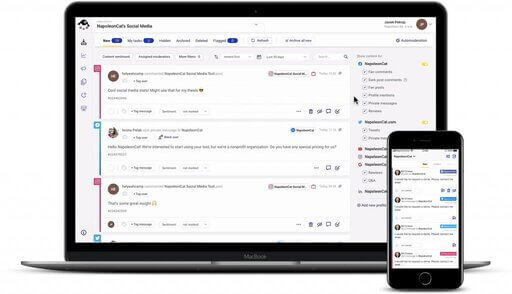
Manage and automate conversations across all your socials
Manage and automate social media interactions on Facebook, Instagram, TikTok, LinkedIn, YouTube, and Google My Business – with an all-in-one social media tool.
The price lock, in Statusbrew’s own words
One of the more unusual things on the pricing page is a promise about future prices. The FAQ under the table reads:
There are No Price Hikes, Ever. The price you sign up for is the price you keep. Forever.
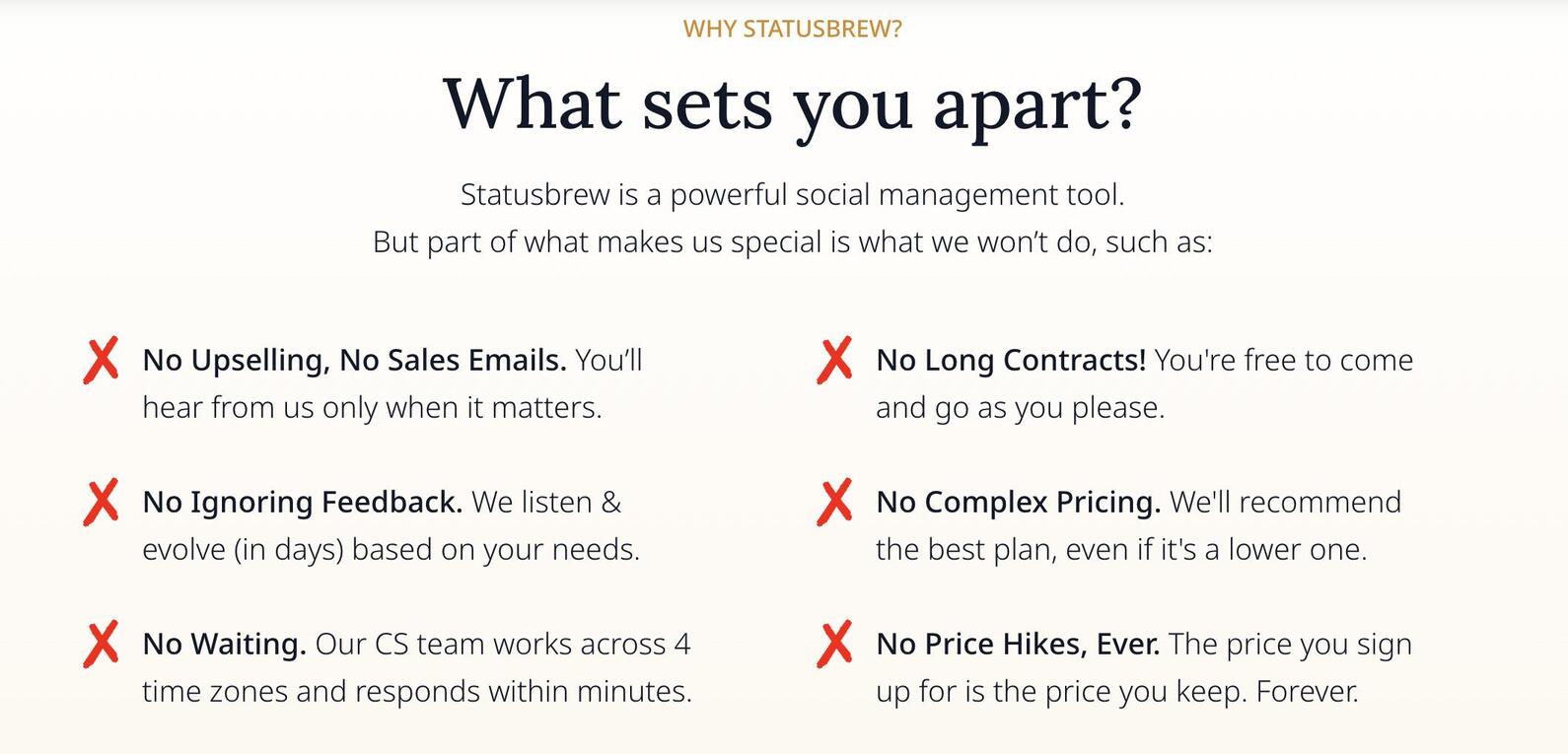
The payment terms put the same thing in contract language. Unless something else is agreed in a separate contract, Statusbrew does not change the price of a plan. That holds even if the plan has since been retired or taken off the pricing page. New features can be added to a plan you already pay for without changing what it costs.
Two things temper it. It fixes the price of your plan, not the size of your bill, so adding users and profiles still raises what you pay. And the payment terms carrying it were last updated in August 2023.
Trial, refunds and cancellation
The trial needs no card, and Statusbrew offers free migration and onboarding with it. How long it runs depends where you look. The pricing page offers a 14-day free trial. The billing help centre says the trial lasts 7 days on Lite and Standard and 14 days on Premium.
The help centre also calls it a free premium trial whichever plan you pick, and flags what happens next. If your trial included features from a higher plan than the one you buy, those features stop working when you land. Worth knowing before you judge a plan on what the trial did.
Refunds are the sharpest edge in the terms. “Statusbrew has a strict no refund policy” appears in the payment terms, and the billing FAQ and the cancellation article both repeat it. Cancelling means you are not charged for the next period and keep the paid features until the current one runs out.

Cancellation itself is self-serve: Billing, then Manage, then Cancel subscription, with a reason. Three limits are documented. Only the Account Owner can do it, it cannot be done from the mobile app, and there is no self-serve way to pause a subscription.
Paid plans renew automatically at the end of the term. Upgrading charges the difference for the rest of the cycle and does not move your billing date. Downgrading leaves a credit, which is applied against your next payment until it runs out.
Whether you can downgrade yourself is answered twice, and the two answers differ. The pricing FAQ says you can upgrade whenever you like “and you can also downgrade on your own accord”. The billing help centre says upgrades work from inside the platform, but that downgrades are not self-serve. If a downgrade is part of your plan for the year, ask their team before you sign rather than after.
Payment is by card, or by ACH for annual terms. Nonprofits with 501(c)(3) status get a flat 50% off Standard and Premium.
Which plan you need to moderate comments
Statusbrew’s help centre publishes what it can hide and delete on each network.
| Conversation type | Hide | Delete |
|---|---|---|
| Facebook comments and ad comments | Yes | Yes |
| Instagram comments and ad comments | Yes | Yes |
| YouTube comments | Yes | Yes |
| TikTok comments | Yes | No |
| X replies | Yes | No |
| Threads replies | Yes | No |
| LinkedIn comments | No | Yes |
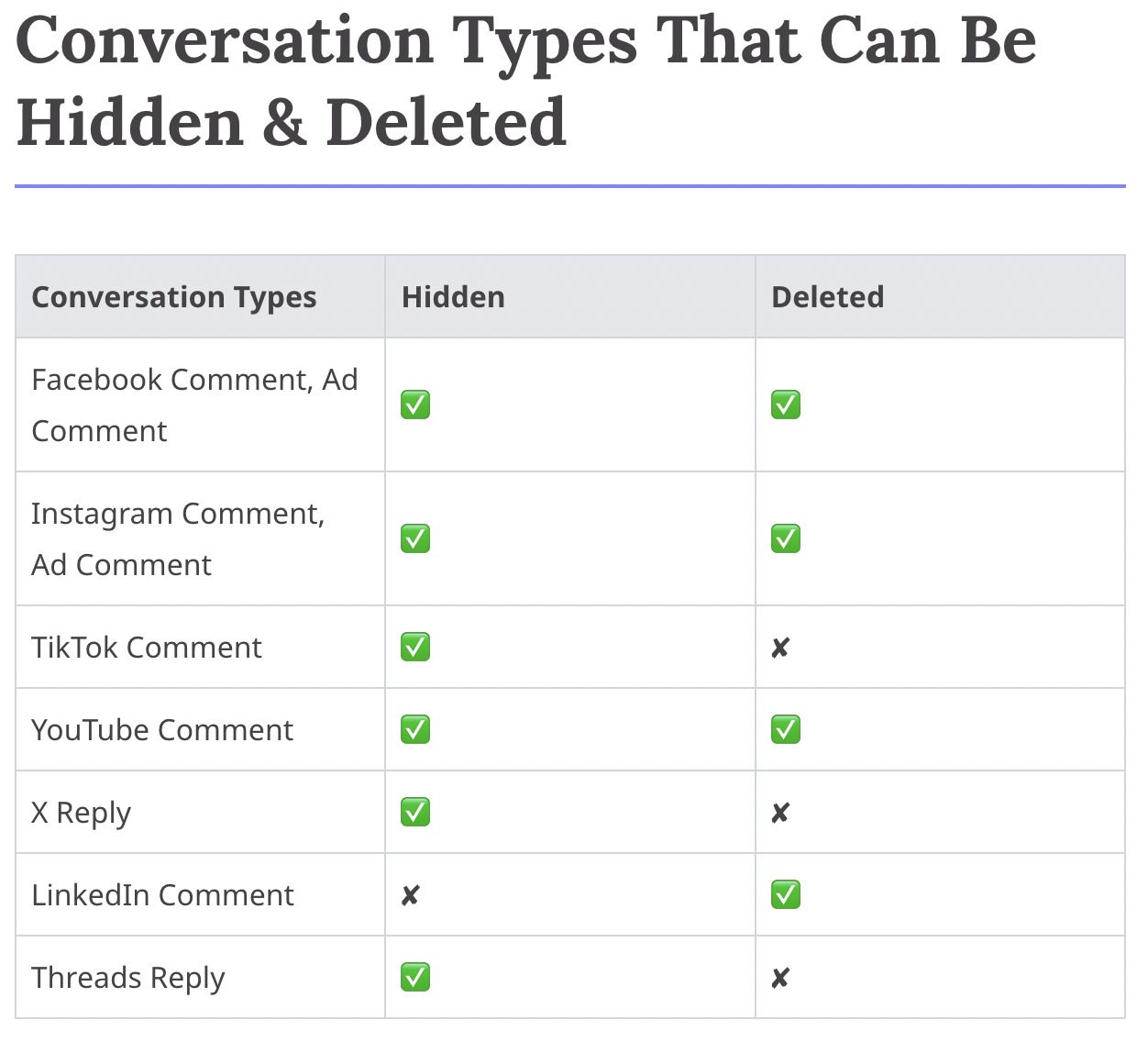
Doing any of it automatically is a plan decision. The Rule Engine, which is what hides or deletes a comment by rule, starts on Standard. Lite’s plan card lists one moderation line: hiding organic Facebook and Instagram comments. So the cheapest Statusbrew plan that acts on a comment by rule is $179 a month, or $129 billed annually, with 3 users and 10 profiles.
Ad comments run through the same inbox and the same rules. Once you connect a Facebook, Instagram or TikTok ad account, its comments arrive as their own type and can be hidden by rule like any other. TikTok is the exception on deleting: its API does not allow it on an ad.
One documented gap is worth knowing before you plan around it. Outside Facebook, where you can ban a user from the contact sidebar, Statusbrew has no built-in block or report action. The workaround its help centre gives is to tag the contact and write a rule that hides or deletes anything they post afterwards.
Statusbrew’s pricing page, its FAQ and its billing help centre describe no cap on messages or comments. On those pages the plans are charged on users and profiles, and nothing else.
Statusbrew vs NapoleonCat: what the same team pays
These two are priced on different things, so the comparison only settles once you fix the team size and say what the tool is for.
| What to compare | Statusbrew | NapoleonCat |
|---|---|---|
| Billing model | Plan, plus each extra user and profile | Plan, with users and profiles included in published steps |
| Entry price | $89 a month, or $69 annual, for 1 user and 5 profiles on Lite | $89 a month, or $79 annual, for 2 users and 5 profiles on Standard |
| Cheapest plan that moderates by rule | Standard, $179 a month or $129 annual, 3 users and 10 profiles | Expert, $139 a month or $119 annual, 2 users and 5 profiles |
| Five people, ten profiles | Standard $179 plus 2 users at $30, $239 a month | Standard $149 a month for publishing and analytics; Expert $249 with automated moderation |
| Volume cap | None described on the pricing page, FAQ or billing help centre | Inbox capacity: 10,000 tickets on Pro, 25,000 on Expert, toppable three times |
| Networks it can hide or delete on | Facebook, Instagram, TikTok, YouTube, X, Threads, LinkedIn, varying by action | Facebook, Instagram, TikTok, YouTube, LinkedIn company pages |
| Ad comments | Facebook, Instagram, TikTok and YouTube | Facebook, Instagram, TikTok and YouTube |
| Free trial | No card. 14 days on the pricing page; the help centre says 7 days on Lite and Standard | 14 days, no card |
Two of those rows go each way, and it is worth being precise about which. If comment moderation is the job and the team is small, NapoleonCat is cheaper to start: $139 a month against $179, or $119 against $129 on annual billing. Statusbrew gives more room for its money at that step: three users and ten profiles against two and five. So the gap closes as the team grows. At five people and ten profiles the two land within $10 of each other, $239 for Statusbrew Standard against $249 for NapoleonCat Expert.
They differ more in what gets counted than in what gets charged. Statusbrew counts people and profiles and, on the pages above, nothing else. NapoleonCat includes a team in the plan and counts inbox capacity instead. It counts one ticket per interaction acted on, not one per comment. So a comment that is hidden, answered by private message and tagged counts as one. Which model is cheaper depends on whether your costs grow with headcount or with comment volume. Where it is comment volume, a Statusbrew alternative built for moderation changes the arithmetic.
Statusbrew pricing FAQ
How much does Statusbrew cost?
Lite is $89 a month, or $69 billed annually, for 1 user and 5 profiles. Standard is $179, or $129 annually, for 3 users and 10 profiles. Premium is $299, or $229 annually, for 6 users and 15 profiles. Enterprise is quoted on request.
Does Statusbrew charge per user?
Each plan includes a set number of users, and extra users are charged on top: $30 a month each on Standard and $35 on Premium. Extra profiles are $10 and $15. The Lite plan cannot add either.
Is there a Statusbrew free plan?
No. There is a free trial that needs no credit card and comes with free migration and onboarding. The pricing page calls it 14 days. The billing help centre says 7 days on Lite and Standard and 14 on Premium.
Does Statusbrew give refunds?
No. Its payment terms state a strict no-refund policy, and the billing FAQ and cancellation article repeat it. Cancelling stops the next payment and leaves the paid features running until the current period ends.
Will Statusbrew raise my price later?
Its FAQ says there are no price hikes ever and that the price you sign up for is the price you keep, and its payment terms say the same. That fixes the plan price, not the bill, so adding users or profiles still costs more.
Which Statusbrew plan moderates comments?
Standard, at $179 a month or $129 billed annually. It is the cheapest plan with the Rule Engine, which is what hides or deletes a comment automatically. Lite lists only hiding organic Facebook and Instagram comments by hand.
What does the Statusbrew Agency plan cost?
It starts at $49 a month per client and is quoted rather than listed. Add-on rates on agency and custom plans can differ from the published ones.
What do people say about Statusbrew on Reddit?
Less than the search results suggest. We found 47 comments naming it, written by 14 accounts, and four of those accounts wrote 36 of the 47. Once the accounts with a visible link to the company are set aside, nine comments are left, from eight people.
Manage and automate conversations across all your socials
Manage and automate social media interactions on Facebook, Instagram, TikTok, LinkedIn, YouTube, and Google My Business – with an all-in-one social media tool.