
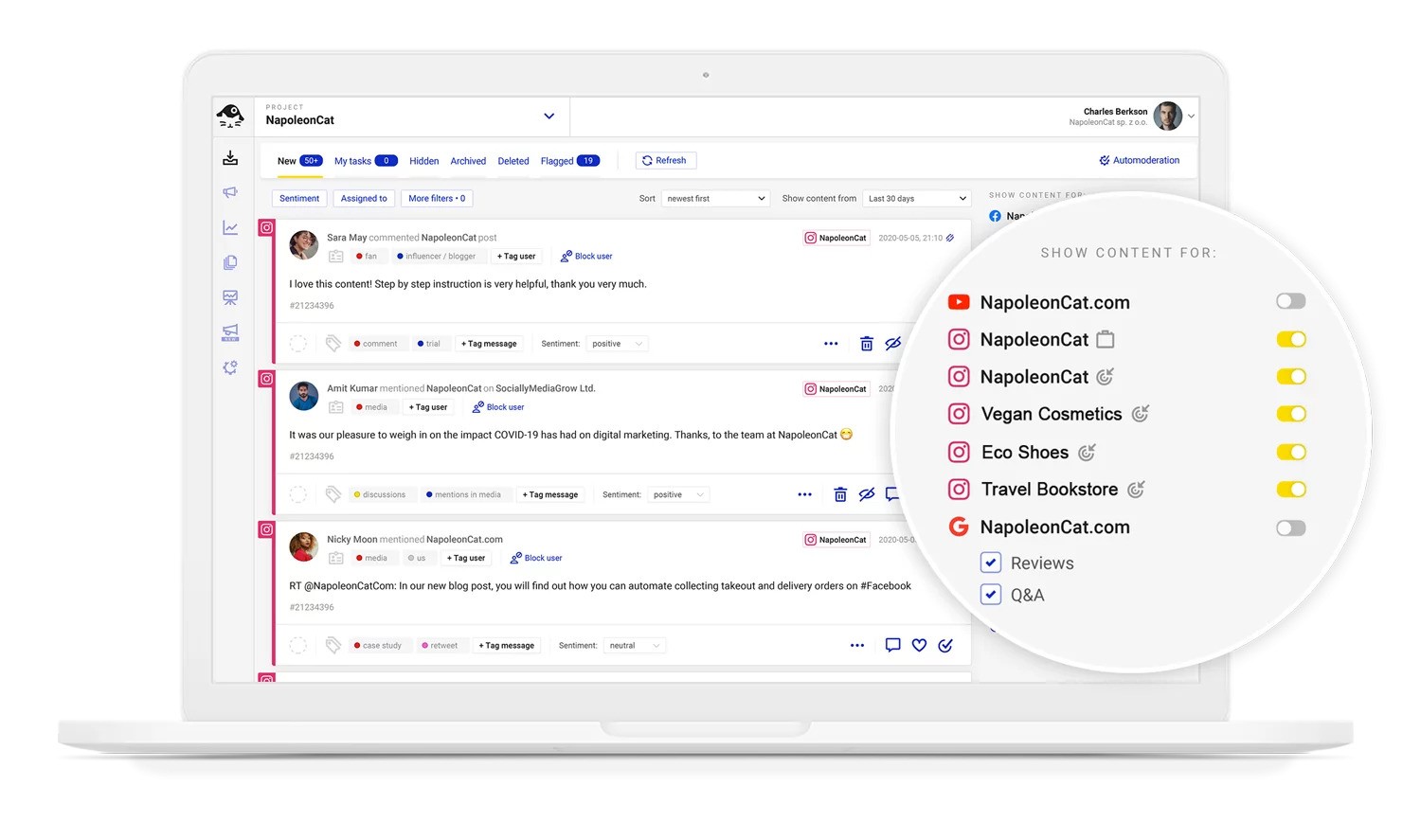
Of course you need an Instagram comment moderation tool. But if you can’t decide which one is the one, let us show you around NapoleonCat and all the different tools it has to offer within a single interface.
Instagram Comment Moderation Tool – Manage & Automate Comments
Trusted by:




Supported platforms








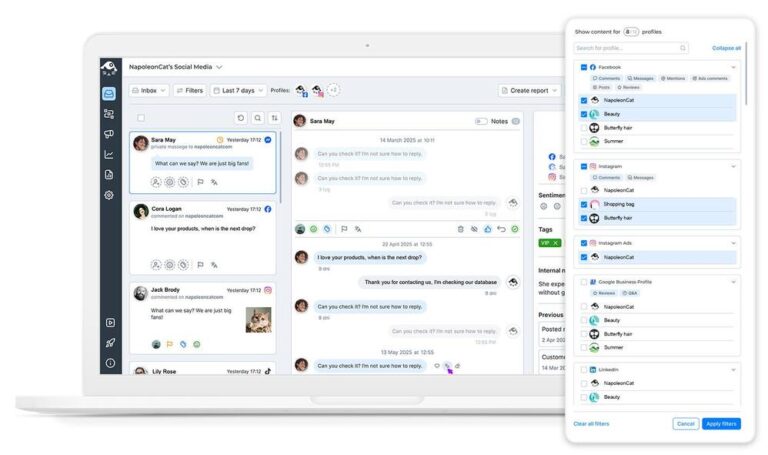
Social Inbox: Manage and moderate all Instagram comments from one dashboard
If you’re managing multiple Instagram accounts next to other social media platforms, the Social Inbox will make your life seriously easier.
See all your Instagram comments on organic posts and ads in one place in real time. Reply, hide, like, flag, and assign to moderators – in one dashboard, without switching between accounts, devices, and Meta’s Ads Manager.
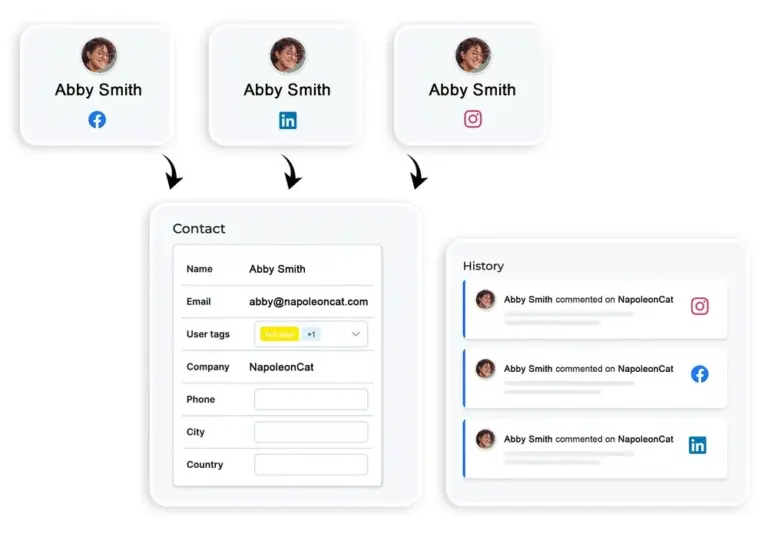
Social CRM: Track commenter history and customer interactions
Want to see the whole picture when you’re talking to someone in the comments? The Social CRM contains your commenter profiles with the entire history of their interactions with you across social media channels.
And you get the crucial context for each conversation to provide excellent customer service on social media.
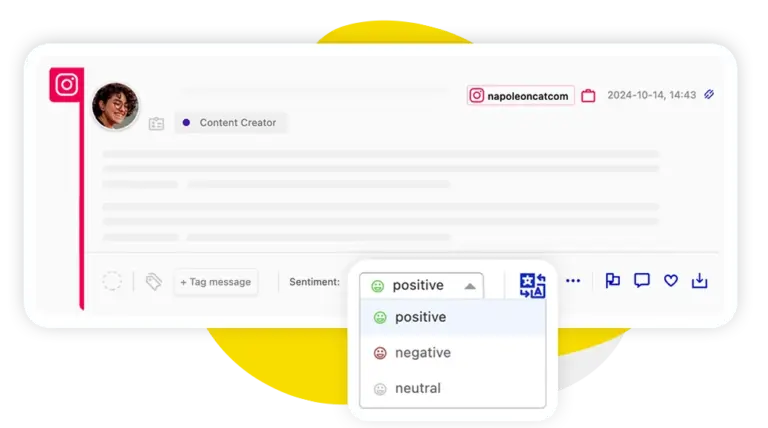
AI assistant: Auto-detect spam, hate speech, and negative sentiment
With the help of AI, you can get to the important conversations faster without having to go through spam manually again and again. The AI Assistant automatically detects and tags spam, hate speech, and negative comments (the positive ones, too), so you know what to do with each one within seconds.
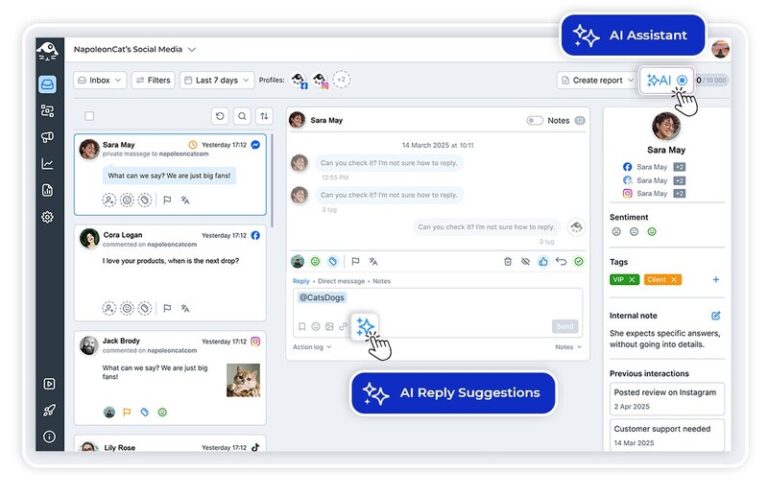
AI reply suggestions: Get smart response recommendations for every comment
AI can also help you with replying to Instagram comments and suggest human-sounding responses based on how you replied in the past and any guidelines and product materials you give it. So you can save time replying to customers while never compromising on the quality of the conversation and your customer satisfaction.
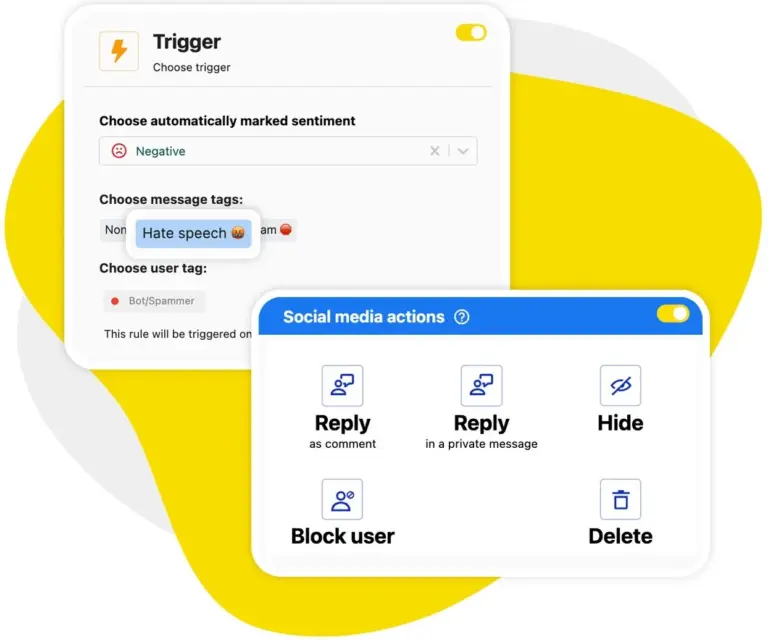
Auto-moderation: Filter and remove unwanted comments automatically 24/7
Comment moderation, but on autopilot? Auto-moderation will help you instantly remove spam and hate from your comment sections, even under your ads.
In the time it saves you, your moderators could be having more productive conversations with actual customers and leads rather than just getting frustrated when cleaning up spammy comments. It doubles as Instagram ad comments automation – the same rules cover your promoted posts and dark ads, so paid campaigns stay as clean as your organic feed.
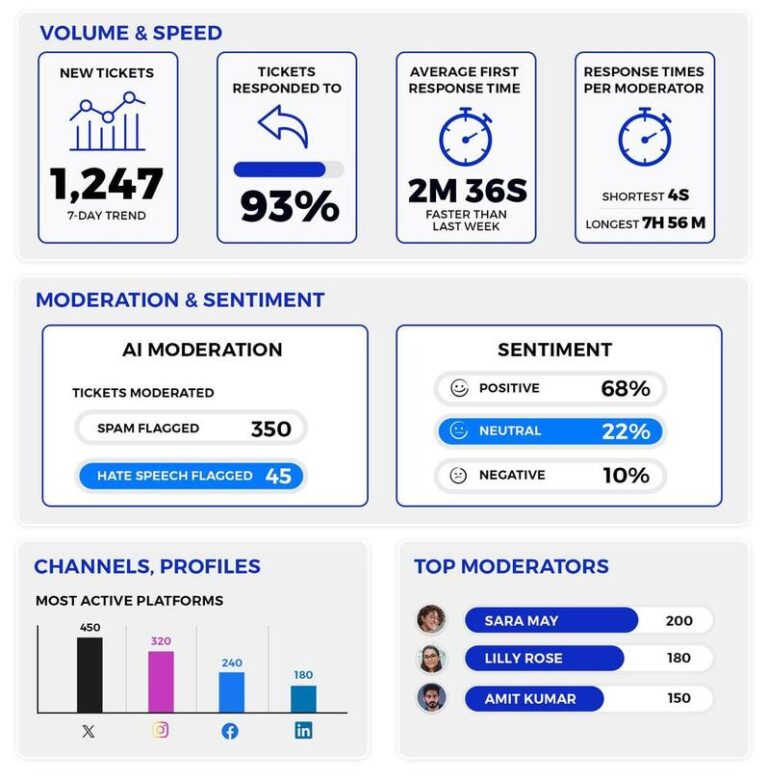
Moderation reports: Track comment activity and filtering effectiveness
Track the quality of your comment moderation on Instagram and other social media channels with moderation reports. Monitor comment volume, response times, and individual moderators’ performance – and automatically email the results to a client or customer service manager to look into.
Instagram comment moderation, just easier




Here’s why our clients love NapoleonCat
Join businesses that save hours every week with social media automation.

NapoleonCat saves up to one-third of a full-time position. That’s time we would otherwise spend manually moderating thousands of comments each month using the Meta Business Suite, profile by profile and comment by comment. Time we can now use for growth. NapoleonCat is the best tool of its kind on the market, and it’s still constantly evolving and improving by introducing new AI features.

It’s hard to imagine our work without a tool that includes so many valuable features. It won’t be an overstatement when I say that NapoleonCat saves us multiple full-time positions that would be dedicated to just moderating comments or manually generating reports.

NapoleonCat gives us the full picture of social media interactions. It’s easier to pick up urgent threads that need taking immediate action. And with conversation history, it’s much easier to continue the work of another team member while they’re out of office.

We work with multiple clients, and with NapoleonCat, we don’t waste time switching between multiple software tools. We can also deliver reliable data from a single source. We tested other social media moderation and analytics tools before, but none of them lived up to what NapoleonCat delivers. They’re the best, and I personally love using the tool. 🙂

NapoleonCat is now an indispensable tool that we use for moderation and analytical purposes, as well as content publishing. We’re curious to see new capabilities of the tool and test its new uses, for example, to moderate TikTok ad comments, as we predict this social media channel to become more and more important for our clients.

It’s the first social media engagement tool we have ever tried that is truly intuitive and that makes it easy for us to include the clients in the process. The service and support is great and personal. And the value for money is great!

We were looking for a tool that would allow us to consolidate and manage comments and private messages from Messenger in one place. Analytics and reports were also very important to us, as they would show us the level of our social media customer service. That’s why, in 2017, we decided to choose NapoleonCat.
See how NapoleonCat compares to its alternatives
| Feature | NapoleonCat | Hootsuite | Sprout Social | Sendible | Buffer |
|---|---|---|---|---|---|
| Instagram Comment Moderation (organic + ads) | ✅ Yes | ⚠️ Limited (no ads) | ⚠️ No ad comments | ❌ No | ❌ No |
| AI Spam & Hate Speech Removal | ✅ AI-based auto removal | ⚠️ Limited (rules / add-on) | ❌ No auto removal | ❌ No | ❌ No |
| AI Sentiment Detection on Comments | ✅ AI-supported tagging | ⚠️ Basic | ⚠️ Labels only | ❌ No | ❌ No |
| AI Reply Suggestions for Comments | ✅ Yes | ✅ Yes | ✅ Yes | ❌ No | ❌ No |
| 24/7 Auto-Moderation (rule-based) | ✅ Yes | ⚠️ Limited | ⚠️ Limited | ❌ No | ❌ No |
| Social CRM (commenter history & profiles) | ✅ Yes | ⚠️ Basic | ⚠️ Basic | ⚠️ Basic | ❌ No |
| Moderation Performance Reports | ✅ Yes (response times, team) | ⚠️ Limited | ⚠️ Limited | ❌ No | ❌ No |
| GDPR Compliance | ✅ EU-based, GDPR-first | ⚠️ CA-based | ⚠️ US-based | ⚠️ UK-based | ⚠️ US-based |
| 1:1 Onboarding & Support | ✅ Included | ✅ Enterprise only | ✅ Add-on | ⚠️ Limited | ❌ No |
FAQs
What is an Instagram comment moderation tool?
An Instagram comment moderation tool helps you manage, filter, and respond to comments at scale on your Instagram posts at scale. It can automatically detect and remove spam and hate speech, suggest replies, route comments to the right team members, and provide analytics on moderation performance – all without needing to use Instagram’s native interface. Most often, it’s part of a broader social media moderation tool that covers your other social media channels, too.
Does NapoleonCat moderate comments on Instagram ads as well as organic posts?
Yes. NapoleonCat is one of the few tools that brings ad comment moderation into the same inbox as organic content. Comments on your Instagram ad posts can be hidden, deleted, replied to, or assigned to a moderator – using the same Auto-moderation rules you apply to organic posts.
How does NapoleonCat automatically remove spam and hate speech from Instagram?
NapoleonCat’s AI Assistant continuously scans incoming comments and tags them by type – spam, hate speech, positive, negative, neutral. Auto-moderation rules then act on those tags instantly: hiding or deleting flagged comments before your audience even sees them. This runs 24/7 in the background without any manual input, or you can schedule it to run during specific hours only.
Can multiple team members moderate Instagram comments at the same time?
Yes. NapoleonCat’s Social Inbox is built for team collaboration. Multiple moderators can work in the same inbox simultaneously, with real-time visibility into who is handling which comment thread. Conversations can be assigned to specific team members, and internal notes can be left to provide context – preventing duplicate replies and dropped conversations.
Can I track my team’s Instagram moderation performance?
Yes. NapoleonCat’s moderation reports show comment volume, response times, and individual team member performance across all connected Instagram accounts. Reports can be automatically emailed to a client or manager on a schedule – weekly, monthly, or quarterly.
Is NapoleonCat suitable for managing Instagram comments for multiple brands or clients?
Yes. Agencies and in-house teams with multiple brands can create separate Workspaces in NapoleonCat, each with its own Instagram accounts, team members, and moderation settings. This keeps client data fully separated while allowing efficient management from a single login.
What do I need to connect a comment moderation tool to Instagram?
To connect an Instagram comment moderation tool like NapoleonCat, you need an Instagram Business or Creator account linked to a Facebook Page, plus admin access to that Page. From there you connect in a few clicks through Meta’s official login – no coding, no API setup, and nothing to install. Once connected, all your organic and ad comments flow into a single dashboard where you can moderate them.
How do I limit comments on Instagram?
Instagram lets you limit comments natively by turning off commenting on individual posts, hiding offensive comments in your settings, or filtering specific keywords. To limit unwanted comments at scale, an Instagram comment moderation tool like NapoleonCat goes further: Auto-moderation automatically hides or deletes comments containing the words, links, or spam patterns you define – across both organic posts and ads, 24/7 – so you’re not limiting comments manually one by one.
How do I unhide a comment on Instagram?
On Instagram you can unhide a comment by opening it and choosing to unhide, but it’s buried in the app. In NapoleonCat it’s faster: every comment – including hidden ones – is visible in your Social Inbox, and you can hide or unhide any comment with a single click, without digging through the app profile by profile.
Why won’t Instagram let me reply to comments?
If Instagram won’t let you reply to a comment, it’s usually because the commenter has restricted or blocked you, the post has comment restrictions or “limited comments” turned on, or you’re hitting a temporary app glitch or action limit. With NapoleonCat you reply to Instagram comments straight from the Social Inbox, so you’re not blocked by the app’s interface – and you see the full context of every conversation before you respond.
Can I moderate Instagram comments for free?
Yes – you can moderate Instagram comments for free during NapoleonCat’s 14-day trial, with full access to the Social Inbox, Auto-moderation, AI features, and reports, and no credit card required. It’s the easiest way to see how much time automated Instagram comment moderation saves before you commit to a plan.
How to hide comments on Instagram ads?
You can hide single comments on your ads from the Instagram app or Meta Business Suite, but at campaign scale manual hiding doesn’t hold up – comments land around the clock, and dark posts are easy to miss entirely. NapoleonCat’s Auto-moderation hides spam, hate, and offensive comments on Instagram ads automatically, 24/7, across every campaign and ad account you manage.
How to turn off comments on Instagram ads?
Meta’s Comment Controls in Ads Manager (at the ad level, under Engagement) let you limit or turn off commenting for many ad types, Instagram placements included – though the toggle isn’t available for every objective or account. If it’s missing, or you’d rather stay selective than go silent, set up a NapoleonCat Auto-moderation rule with no keyword triggers – it applies to every incoming ad comment and hides them automatically, and you can switch it back on whenever you like.
How to manage comments on Instagram ads?
Natively, you’ll be bouncing between the Instagram app, Ads Manager, and Business Suite – and comments on dark posts are easy to lose track of. NapoleonCat pulls comments from all your Instagram ads, organic posts, and other platforms into one Social Inbox feed, with team assignments, translations, sentiment tags, and automation on top.
Is there an Instagram ad comments automation tool?
Yes – you’re looking at it. NapoleonCat automates Instagram ad comment moderation end to end: the pre-trained AI Assistant detects spam, hate speech, and negative sentiment, Auto-moderation hides or deletes what you don’t want under your ads, and auto-replies take care of the repetitive questions – across every ad account and Page you manage.
Manage every Instagram comment from one view
Free 14-day trial – full access, zero commitment.
No credit card required